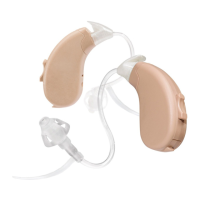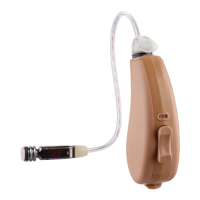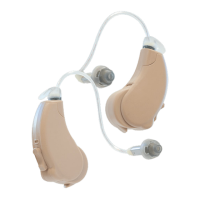
EasyManua.ls Logo

Lucid Engage Series - User Manual

Lucid Engage Series
21 pages
Print Icon
To Next Page IconTo Next Page
Loading...
PREMIUM RECHARGEABLE
OTC HEARING AIDS
®
®
Android or iOS device
compatible but not required
to use the hearing aids

Questions and Answers

Summary

Welcome and Safety Information

Age Restriction Warning

Advises users under 18 not to use the hearing aid, recommending a doctor's consultation.

Important Safety Warnings and Cautions

When to Consult a Doctor

Lists specific symptoms and conditions that require medical attention.

Device Pain and Discomfort

Guidance on managing pain during insertion and reporting adverse events.

Hearing Protection Disclaimer

Clarifies the device is not for hearing protection and recommends earplugs in loud areas.

Usage Cautions and Recommendations

Sound Output and Stuck Objects

Guidance on managing uncomfortable sound output and dealing with stuck hearing aid parts.

Professional Consultation and Usage Notes

Advice on consulting professionals and managing expectations when starting with hearing aids.

Adverse Event Reporting

Reporting to FDA

Instructions on how to report hearing aid malfunctions, injuries, or adverse events to the FDA.

Getting Started with Engage

Initial Setup Steps

A guide to the initial steps for setting up and using the hearing aids.

Package Contents

Details the items included in the Engage hearing aid box.

Engage Device Overview

Understanding Device Components

Identifies and labels the key parts of the Engage hearing aid.

Charging Your Hearing Aids

Charging Process and Indicators

Step-by-step guide to charging, including battery life and LED status lights.

Wearing and Fitting Your Hearing Aids

Hearing Aid Insertion Steps

Illustrated guide for inserting the hearing aids correctly into the ear.

Achieving a Proper Fit

Advice on fit adjustment and seeking assistance for optimal comfort and performance.

Lucid Hearing App

Downloading and Using the App

Instructions for downloading the app and its benefits for managing hearing aids.

Manual Volume Control

Adjusting Volume with Toggle Switch

How to increase or decrease the hearing aid volume using the device's toggle switch.

Hearing Aid Profiles

Understanding Preset Profiles

Details on the four acoustic profiles designed for mild-moderate hearing loss.

Manual Profile Adjustment

Switching Profiles via Toggle Switch

How to manually change between sound profiles using the device's toggle switch.

App Start-Up and Pairing

Pairing Hearing Aids with Mobile Devices

Step-by-step guide for pairing the hearing aids with both Apple and Android smartphones.

Concha Lock Adjustment

Replacing the Concha Lock

Step-by-step instructions for removing and installing the Concha Lock for optimal fit.

Hearing Aid Care and Cleaning

General Care and Maintenance

Guidelines for daily care, avoiding damage, and maintaining device performance.

Cleaning Tips and Components

Detailed instructions on cleaning wax buildup from tips, sound ports, and the device.

Wax Stop Maintenance

Replacing the Wax Stop

Instructions for safely removing and inserting new wax stops to protect the speaker.

Ear Tip Selection and Replacement

Choosing the Right Ear Tip

Guidance on selecting between closed and vented ear tips for optimal fit and sound.

Replacing Ear Tips

Step-by-step instructions for removing and attaching new ear tips to the hearing aid.

Tube Replacement

Attaching and Removing Tubes

Step-by-step guide for safely removing and attaching hearing aid tubes.

Troubleshooting Common Issues

Sound and Volume Problems

Solutions for low sound output, wax buildup, and volume settings.

Fit, Feedback, and Power Issues

Troubleshooting for whistling, discomfort, battery door issues, and tip fit.

Technical Specifications

ANSI Test Data

Presents sound pressure level data and technical measurements according to ANSI standards.

Warranty Information

Warranty Terms and Safety Warnings

Covers warranty periods, claim procedures, and critical safety warnings to maintain warranty validity.

Regulatory Compliance

FCC Statement and Conditions

Details the device's compliance with FCC rules and operational conditions.

Environmental and Operational Specs

Specifies temperature, humidity, and IP ratings for safe transport, storage, and operation.

Battery Safety Information

Hazards of Swallowing Batteries

Highlights the dangers of swallowing batteries and necessary precautions.

Battery Handling and Fire Precautions

Provides warnings on battery handling, heat, fire risks, and disposal of electronic components.

Summary

Welcome and Safety Information

Age Restriction Warning

Advises users under 18 not to use the hearing aid, recommending a doctor's consultation.

Important Safety Warnings and Cautions

When to Consult a Doctor

Lists specific symptoms and conditions that require medical attention.

Device Pain and Discomfort

Guidance on managing pain during insertion and reporting adverse events.

Hearing Protection Disclaimer

Clarifies the device is not for hearing protection and recommends earplugs in loud areas.

Usage Cautions and Recommendations

Sound Output and Stuck Objects

Guidance on managing uncomfortable sound output and dealing with stuck hearing aid parts.

Professional Consultation and Usage Notes

Advice on consulting professionals and managing expectations when starting with hearing aids.

Adverse Event Reporting

Reporting to FDA

Instructions on how to report hearing aid malfunctions, injuries, or adverse events to the FDA.

Getting Started with Engage

Initial Setup Steps

A guide to the initial steps for setting up and using the hearing aids.

Package Contents

Details the items included in the Engage hearing aid box.

Engage Device Overview

Understanding Device Components

Identifies and labels the key parts of the Engage hearing aid.

Charging Your Hearing Aids

Charging Process and Indicators

Step-by-step guide to charging, including battery life and LED status lights.

Wearing and Fitting Your Hearing Aids

Hearing Aid Insertion Steps

Illustrated guide for inserting the hearing aids correctly into the ear.

Achieving a Proper Fit

Advice on fit adjustment and seeking assistance for optimal comfort and performance.

Lucid Hearing App

Downloading and Using the App

Instructions for downloading the app and its benefits for managing hearing aids.

Manual Volume Control

Adjusting Volume with Toggle Switch

How to increase or decrease the hearing aid volume using the device's toggle switch.

Hearing Aid Profiles

Understanding Preset Profiles

Details on the four acoustic profiles designed for mild-moderate hearing loss.

Manual Profile Adjustment

Switching Profiles via Toggle Switch

How to manually change between sound profiles using the device's toggle switch.

App Start-Up and Pairing

Pairing Hearing Aids with Mobile Devices

Step-by-step guide for pairing the hearing aids with both Apple and Android smartphones.

Concha Lock Adjustment

Replacing the Concha Lock

Step-by-step instructions for removing and installing the Concha Lock for optimal fit.

Hearing Aid Care and Cleaning

General Care and Maintenance

Guidelines for daily care, avoiding damage, and maintaining device performance.

Cleaning Tips and Components

Detailed instructions on cleaning wax buildup from tips, sound ports, and the device.

Wax Stop Maintenance

Replacing the Wax Stop

Instructions for safely removing and inserting new wax stops to protect the speaker.

Ear Tip Selection and Replacement

Choosing the Right Ear Tip

Guidance on selecting between closed and vented ear tips for optimal fit and sound.

Replacing Ear Tips

Step-by-step instructions for removing and attaching new ear tips to the hearing aid.

Tube Replacement

Attaching and Removing Tubes

Step-by-step guide for safely removing and attaching hearing aid tubes.

Troubleshooting Common Issues

Sound and Volume Problems

Solutions for low sound output, wax buildup, and volume settings.

Fit, Feedback, and Power Issues

Troubleshooting for whistling, discomfort, battery door issues, and tip fit.

Technical Specifications

ANSI Test Data

Presents sound pressure level data and technical measurements according to ANSI standards.

Warranty Information

Warranty Terms and Safety Warnings

Covers warranty periods, claim procedures, and critical safety warnings to maintain warranty validity.

Regulatory Compliance

FCC Statement and Conditions

Details the device's compliance with FCC rules and operational conditions.

Environmental and Operational Specs

Specifies temperature, humidity, and IP ratings for safe transport, storage, and operation.

Battery Safety Information

Hazards of Swallowing Batteries

Highlights the dangers of swallowing batteries and necessary precautions.

Battery Handling and Fire Precautions

Provides warnings on battery handling, heat, fire risks, and disposal of electronic components.

Lucid Engage Series Specifications

General IconGeneral
CategoryHearing Aid
ManufacturerLucid Hearing
BluetoothYes
RechargeableYes
TypeDigital
Water ResistanceIP68
Warranty3 years
Battery TypeLithium-Ion

Related product manuals