
 To Next Page
K
Kathleen ScottAug 16, 2025
What to do if Lucid Hearing Aids not turning off?
- TTheresa FloresAug 16, 2025
If your Lucid Hearing Aid is not turning off, open the battery door.

What to do if Lucid Hearing Aids not turning off?
If your Lucid Hearing Aid is not turning off, open the battery door.
How to fix low battery in Lucid ENRICH PRO?
If your Lucid Hearing Aid's battery is low, the suggested solution is to replace the battery.
How to adjust Lucid Hearing Aid tube size?
If the Lucid Hearing Aid device is not comfortable because the tube is too large or too small, see the Tube Fit Guide (included).
Why is Lucid ENRICH PRO device not comfortable?
If the Lucid Hearing Aid device is not comfortable because the tips are too large or too small, try a different size dome tip.
What to do if Lucid Hearing Aid dome tip damaged?
If the dome tip of your Lucid Hearing Aid is damaged or is the wrong size, replace it with a new tip.
What to do if Lucid ENRICH PRO Hearing Aid tip not inserted properly?
If the tip of your Lucid Hearing Aid is not inserted properly, you should re-insert the tip.
What to do if my Lucid ENRICH PRO has no sound?
If your Lucid Hearing Aid produces no sound or seems 'dead', the microphone opening or sound port might be blocked by wax or moisture. Try cleaning the microphone opening and/or sound port. Also, check if the battery is dead and replace it if necessary. Ensure that the hearing aids are correctly inserted.
Why does my Lucid ENRICH PRO Hearing Aid keep beeping?
If your Lucid Hearing Aid beeps intermittently, it likely indicates a weak battery. Replace the battery to resolve this issue.
What to do if my Lucid ENRICH PRO has intermittent sound?
If your Lucid Hearing Aid sound fades or cuts in and out, moisture might be clogging the microphone opening. Consider purchasing and using a drying kit to remove the moisture.
Why wax build-up in my Lucid Hearing Aid?
If you have wax build-up in the ear canal, clean the sound port of your Lucid Hearing Aid. It's also advisable to have your ears checked and cleaned by a physician.
States the hearing aid is for users 18 and older, advising younger individuals to consult a doctor.
Lists specific ear conditions and symptoms that necessitate seeing a doctor or ENT.
Advises to remove the device if pain occurs and contact manufacturer or healthcare professional.
Advises using hearing protection in loud environments instead of the hearing aid.
Suggests turning down volume or adjusting the device if sound is uncomfortable or painful.
Advises seeking medical help for stuck ear tips, warning against using tools like tweezers.
Recommends consulting a hearing healthcare professional if concerns persist after using the device.
Sets expectations for hearing aid benefits, limitations, and adaptation period.
Instructs users to report problems to the FDA, providing contact information and website.
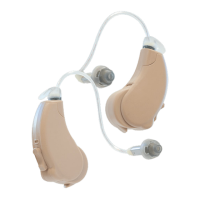
Lists all items included in the Enrich® Pro hearing aid package.
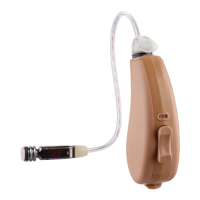
Identifies key parts of the hearing aid like microphone, rocker switch, and battery door.
Guides users on selecting the proper ear tip for a snug and comfortable fit.
Describes the two types of ear tips: Open Fit and Fully Occluding.
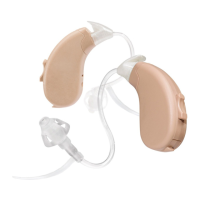
Mentions the availability of large and small sound tubes, color-coded for left and right.
Provides step-by-step instructions for securely attaching sound tubes to the hearing aid.
Explains the correct method for twisting and removing sound tubes to prevent damage.
Offers a step-by-step visual guide for correctly inserting the hearing aid into the ear.
Details how to properly remove the hearing aid, emphasizing not to pull the tubing.
Explains how to turn the hearing aid on and off using the battery door.
Details the process of inserting and removing the Type 312 battery, including activation.
Describes the low battery voice prompt and expected battery life.
Instructs on using the rocker switch to increase or decrease volume and interpreting volume adjustment tones.
Describes the two available listening profiles: General Listening and Music/Concert.
Explains how to cycle through and select profiles using the rocker switch.
Advises daily cleaning with a soft cloth and using the provided brush for sound ports.
Details washing ear tips in lukewarm water with mild detergent.
Lists crucial handling precautions for delicate electronic devices.
Outlines restrictions regarding heat, chemicals, liquids, and specific environments.
Covers general cleaning, avoiding disassembly, and proper switch usage.
Advises consulting a physician for skin irritation or allergic reactions to materials.
Addresses problems like no/low sound output and potential causes like low battery or improper tip insertion.
Covers whistling/feedback and device discomfort due to fit or wax buildup.
Solves device power issues and discomfort caused by ear tip or tube size.
Presents the ANSI test graph and data for the hearing aid's performance.
Details the 60-day return period and 1-year manufacturer's warranty.
Warns against self-repair to avoid voiding the warranty and causing further damage.
Lists prohibitions like dropping, immersing, or exposing the device to heat or chemicals.
Emphasizes that hearing aid batteries are dangerous if swallowed and advises keeping them away from children.
Provides guidelines on battery types, voltage, and avoiding damage or explosion.
Lists recommended temperature ranges for storage, transport, charging, and operation.
Warns against opening, crushing, heating, or short-circuiting batteries to prevent fire risks.
The Lucid Hearing Enrich Pro OTC Hearing Aids are designed to help individuals aged 18 and older with hearing loss to enjoy sounds more clearly. These over-the-counter hearing aids are intended for users who do not require specialized medical care for their hearing condition. The manual emphasizes the importance of consulting a doctor, preferably an ear-nose-throat doctor (ENT), if the user is under 18 or experiences certain symptoms, as OTC hearing aids are not suitable for all types of hearing loss or medical conditions.
The Enrich Pro hearing aids are designed to be user-friendly, with features that allow for easy insertion, volume adjustment, and profile selection to adapt to different listening environments. The device comes with various components to ensure a comfortable and effective fit, including assorted ear tips and sound tubes of different sizes. Users are encouraged to experiment with these components to find the perfect fit that seals the ear without being uncomfortably tight.
For initial setup, the manual provides clear instructions on how to attach the sound tubes and insert the hearing aids. It highlights that proper insertion is crucial to prevent feedback (whistling) and ensures the devices are practically invisible when correctly positioned. Users are advised to practice inserting the hearing aids without the battery until they have perfected the process. When removing the instruments, it's important to grasp the instrument itself, not the tubing, to avoid stretching or distorting the tubing, which could void the warranty.
The Enrich Pro hearing aids are powered by type 312 zinc-air batteries, recommended for optimal performance. The manual details the battery insertion and removal process, including the need to remove the adhesive label and wait for air activation before insertion. A low battery voice prompt will alert users when the battery needs to be replaced, with an expected battery life of 5-7 days.
Volume adjustment is straightforward, using a rocker switch to increase or decrease the sound level. A quick double tone indicates that the volume has been adjusted, and the absence of tones signifies reaching the maximum or minimum hearing volume level. Users are reminded to ensure the volume is always at a comfortable listening level and not to hold down the rocker switch.
The Enrich Pro features two listening profiles to cater to different sound environments: "General Listening" and "Music/Concert." The General Listening profile is automatically selected upon power-on and amplifies higher frequency sounds, making it suitable for most listening situations. The Music/Concert profile is designed for listening to music or attending concerts where low-frequency sounds need amplification. Users can cycle through these profiles by holding the rocker switch UP/DOWN for 2 seconds, with a two-beep prompt announcing the profile change. Evaluating the different profiles for various listening environments is recommended to determine the best and most comfortable sound.
Maintenance of the Enrich Pro hearing aids is crucial for their longevity and performance. The manual emphasizes the importance of daily cleaning to prevent wax buildup, which is the most common cause of instrument failure. Users should wipe their hearing aids with a soft, dry cloth daily and carefully remove any traces of wax and debris. A cleaning tool, specifically a brush, is provided to assist in lightly brushing the sound ports. Ear tips can be disconnected from the hearing aid and washed in lukewarm water with a mild detergent, then thoroughly dried before reconnecting. It is essential to remove the hearing aids before showering or bathing to prevent water damage.
General product care guidelines include not disassembling the device, avoiding immersion in liquids, and protecting the instruments from excessive heat, chemicals (like hair spray or perfume), and potential explosive or dangerous situations. Users are also advised to remove batteries during prolonged periods of non-use and to take off the hearing aids at night. If any part of the hearing aid, such as an eartip, gets stuck in the ear, medical help should be sought immediately, and users should not attempt to remove it with tweezers or cotton swabs, as this could cause further injury.
The manual also addresses potential issues and troubleshooting steps. For problems like no/low sound output, whistling/feedback, or discomfort, solutions range from replacing batteries, re-inserting ear tips, adjusting volume, or replacing damaged dome tips, to contacting customer service or a hearing healthcare professional. Users are encouraged to reach out to Lucid Hearing's customer service for assistance with any persistent issues.
A warning is included regarding the potential need for medical help if a piece of the hearing aid gets stuck in the ear, advising against self-removal with tools that could push the part further into the ear canal. The manual also notes that while hearing aids can benefit many people, they will not restore normal hearing or prevent/improve medical conditions causing hearing loss. It acknowledges that users may need a few weeks to adjust to hearing aids and that training or counseling can enhance their experience.
Finally, the manual includes important battery safety information, highlighting that hearing aid batteries are dangerous if swallowed and should be kept out of reach of children. It provides instructions on what to do if a battery is swallowed and advises against storing batteries in pill containers where they might be mistaken for medication. Users are also warned about the risks of low-quality batteries and the importance of proper insertion.
The Lucid Hearing Enrich Pro OTC Hearing Aids are designed to offer a practical and accessible solution for adults experiencing hearing loss, with a strong emphasis on user safety, proper usage, and consistent maintenance to ensure optimal performance and durability.
 General
| Style | Receiver-in-Canal (RIC) |
|---|---|
| Bluetooth | Yes |
| Rechargeable | Yes |
| Type | Digital |
| Water Resistance | IP68 |
| Noise Reduction | Yes |
| Feedback Cancellation | Yes |
| Compatibility | iOS and Android |
| Frequency Range | 8000 Hz |