11
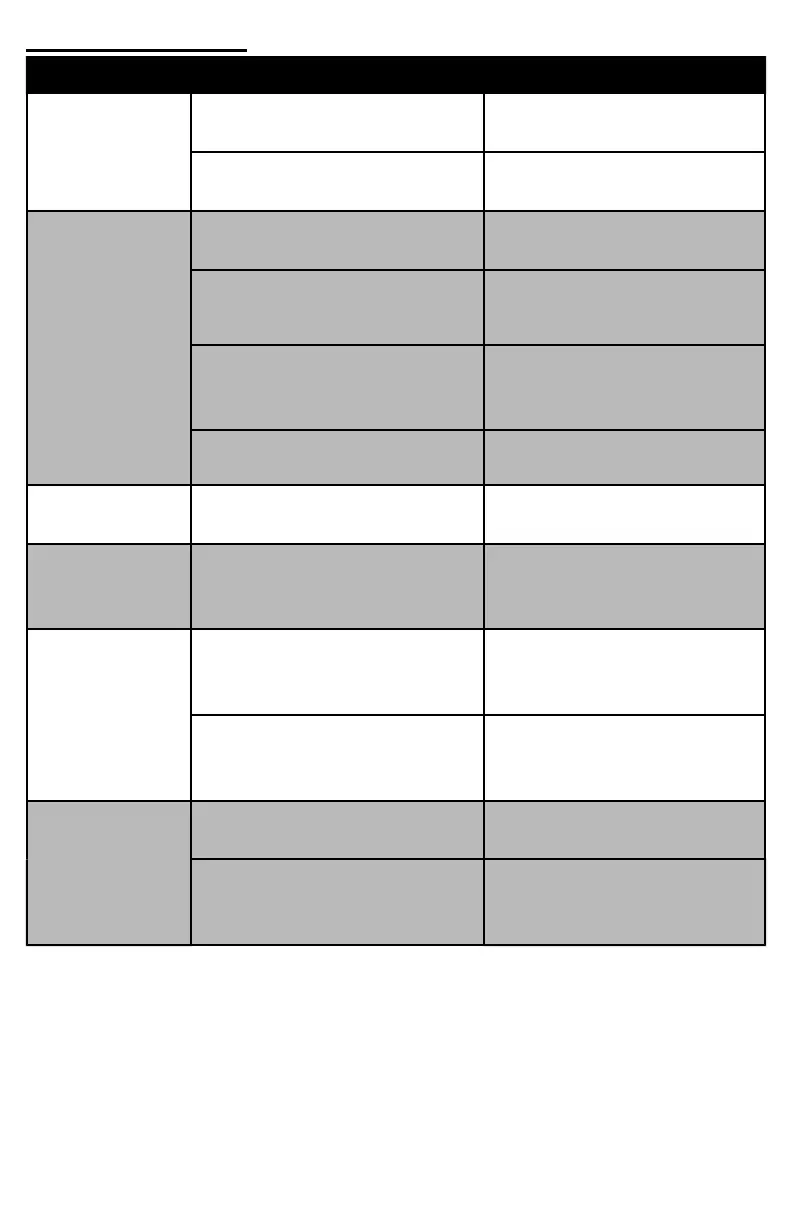
PROBLEM CAUSE SOLUTION
• Tool Skips off
to one side or
bounces around
• Stock is larger than tool will
accept
• Taper down the end of the
stock with a draw knife
• Not enough pressure is being
applied
• Lean into drill with body
• Not cutting
stock
• Stock is larger than tool will
accept
• Taper down the end of the
log with a draw knife
• Blades are slid too close
• Position blades so they are
back no closer than 1/8"
• Blades are dull
• Not applying enough
pressure
• Sharpen blades
• Purchase new blades
• Lean into drill with body
• Takes too
much of a "bite"
• Aggressive cutting from dual
blades
• Use the TB2500 Blade
Shims
• Crooked Stake
• Holding drill crooked while
cutting
• Position the drill square
against the stock before
cutting
• Drill stops or
cuts on small
diameter stock
but not larger
• Using a variable speed drill
• Make sure you are using a
single-speed drill with low
RPMs
• Using a non-Milwaukee
brand drill
• We recommend purchasing
a Milwaukee brand hole hog
drill
• Spiral grooves
on Stake
• Lateral wobbling of the drill
• Hold the drill as steady as
you can while cutting
• Removing the cutter while
drill is still spinning
• DO NOT remove the cutter
until the drill has come to a
complete stop
Troubleshooting



 To Next Page