PBM Charging & Connection Instructions
The PhotonMaster Bluetooth Module uses an integrated high capacity Li-ion
battery delivering enough power to perform more than 1000 readings on a
single charge with a PhotonMaster luminometer. When the PBM is in standby
mode (turned off) it draws a small current to maintain operational functionality,
which over time will deplete the battery. The PBM can be charged from most
common USB wall chargers (not supplied) or from a USB port on a computer.
A full charge will take approximately 5 hours to complete based on a
maximum 500mA power supply (common found on phone chargers).
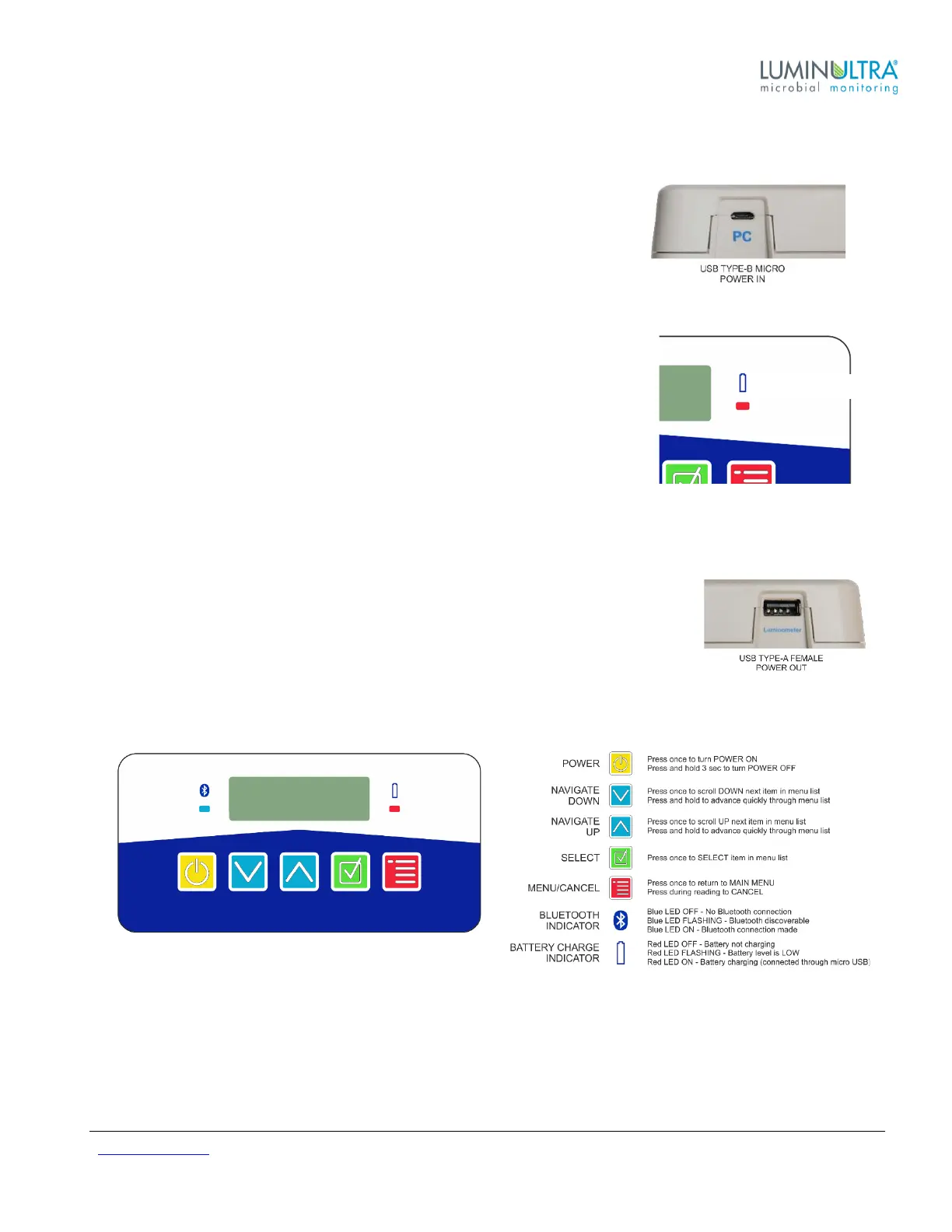
Connect the Micro USB to USB cable (supplied) to the PBM port labelled ‘PC’
and the opposite end to a USB charger or USB port on a computer. With the
PBM turned ON and the charging cable connected, the red battery indicator light
will illuminate to signify the unit is being charged. The battery is fully charged
when the battery indicator light does not illuminate with the PBM turned ON.
NOTE: When charging a device with a completely dead battery, an initial charge
may be required before the PBM responds. In such cases it is advised to allow
10-15 minutes charge time to allow sufficient charge before the unit will power on.
Product Interface
The PhotonMaster luminometer is easy to use; simply plug in to the USB port of your
PhotonMaster Bluetooth Module and start taking readings!
Top View & Button/LED Descriptions


 To Next Page