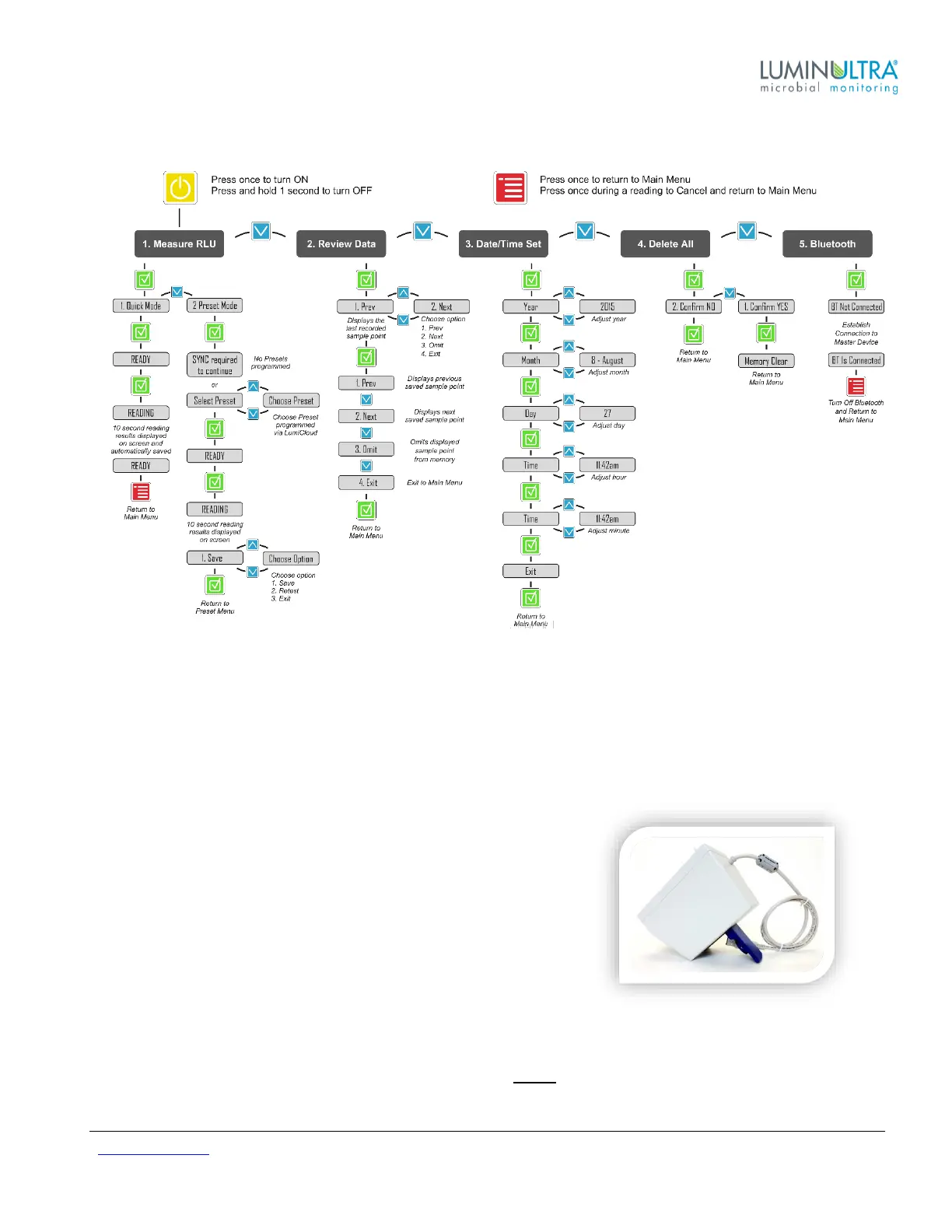
User Interface Map
Cleaning Instructions
There are several routine maintenance steps that are recommended to ensure that the PhotonMaster Luminometer
remains in good condition and that you continue to obtain the most accurate testing results.
If fluid has been spilled into the chamber, immediately follow these steps:
1. Remove assay tube – do not depress shutter or reclose the lid!
2. Keep lid open and invert the PhotonMaster.
3. Let the unit sit on a flat, clean surface for one hour.
Do not expose PhotonMaster to bright light during this time, and do not
perform these tasks in a dirty or dusty environment (e.g. outdoors).
The number one cause of spillage in the PhotonMaster chamber is
when assay tubes are left in the luminometer following testing. Please
be sure to remove used assay tubes from the luminometer
immediately upon completion of your testing.
LuminUltra recommends that the PhotonMaster be cleaned at least on an annual basis. Please use only the
approved Luminometer Cleaning Kit (LCK) or Luminometer Maintenance Kit (LMK) that is furnished by
LuminUltra, which includes 5 foam swabs and cleaning fluid. Never use sharp or abrasive materials for cleaning
the PhotonMaster chamber, as this can compromise the sensitive optics of the device!


 To Next Page