2
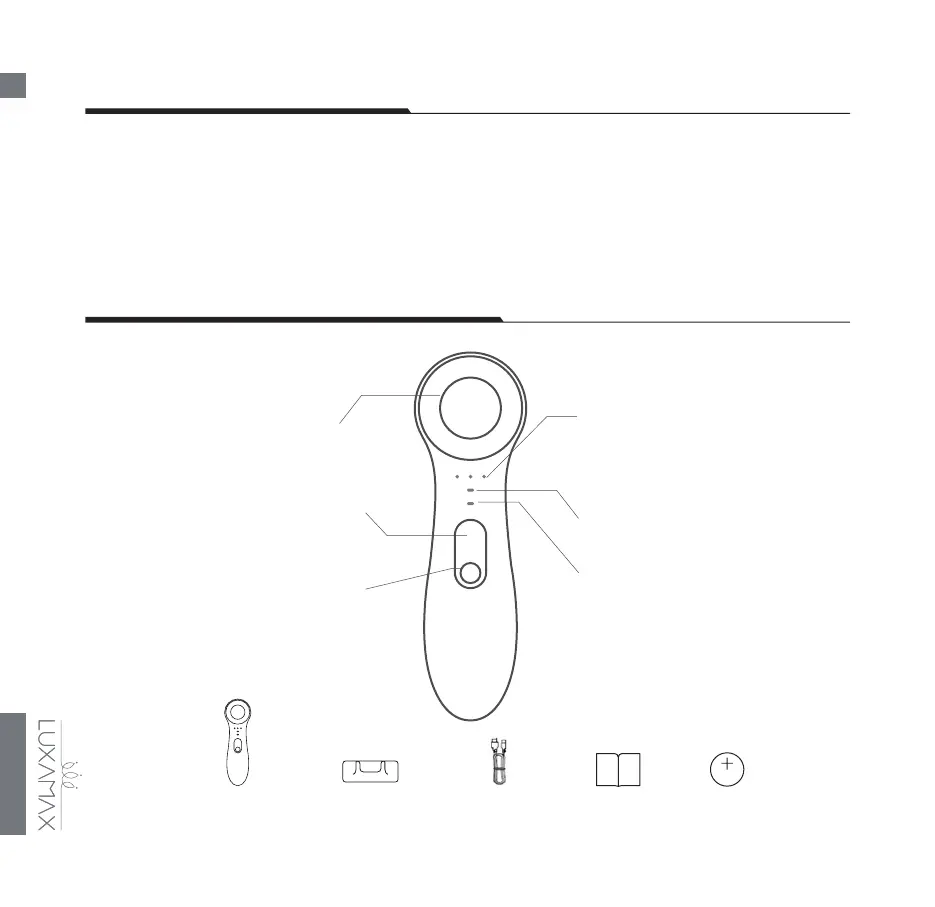
POWER BUTTON
LUXAMAX AVA Charging Base USB Charging
Cable
User Manual 3 Button
Batteries
DEAR VALUED CUSTOMER
GETTING TO KNOW YOUR DEVICE
Congratulations on taking the rst step toward awlessly beautiful and younger-looking skin by acquiring
the LUXAMAX AVA 3-in-1 Smart Facial Cleansing and Rejuvenating Device. Before you begin to enjoy all
the benets of sophisticated skincare technology in the comfort of your home, please take a few moments
to carefully read the instructions in this user manual.
Please READ ALL INSTRUCTIONS BEFORE USE and utilize this product only for its intended use as
described in this manual.
BATTERY/INTENSITY INDICATORS
Lets you know your current intensity
level and battery charge
SILICONE CLEANSING BRUSH
Equipped with Automated UVC
Disinfecting Cap
PURIFY MODE INDICATOR
Default mode when you turn on your
device
LUXIFY MODE INDICATOR
Press the power button once in order
to switch to LUXIFY mod
e
INTENSITY BUTTON N
Adjusts your preferred treatment
intensity
Powers ON/OFF
the device (press and hold) selects
treatment mode (press once)



 To Next Page