4
PURIFY MODE
Step 1:
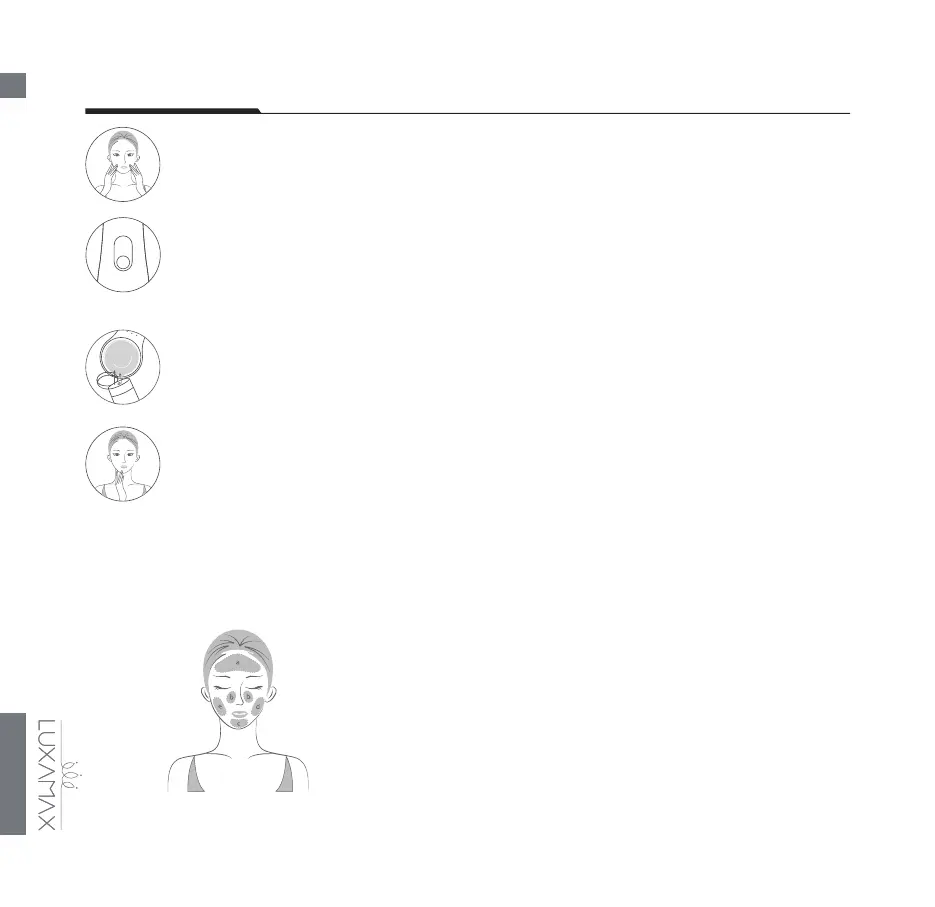
Remove as much makeup as you can. You may also do this by applying your makeup remover.
Then dampen your face thoroughly.
Step 2:
Turn on your device by pressing and holding the power button which activates the PURIFY
Mode. Three dierent intensities—for sensitive, normal, and oily skin types—are available to
suit every user’s comfort and eicacy requirements. Use the intensity buttons to adjust your
preferred treatment intensity.
Step 3:
Apply a layer of your regular cleansing product on the silicone cleansing brush. Place the
silicone head against your skin, gliding it continuously and evenly across the entire treatment
area, from bottom to top, from inside to outside.
Step 4:
Your LUXAMAX AVA turns o automatically after 2 minutes which means you have
successfully nished your treatment on the PURIFY Mode. Now rinse and dry your face to
complete the cleansing routine. Then switch to LUXIFY Mode as needed.
Note: When treating, divide your face into 5 zones as shown in the
picture below to ensure an even purifying over the entire face. Treat
zone A for 30 seconds, then move on to zones B (20 seconds), C (10
seconds), D (30 seconds), and E (30 seconds).



 To Next Page