6
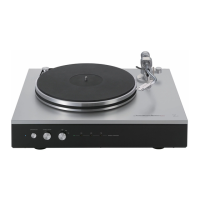
Names and Functions
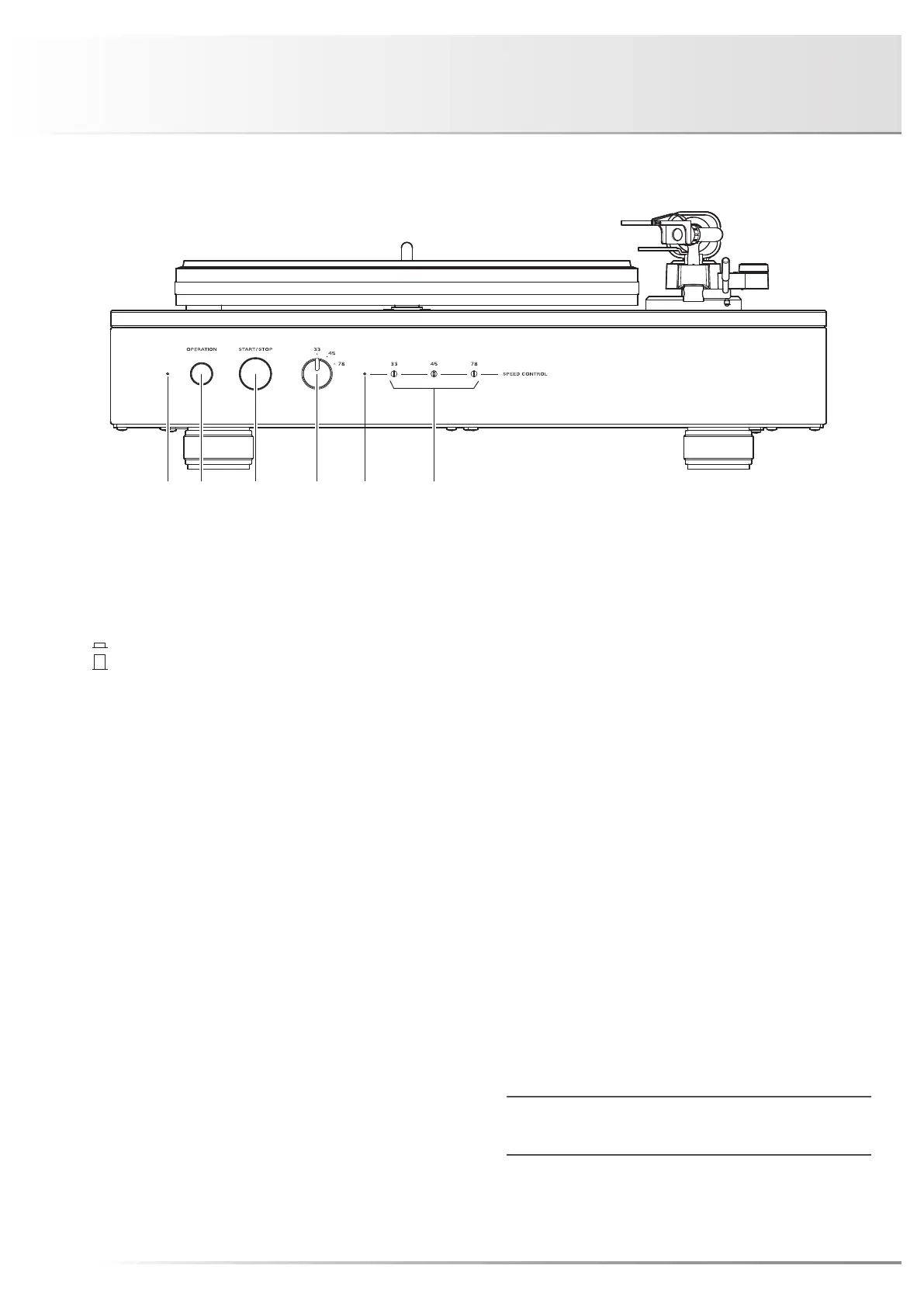
1. Operation indicator
This indicator lights up when the power is turned on.
2. Operation button (OPERATION)
This button turns on and off the power.
: ON
: OFF
3. Start/stop button (START/STOP)
This button starts rotating the platter at the selected rotation
speed.
This button also stops platter rotation while the platter is
rotating because this button serves as both start and stop
buttons.
4. Rotation speed selection switch
(33/45/78)
This switch toggles the rotation speed of the platter be-
tween 33 rpm, 45 rpm and 78 rpm.
Select a rotation speed in accordance with a record to listen
to.
5. Rotation speed deviation indicator
Adjust the rotation speed fine tuning volume to let the indi-
cator light (green).
6. Rotation speed fine tuning volume
(33/45/78 SPEED CONTROL)
The rotation speed is adjusted at shipment. However, if the
rotation speed deviation indicator blinks approx. five sec-
onds even after pressing the start/stop button, perform ad-
justment with each volume as follows:
33: Set the rotation speed selection switch to 33, and
perform adjustment to let the indicator light (green). Fit
the tip of the supplied flat-bladed screwdriver into the
minus-shaped groove of the volume shaft, and rotate it
to adjust the volume.
When the rotation speed is faster than 33 rpm, the
indicator blinks blue, and when it is slower than 33
rpm, it blinks green.
45: Set the rotation speed selection switch to 45, and
perform adjustment to let the indicator light (green). Fit
the tip of the supplied flat-bladed screwdriver into the
minus-shaped groove of the volume shaft, and rotate it
to adjust the volume.
When the rotation speed is faster than 45 rpm, the
indicator blinks blue, and when it is slower than 33
rpm, it blinks green.
78: Set the rotation speed selection switch to 78, and
perform adjustment to let the indicator light (green). Fit
the tip of the supplied flat-bladed screwdriver into the
minus-shaped groove of the volume shaft, and rotate it
to adjust the volume.
When the rotation speed is faster than 78 rpm, the
indicator blinks blue, and when it is slower than 33
rpm, it blinks green.
Use the supplied rotation speed adjustment screwdriver.
When the rotation speed adjustment screwdriver is used, be
careful not to damage the panel with the screwdriver tip.
Front view


 To Next Page