10
English Svenska Norsk
OPERATION
Microphone jack
1. Plugging the microphone into either Microphone jack on
the unit, you will hear prompt voice of “Mic. down”. When
you remove the microphone, you will hear the voice of
“Mic. off”.
Notes: Rotate the Microphone volume knob to adjust
the volume as desired. Or press M.MENU button on
the remote control first, then adjust volume by pressing
Volume -/+.
2. If microphone is near the loudspeaker, a howling effect
(acoustic feedback) may occur. If this happens, place
microphone away from the loudspeaker.
3. Press the MIC. PRIO button, you will hear “Mic.firster”.
It makes the mic.volume louder than the music volume
during singing. Press the button again to resume.
4. Press the DELAY button to adjust microphone voice
delay time
5. Press the ECHO button and rotate the Microphone
volume knob to adjust the echo intension.
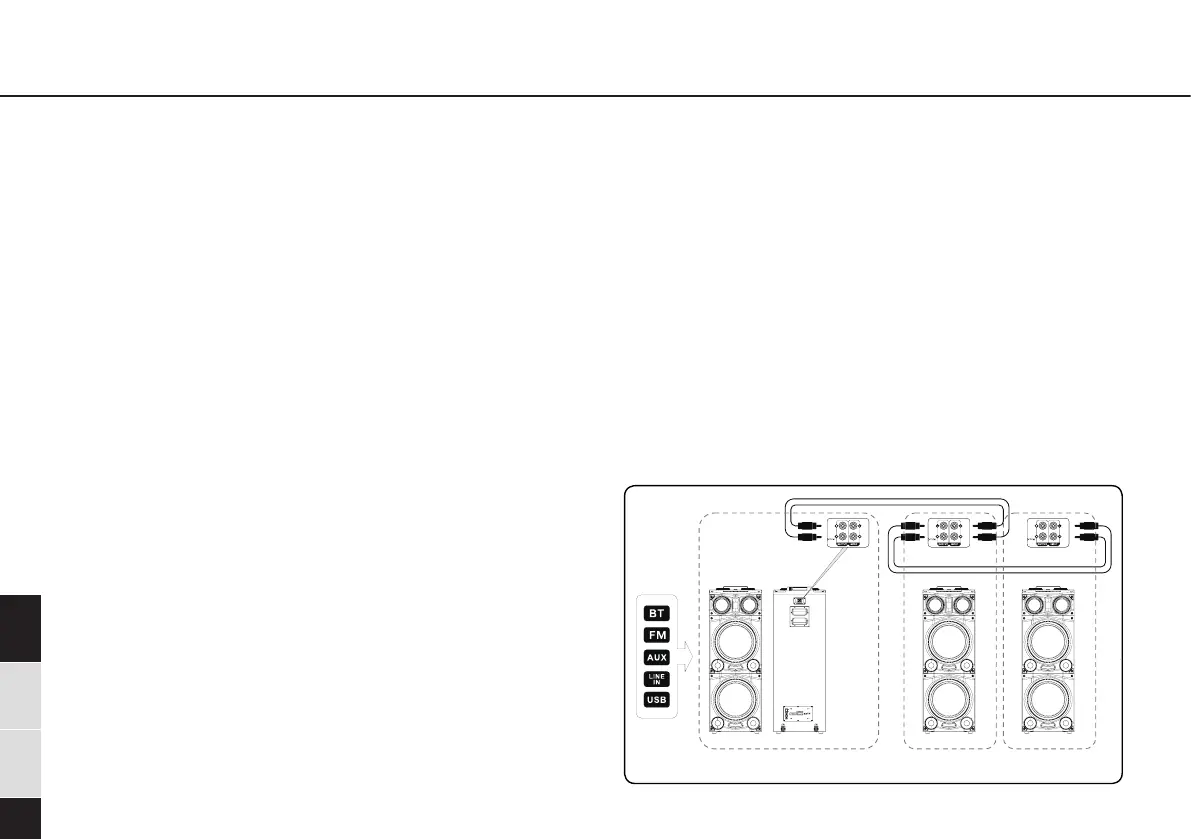
Party Chain Function
• You can connect multiple audio using audio cords (not
supplied) in a chain to create a more interesting party
environment and to produce higher sound output.
Activate a unit in the chain to be the “Party Host” and
share the music. Other units will become “Party Guest”
and play the same music as the “Party Host”.
Light Mode:
1. Rotate the light knob to select the projection effect of
ceiling LED light.
2. Press the Light mode button to adjust the color of
speaker lights.
3. If no audio signal—pulsing mode, user can change effect
via “Light mode” button as display will show “C-01 to
C-15” when pressing the button.
4. With audio signal-blinking mode (blinking with music
rhythm), user can change effect via “Light mode” button
as display will show “L-01 to L-09” when pressing the
button.
5. Press the Light on/off button to turn on/off the LED lights


 To Next Page