English - 42 -
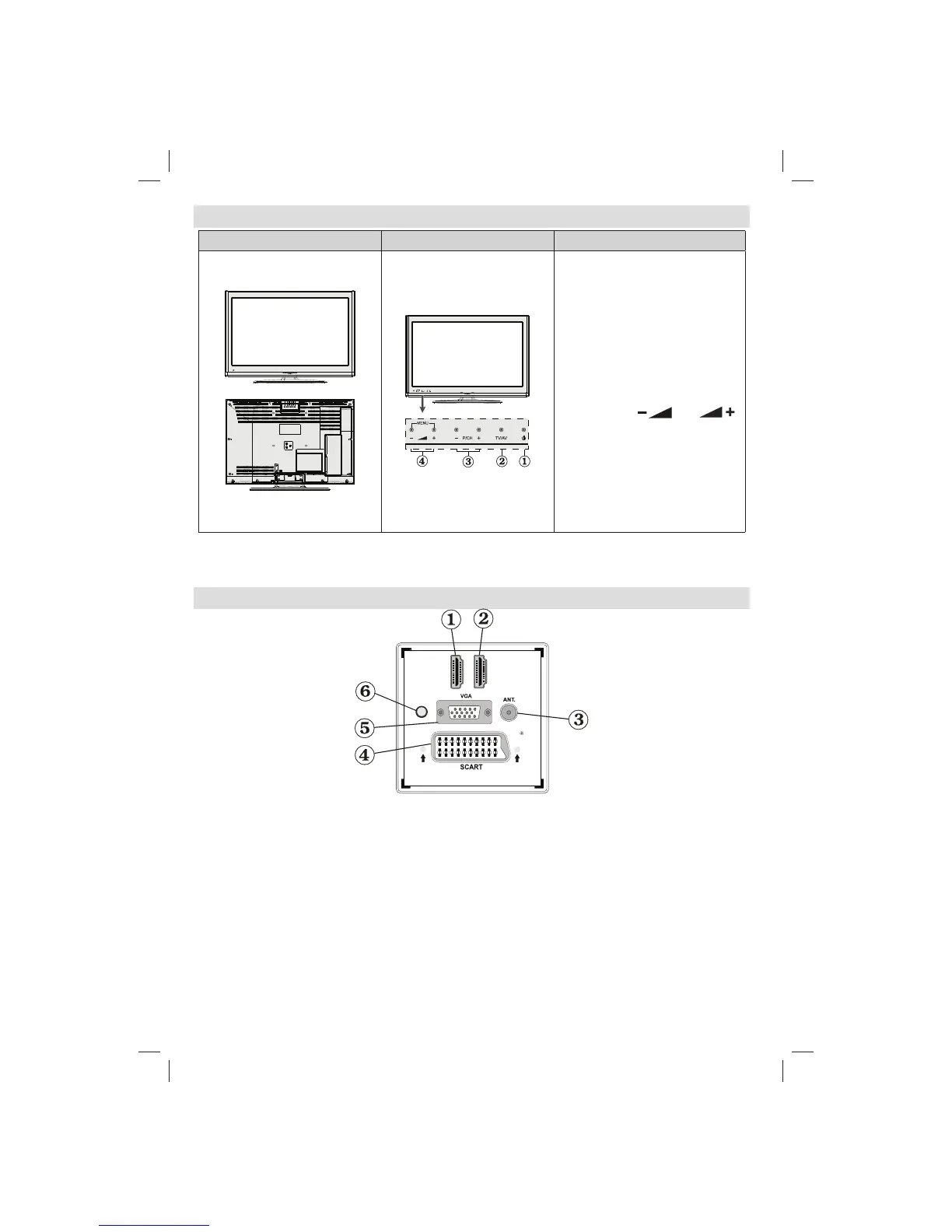
TV and Operating Control Switch
FRONT and REAR VIEW Control switch VIEW Control Switch
Standby button1.
TV/AV button2.
Programme Up/Down buttons3.
Volume Up/Down buttons4.
Note: Press
“ ” / “ ”
buttons at the same time to view
main menu
Viewing the Connections - Back Connectors
D
I
H
M1
SPDIF
Coax.OUT
D
I H
M2
HDMI 2: HDMI Input1.
HDMI 1: HDMI Input2.
HDMI Inputs are for connecting a device that has a HDMI socket. Your TV is capable of displaying
High Defi nition pictures from devices such as a High Defi nition Satellite Receiver or DVD Player. These
devices must be connected via the HDMI sockets or Component Socket. These sockets can accept
either 720p or 1080p signals. No sound connection is needed for a HDMI to HDMI connection.
RF Input3. connects to an aerial antenna system or a cable.
Note: If you use a decoder or a media recorder, you should connect the aerial cable through the device to
the television with an appropriate antenna cable, as shown in the illustration in the following pages.
SCART 4. input or output for external devices. Connect the SCART cable between SCART socket on TV and
SCART socket on your external device (such as a decoder, a VCR or a DVD player).
Note: If an external device is connected via the SCART socket, the TV will automatically switch to AV mode.
Note: S-VHS signal is supported via the scart socket (optional).
Note: When receiving DTV channels (Mpeg4 H.264) or while in Media Browser mode, output will not be
02_MB62_[GB]_(01-TV)_woypbpr_DVBT_C_PVR_NICKEL17_1910UK_32911W_10078118_50214306.indd 4202_MB62_[GB]_(01-TV)_woypbpr_DVBT_C_PVR_NICKEL17_1910UK_32911W_10078118_50214306.indd 42 26.03.2012 14:24:0126.03.2012 14:24:01


 To Next Page
 Loading...