English - 19 -
Getting Started
Remote Control
NOTE: The Remote Control range is approximately
7m / 23ft.
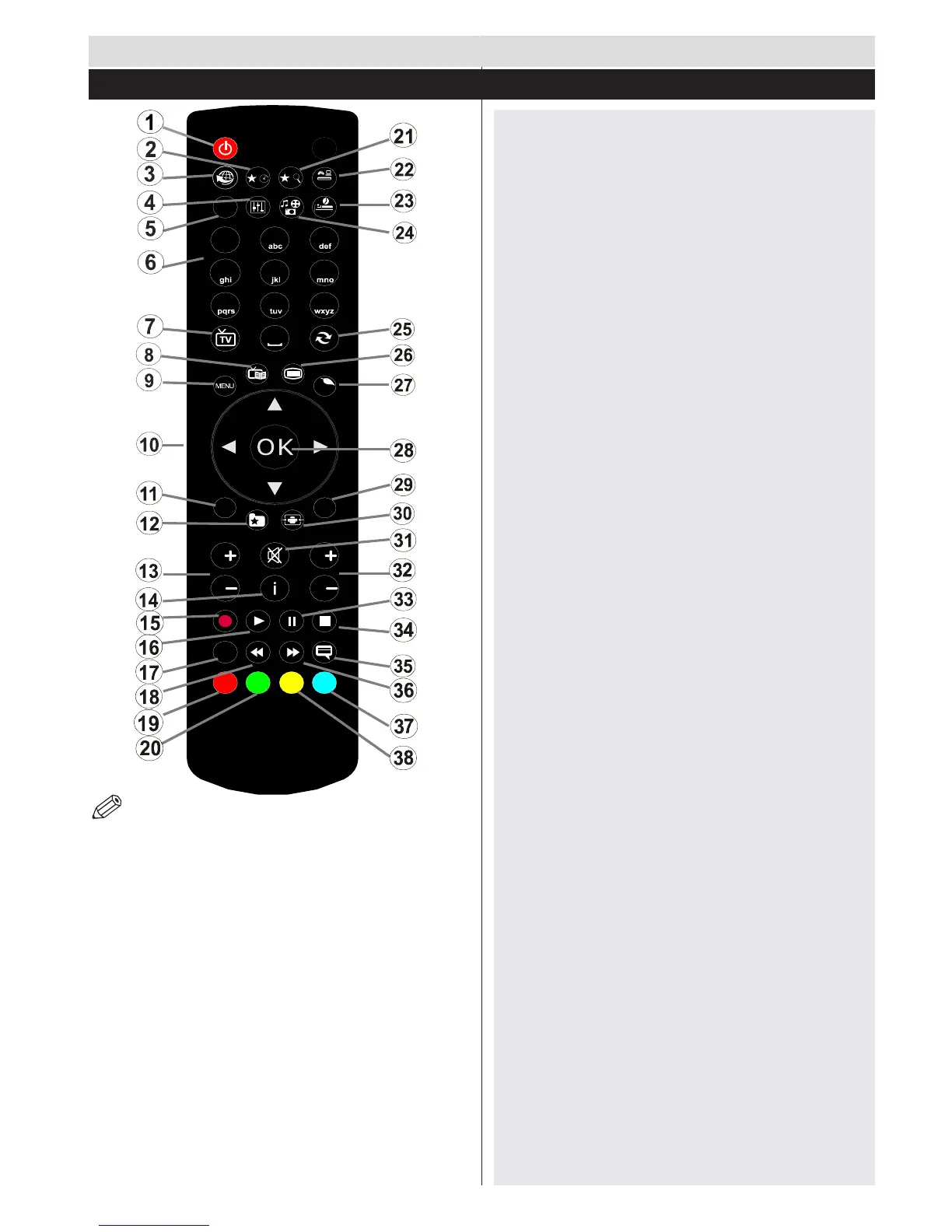
1. Standby
2. My button 1
3. No function
4. Equalizersettingsmode
5. Picturemodeselection
6. Numeric buttons
7. TV Button / Channel list
8. Electronic programme guide
9. Menu
10. Navigationbuttons(Up/Down/Left/(Right-TXT
Subpage)
11. Back
12. Favourites
13. Volume Up / Down
14. Info
15. Record programme
16. Play
17. Current language / Mono/Stereo - Dual I-II
18. Rapid reverse
19. Red button
20. Green button
21. My button 2
22. Source selection
23. Sleep timer
24. Media browser
25. Channel swap
26. Teletext
27. Q. Menu
28. OK/Select/Hold(inTXTmode)/ChannelList
(DTV mode)
29. Exit/Return/Indexpage(inTXTmode)
30. Imagesize
31. Mute
32. ProgramUp/Down
33. Pause/Timeshift
34. Stop
35. Subtitles
36. Rapid advance
37. Blue button
38. Yellowbutton
Using My Button 2 (**)
Press MYBUTTON 2for ve seconds when on
a desiredsource,channel or link, untilthe “MY
BUTTON IS SET” message is displayed on the
screen.ThisconrmsthattheselectedMYBUTTON
is now associated with the selected function.
Using My button 1 (*)
Press MY BUTTON 1 for ve seconds when on
a desired source, channel or link, until the “MY
BUTTON IS SET” message is displayed on the screen.
This conrms that the selected MY BUTTON is now
associated with the selected function.


 To Next Page