Need help?
Do you have a question about the Luxul XWC-2000 and is the answer not in the manual?
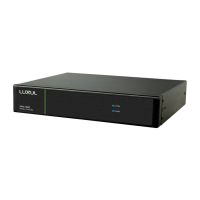
The Luxul XWC-2000 is a wireless controller designed to manage and configure compatible Access Points (APs) within a network, simplifying the setup and maintenance of a robust wireless infrastructure. This Quick Install Guide provides essential information for physical installation, initial setup, and basic operation, ensuring users can quickly integrate the controller into their existing network environment. The primary function of the XWC-2000 is to centralize the management of Luxul APs, allowing for a streamlined approach to wireless network deployment and optimization.
The Luxul XWC-2000 Wireless Controller serves as a central hub for managing Luxul Access Points. Its core function is to automatically configure and manage all compatible APs on the same subnet, provided their firmware is v5 or newer. This automation significantly reduces the manual effort typically required for setting up multiple APs, making it ideal for both small and large-scale deployments. Once the controller is configured, it takes over the management of connected APs, ensuring consistent performance and simplified administration.
A key feature of the XWC-2000 is its ability to create a configuration profile for the APs. This profile dictates the wireless settings, security protocols, and other parameters for all managed APs, ensuring uniformity across the network. Users can add or remove APs from this managed profile at any time, offering flexibility as network requirements evolve. The controller also plays a crucial role in optimizing the roaming experience for client devices. By ensuring adequate signal overlap between APs, but not so much that there is excessive interference, the XWC-2000 helps client devices maintain a strong connection as they move throughout the coverage area. The guide emphasizes the importance of proper AP placement to achieve optimal roaming, suggesting that client devices should ideally see signal strengths of two overlapping APs in the range of -60 to -70 dBm at the midway point between them. This intelligent management helps prevent dropped connections and ensures a seamless user experience.
Furthermore, the XWC-2000 supports automatic firmware updates for both itself and the connected APs, provided it has Internet access. This ensures that the wireless network remains secure and benefits from the latest features and performance improvements without requiring manual intervention for each device. While the controller can operate without Internet access, firmware updates will not be available in such scenarios. The presence of a DHCP server on the network is a prerequisite for the controller's operation, as it relies on DHCP for IP address assignment to both the controller and the APs.
The XWC-2000 is designed for straightforward physical installation. It simply connects to the network alongside any compatible Access Points. The guide illustrates a typical setup where the controller, APs, and a LAN are interconnected, often utilizing a PoE Injector or Compatible PoE Switch for power and data transmission to the APs. This simple connectivity allows for quick integration into existing network infrastructures.
Accessing the controller for initial setup is done via a web browser. Users enter the controller's default IP address (192.168.0.19) into the address bar and log in using the default username and password (both "admin"). This initiates a built-in Setup Wizard that guides the user through creating a configuration profile. The wizard is designed to be intuitive, walking users step-by-step through the process of setting up their wireless network. It automatically configures and manages all available APs on the same subnet once the profile is established.
The guide provides important considerations for IP addressing. If the network uses a 192.168.0.X address scheme, and the user's computer shares a similar address, they can proceed directly to the setup. However, if the network uses a different IP address scheme, users may need to manually change their computer's IP address to be on the same subnet as the controller for initial configuration. This ensures that the computer can communicate with the controller to perform the setup. The guide also cautions users about potential IP address conflicts if another device on the network is already using the default 192.168.0.19 address, suggesting temporary disconnection or reconfiguration of the conflicting device, or configuring the Wireless Controller on a separate isolated network.
For optimizing AP placement, the guide recommends ensuring adequate coverage without excessive signal overlap. It suggests that users may need to experiment with AP placement to achieve the best roaming experience. Tools like Ekahau HeatMapper are recommended to assist with this process, and Luxul provides additional resources such as "How-To" videos and detailed information on AP placement and IP addressing on their website. These resources aim to empower users to effectively design and manage their wireless networks.
The XWC-2000 also includes a feature for selecting the front-panel LED color. A switch on the rear panel allows users to toggle the Power and System LEDs between green and blue. This aesthetic feature helps the controller blend seamlessly with other equipment in a rack, allowing users to match the LED colors to their existing rack setup.
The Luxul XWC-2000 incorporates several features to facilitate maintenance and troubleshooting. One crucial aspect is its automatic firmware update capability. As mentioned, the controller automatically checks for and applies firmware updates for itself and compatible APs when connected to the Internet. This proactive approach to updates helps maintain system security, stability, and access to the latest functionalities without requiring constant manual checks.
The controller provides clear indicators of its operational status through its front-panel LEDs. During normal operation, the System LED blinks like a heartbeat (blink-blink-dark), providing a visual confirmation that the controller is functioning correctly. This allows for quick assessment of the device's status without needing to access its web interface.
For troubleshooting or reconfiguring the device, the XWC-2000 offers two distinct reset functions accessible via a button on the rear panel. A brief press and release of the Reset button will force the controller to reboot. During this process, the front panel LEDs will go dark, and the System LED will blink slowly as the controller reboots, indicating that the process is underway. This soft reboot can be useful for resolving minor operational glitches without losing existing configurations.
For more significant issues or to start fresh with the controller, there is an option to restore factory defaults. Pressing and holding the Reset button for at least 5 seconds will initiate this process. The System LED will blink quickly to indicate that the controller is returning to its factory default configuration. After a few seconds, it will go dark and then blink slowly while the controller boots up with its default settings. This feature is invaluable for resolving complex configuration problems or when redeploying the controller in a new environment, ensuring a clean slate for setup.
The guide also highlights the importance of a DHCP server for network operation, which is a fundamental maintenance consideration. Ensuring a DHCP server is present and correctly configured is vital for the XWC-2000 and all Luxul APs to obtain IP addresses and communicate effectively within the same subnet. This network prerequisite is a key element in maintaining a functional wireless system managed by the controller.
Finally, Luxul provides extensive support resources, including sales and technical support contact information, as well as online resources like "Smart Tips" for setup and configuration best practices. These resources are designed to assist users with any questions or issues they may encounter, ensuring long-term usability and optimal performance of the XWC-2000 Wireless Controller.
 General
| Model | XWC-2000 |
|---|---|
| Device Type | Wireless Controller |
| Management Interface | Web-Based |
| Wireless Standards | 802.11 a/b/g/n/ac |
| VLAN Support | Yes |
| Gigabit Ethernet | Yes |
| Guest Network Support | Yes |
| Band Steering | Yes |
| Load Balancing | Yes |
| Power over Ethernet (PoE) | No |
| Security Features | WPA2 |
| Operating Temperature | 0 to 40 °C |
| Operating Humidity | 10% to 90% non-condensing |

 To Next Page