Dial to the left side to turn on the Left winker.
Dial to the right side to turn on the Right winker.
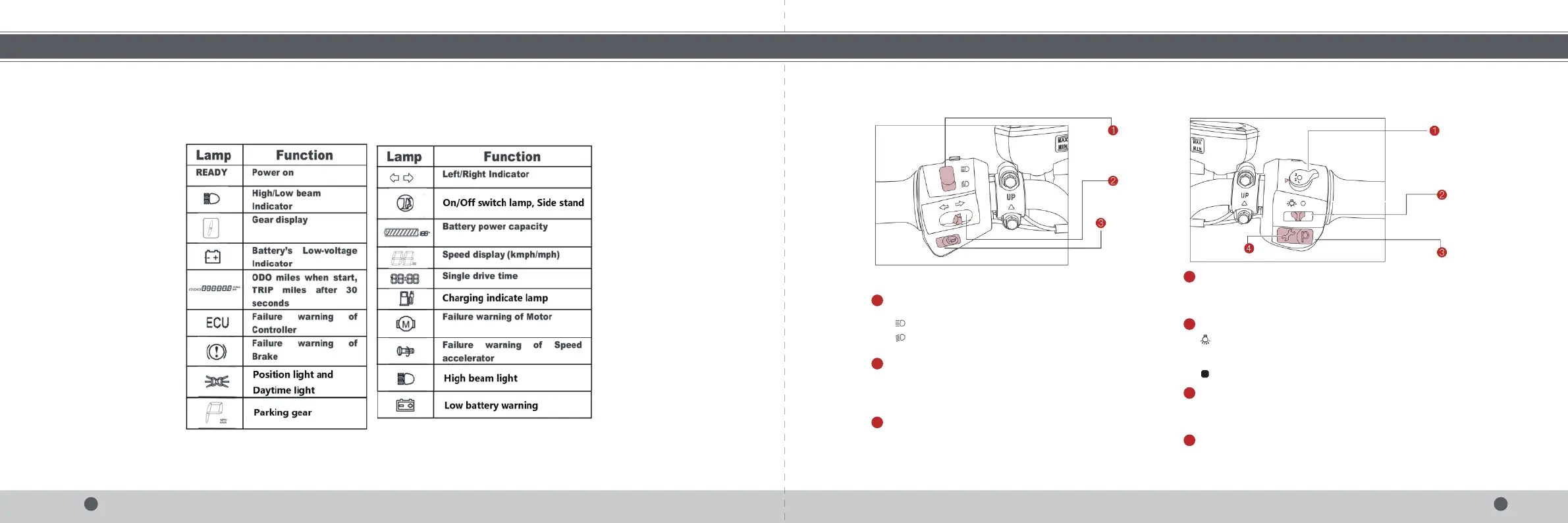
Details Of Instrument Panel
Left Start Button Right Start Button
High/Low beam switch button
Winker button
5 6
OPERATION GUIDEOPERATION GUIDE
Press up to turn on the high beam.
Press down to turn on the low beam.
1
2
Press to make a sound and release to stop.
Horn button
3
Dial up to turn on the headlamp.Turn downward to AUTO to automatically
turn on the headlights. The headlights turn on automatically according to
the brightness of the environment.
Dail down to to turn off the headlamp.
Gear shift button
Headlamp button
The bike has three(3) Gear modes,1 "Eco", 2 "Cruise", and 3 "Sport".
Dial rightwards for "Eco", Middle for "normal"and left for "sport".
1
2
Parking button has two modes: press to park the bike and parking indicator P
goes on; and press again to exit the parking status.
Parking button
3
When the scooter have failure warning on the motor/Controller/Brake/Accelerator,
always press this button, slow driving to nearby service center for repairs.
Recover button
4


 To Next Page
 Loading...