Page 20
Section 4 – Using the System
4.1 Changing the User Pincode
The user code is factory set to and is the same for every LS5000 system.
It is recommended that the user code be changed immediately after completing the basic
installation.
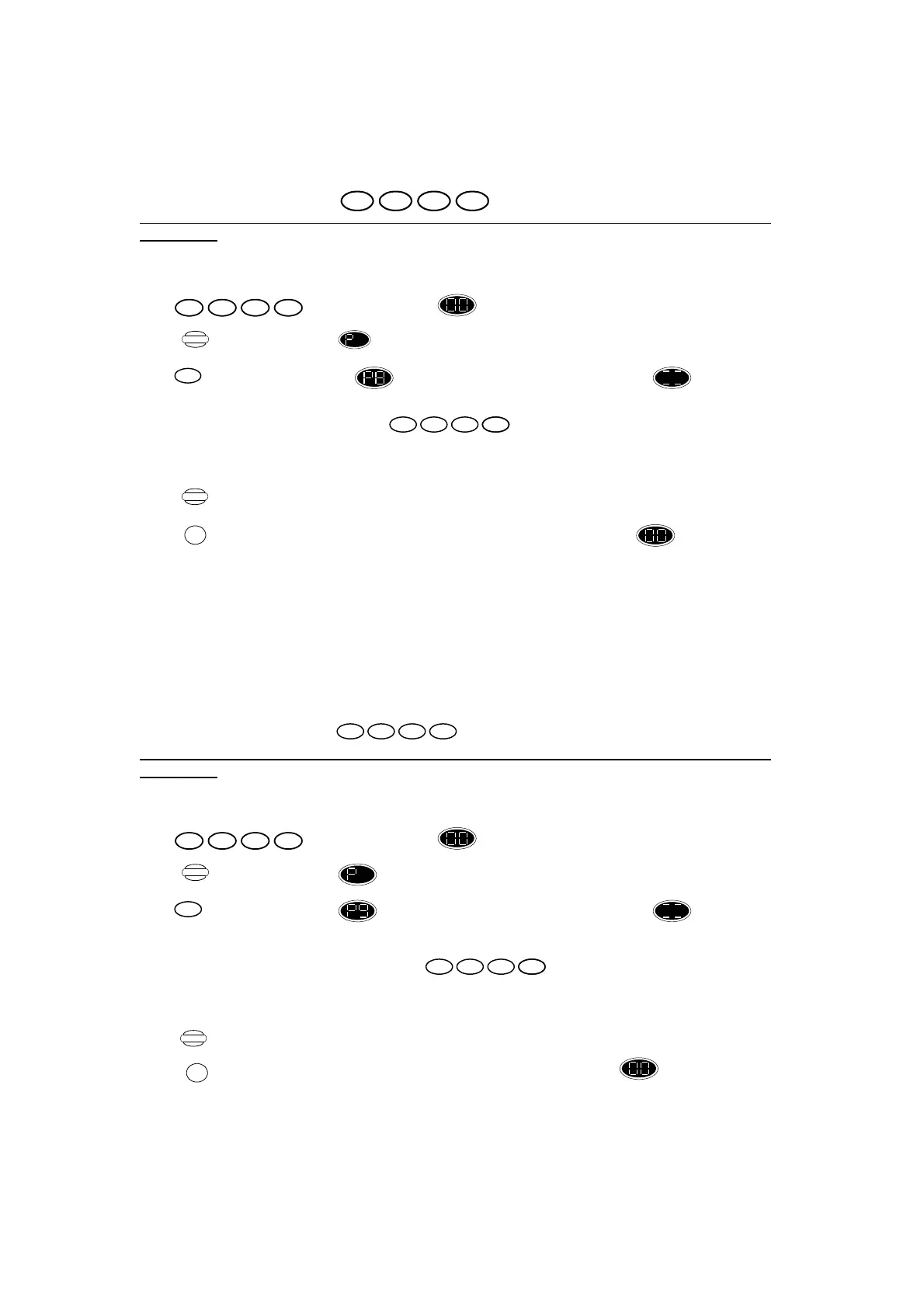
Press the following buttons:
Press , display changes to flashing
Press ,display changes to .
Press ,display changes to for 2 seconds, then to four-bar pattern , to show that
four digits need to be entered.
Enter your desired 4 digit user code:
For each digit you press, one of the lighted bars on the four-bar pattern will go out. After
pressing the fourth digit, unit gives OK beep.
Press ,Control Unit stores the new user code.
or
Press , this cancels the above procedure and returns the control unit to .
Note that the old user code will work until the new user code has been entered to certify the code.
When certified, the old code is deleted. You can use this procedure whenever you wish to change
your user code. Note that the user code cannot be the same pincode as the secondary or engineer
code.
4.2 Changing the Secondary Pincode
The secondary pincode is factory disabled. To enable it, refer to the engineer section 6.7.
The user code is factory set to and is the same for every LS5000 system.
It is recommended that the secondary code be changed immediately after completing the basic
installation.
Press the following buttons:
Press , display changes to flashing
Press display changes to .
Press ,display changes to for 2 seconds, then to four-bar pattern , to show that
four digits need to be entered.
Enter your desired 4 digit secondary code:
Enter your desired 4 digit secondary code. For each digit you press, one of the lighted bars
on the four-bar pattern will go out. After pressing the fourth digit, unit gives OK beep.
Press ,Control Unit stores the new user code.
or
Press ,This cancels the above procedure and returns the control unit to .
Note that the old user code will work until the new secondary code has been entered to certify the
code. When certified, the old code is deleted. You can use this procedure whenever you wish to
change your secondary code. Note that the secondary code cannot be the same pincode as the user or
engineer code.
The secondary code is available to people who should not be allowed to program the system, like
1432
1432
Program
8
n nnn n
Store
RESET
6 85 7
1432
Program
9
n nnn n
Store
RESET


 To Next Page
 Loading...