19
E
N
G
L
I
S
H
18
E
N
G
L
I
S
H
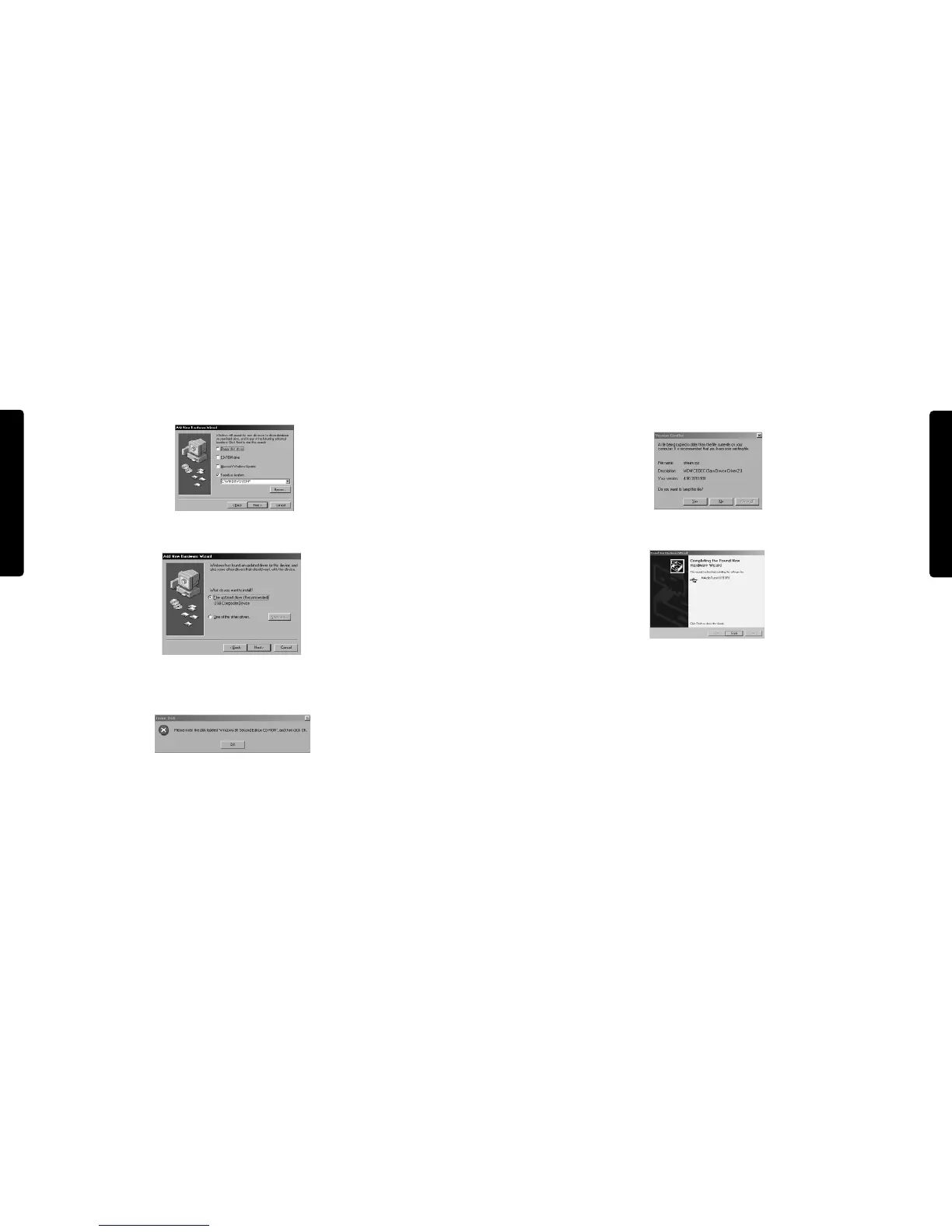
11. The New Hardware Wizard will write the remaining files to your system. When the
installation is complete, click Finish.
12. After the installation is complete, you may double-click on the M-Audio Transit USB
Control Panel icon to open the Transit USB Control Panel. See the section “Transit USB
Control Panel” for more information on the Control Panel’s features and function.
Mac OS 9.2.2
1. Insert the Transit USB driver CD into your CD-ROM drive.AutoRun will open the CD
and allow you to view its contents.
2. Double click on the “M-Audio Transit USB Installer” icon.
3. Click Continue in the initial installer introduction screen.
8. Windows will ask “ What do you want to install?” Select the default “The updated driver
(Recommended)” and click “Next”.
9. In some cases,Windows may ask you to insert your Windows CD-ROM. If so, insert the
CD and, using the Windows Explorer menu, navigate to your CD-Rom drive. Select
Win98SE to open the folder and click "OK".
10. In some Windows will ask you to update your stream.sys file. Click “Yes” to continue.



 To Next Page