hi
F
ace
T
wo
192
k
H
z
/24bit digital audio interface
REVISION 1.0 – MAY 2013
Copyright © 2013, M2Tech Srl
27
M2Tech
www.m2tech.biz
8. Configuring the player for WASAPI: two examples
8.1. FooBar
To use FooBar with WASAPI under Windows 7 or Windows 8 it is necessary to download
the DLL for WASAPI from the FooBar2000 website and install it in the Components sub-
folder inside FooBar2000 main folder in your hard disk. The DLL can be found at
http://www.foobar2000.org/components/view/foo_out_wasapi (click on Download). It is a
zip folder which contains the DLL. Extract it from the zip and copy to the Components
folder.
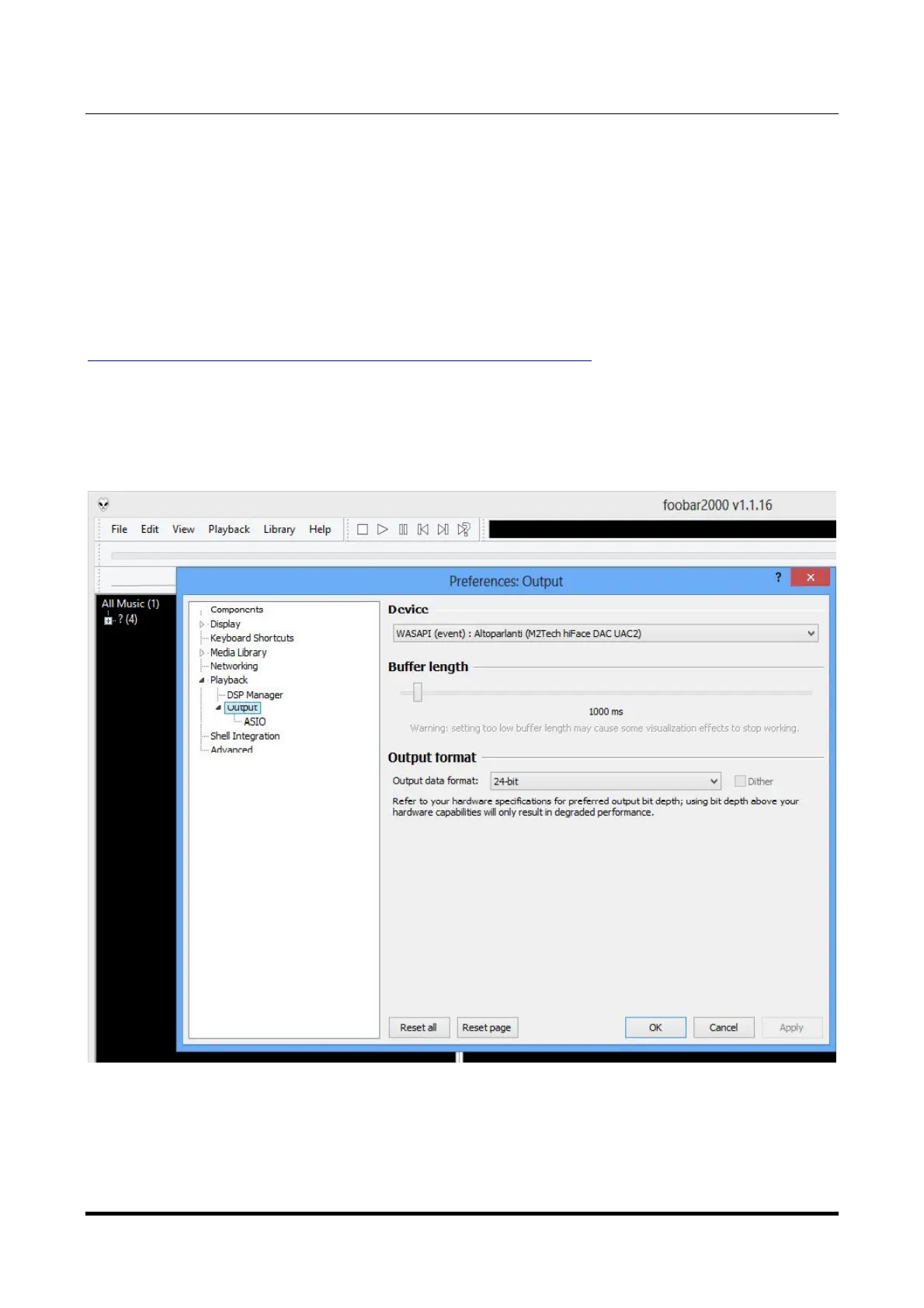
Then, restart FooBar, go to the File/Preferences/Playback/Output window and set
parameters as in figure 22.
Figure 22
Please note that 24 bits is OK for WASAPI. Please refer to the Foobar2000 technical notes
for more info.


 To Next Page