MACTOOLS.COM
8
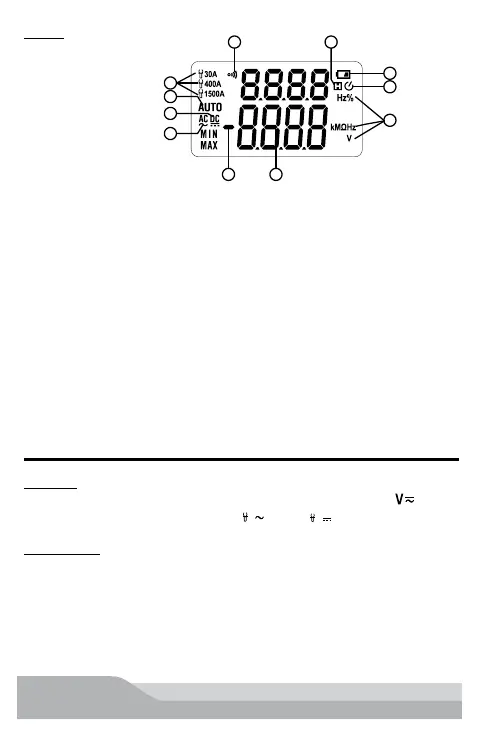
Display
3
2
1
4
5 6
7
8
9
1011
KEYS OPERATION
FUNC Key
Press the key to switch functions. Switch AC/DC Voltage in “ ”
position, switch different range in “
A
” and “
A
” position.
Data Hold Key
Press the key to hold the current reading on the LCD display.
Press the key again to release the hold.
1 Measuring indicator of FACOM current probe 720.P30 or 720.P1500
2 Automatic measuring range indicator
3 Direct voltage indicator
4 Alternating voltage indicator
5 Numerical value polarity indicator (negative sign)
6 Measurement display value
7 Measurement unit
8 Auto power off indicator
9 Battery low-voltage indicator
10 Data hold indicator
11 Continuity measurement indicator


 To Next Page