22
Current Measurements
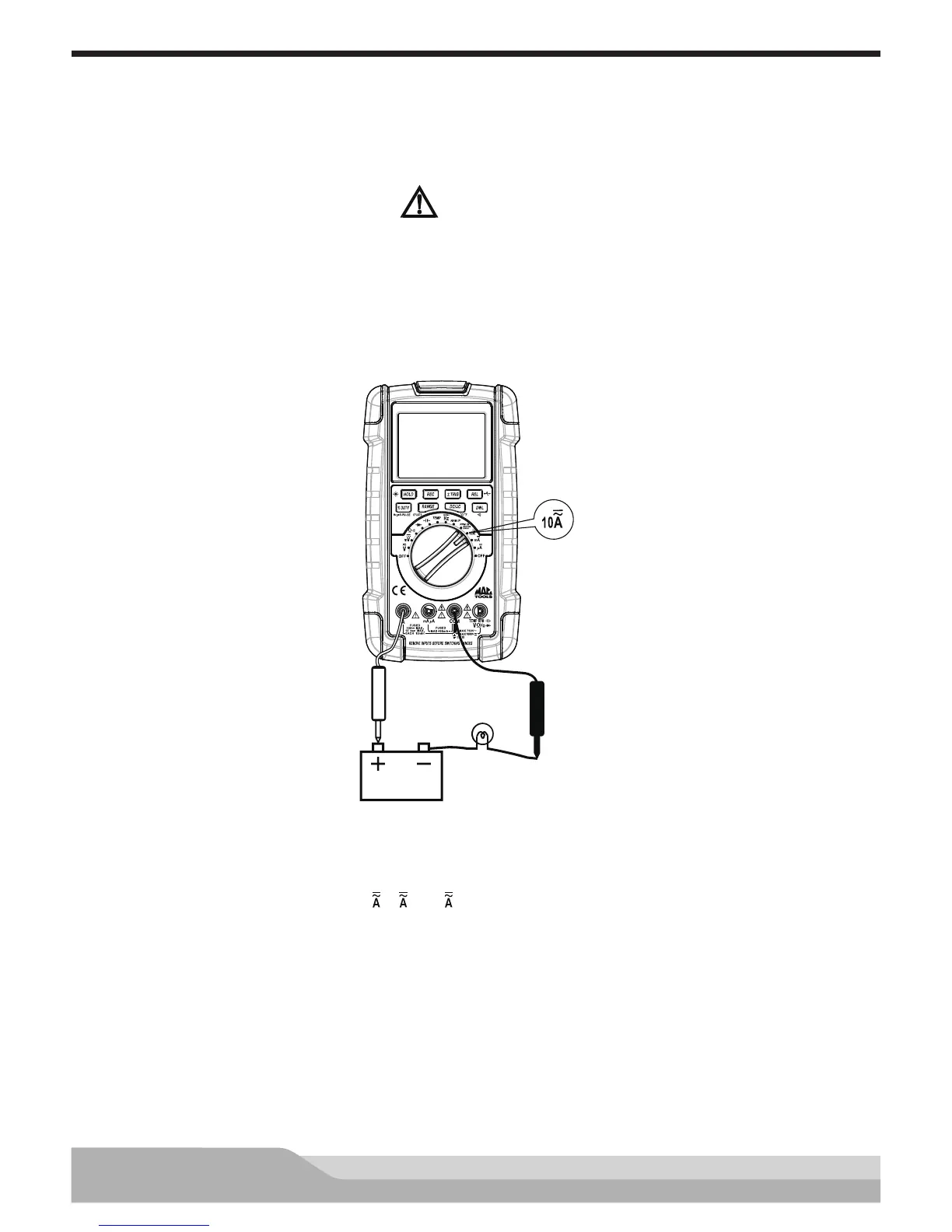
Current measurements are dynamic tests that measure the current through a circuit or component with
the power on. Current measurements are made with the test leads connected in series with the circuit or
component under test.
CAUTION
TO AVOID DAMAGE TO THE METER, CURRENT SOURCES HAVING OPEN CIRCUIT VOLTAGES GREATER
THAN 1000V DC OR 750V AC MUST NOT BE MEASURED.
NOTE: When making current measurements, the meter must be connected in series with the circuit (or circuit
element) under test. To avoid damage to the meter or the equipment under test, never connect the test
probes across a voltage source when the meter is in current measurement function.
12V Battery
Red
Black
Meter setup to measure current:
• Set the rotary switch to a current (10 ,m , or μ ) setting.
• Press the “DC/AC” button to select AC or DC current measurement, the display will show the corresponding
symbol.
• Insert the black lead in the “COM” jack.
• If the current to be measured is between 400mA and 10A, insert the red test lead in the “A” jack. If the
current is less than 400mA, insert the red test lead in the “mA μA” jack instead.
• Turn off power to the circuit to be tested. Then discharge all high-voltage capacitors.
• Break the circuit path to be tested, creating a point where the test probes can be connected in series with
the circuit.


 To Next Page