21
Diode Test
A diode operates as an electronic switch to allow current to ow in one direction only. It turns on when the
voltage is over a certain level, generally greater than 0.3V for a silicon diode. The meter has a static diode test
mode to test diodes when the circuit power is off. Readings across a good diode will typically be greater than
0.3V in one direction, while indicating an open circuit in the other direction.
NOTE: Turn off power to the circuit to be tested.
RedBlack
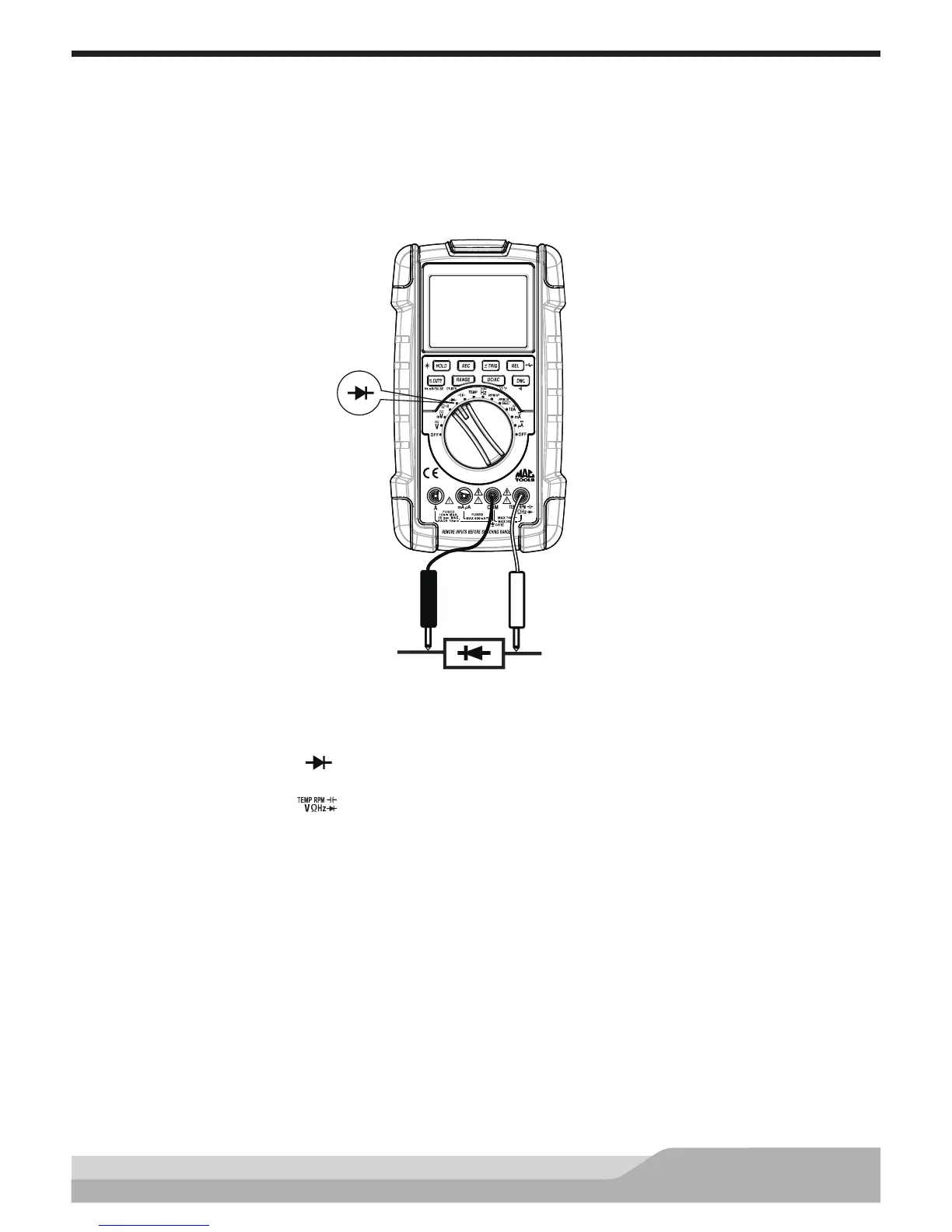
Meter setup to test the diode:
• Set the rotary switch to the setting.
• Insert the black lead in the “COM” jack.
• Insert the red lead in the “ ” jack.
Connect:
• Black test probe to the cathode of the diode.
• Red test probe to the anode of the diode.
If the diode is good, the reading should indicate 0.3V to 0.8V on the display.
Reverse the probes. The display should show “OFL” if the diode is good.
NOTE: A defective diode may read OFL (OverFLow) or have the same reading in both directions no matter how
the test probes are connected.


 To Next Page