EasyManua.ls Logo

MAC TOOLS MW165 - Gun Maintenance; Troubleshooting

MAC TOOLS MW165
20 pages
Print Icon
To Next Page IconTo Next Page
To Previous Page IconTo Previous Page
Loading...
4-3.
Gun
Maintenance
4-4.
Troubleshooting
Replace
contact
tip.
I
___
FLYING
METAL
CHIPS
AND
DIRT
can cause
injury
and
damage
equipment.
Point
gun
away
from
people
and
in
a
safe
direction
when
blowing
out
with
compressed
air.
READ
SAFETY
BLOCKS
at
start
of
Section
4
before
proceeding.
sw~m10.1
10/91
1
4
5
2
7
Turn
Off
and
unplug
unit.
1
Wire
Spool
Cut
welding
wire
off
at
contact
tip.
Retract
wire
onto
spool
and
secure.
2
Gun
Securing
Nut
Disconnect
trigger
leads.
Loosen
nut
and
remove
gun
and
trigger
leads.
3
Nozzle
4
Contact
lip
5
Head
Tube
6
Liner
Collet
Disassemble
gun
as
shown.
7
Liner
Pull
liner
from
this
end.
Blow
gun
casing
out
with
compressed
air.
Insert
new
liner
into
gun
casing
until
even
with
end
of
head
tube.
Install
collet
onto
liner.
Install
contact
tip
and
nozzle.
Insert
gun
into
feeder
and
mark
where
liner
touches
drive
roll.
Remove
gun
and
cut
liner
oft.
ReInstall
gun
so
that
liner
is
as
close
as
possible
to
drive
rolls
without
touching.
Thread
welding
wire
(see
Section
2-7).
Close
door.
Ref.
ST-t55
506A
/
5T-155
509-A
Tools
Needed:
~
3/8,5/16
in
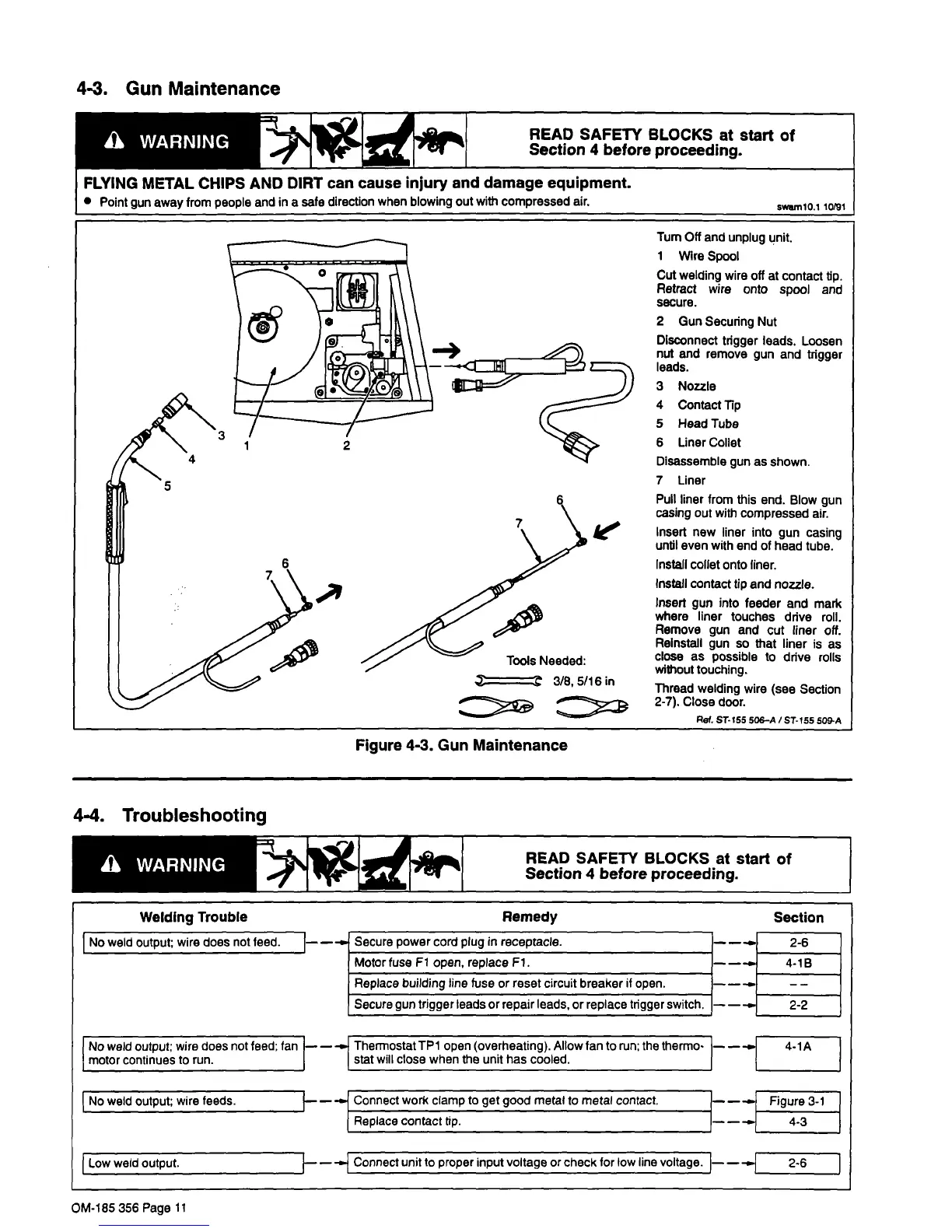
Figure
4-3.
Gun
Maintenance
Welding
Trouble
No
weld
output;
wire
does
not
feed.
j-...~
Secure
power
cord
plug
in
receptacle.
READ
SAFETY
BLOCKS
at
start
of
Section
4
before
proceeding.
Remedy
-...~
-~L__4-lB
-~L
-..J
Section
2-6
2-2
Motor
fuse
Fl
open,
replace
Fl.
Replace
building
line
fuse
or
reset
circuit
breaker
it
open.
Secure
gun
trigger
leads
or
repair
leads,
or
replace
trigger
switch.
LN~e~~Put;_wire
feeds.
No
weld
output;
wire
does
not
feed;
fan
~
-.4
Thermostat
TP1
open
(overheating).
Allow
fan
to
run;
the
thermo-
-~
4-1
A
motor
continues
to
run.
]
stat
will
close
when
the
unit
has
cooled.
Low
weld
output.
F-.
-~
Connect
work
clamp
to
get
good
metal
to
metal
contact.
1-..
Figure
3-1
H-.~
4-3
-
Connect
unit
to
proper
input
voltage
or
check
for
low
line
voltage.
J
-..J
2-6
OM-185
356
Page
11

Related product manuals