•
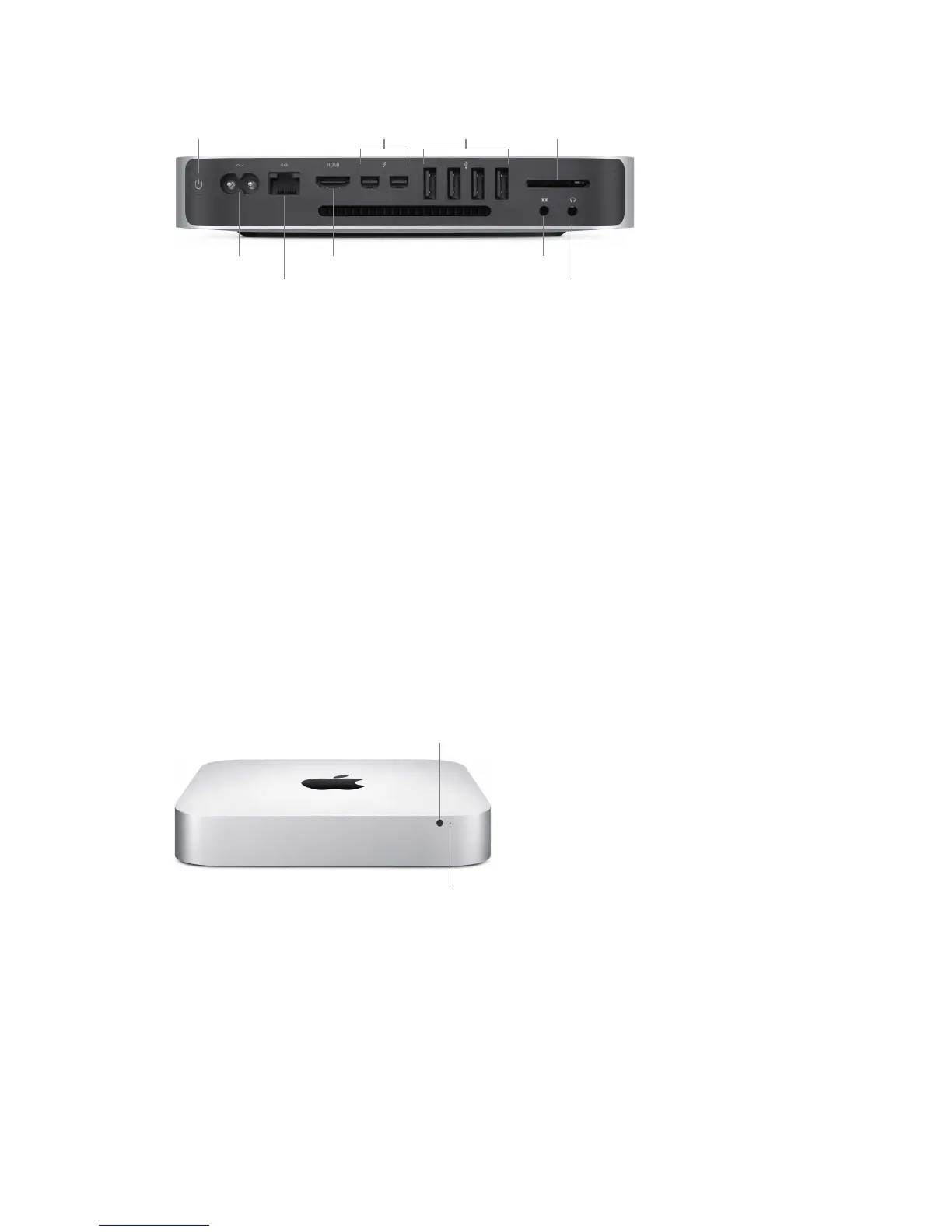
Power button: Press and hold for three seconds to turn your Mac mini on or o, or press to put
it to sleep.
•
Power port: Plug the power cord into the power port on the back of your Mac mini, then plug
the other end of the cord into a power outlet.
•
Gigabit Ethernet port: Connect a router or modem to use the Internet, or connect to another
computer to transfer les without using Wi-Fi.
•
HDMI port: Use an HDMI to DVI Adapter or HDMI cable (sold separately) to connect your
Mac mini to a TV or external display.
•
Thunderbolt 2 ports: Transfer data at lightning-fast speeds, and connect a display (such as
the Apple Thunderbolt Display), docking stations, and RAID arrays. Thunderbolt 2 supports
adapters (sold separately) for technologies like FireWire or HDMI, for increased connectivity.
•
USB 3 ports: Connect an iPad, iPhone, iPod, digital camera, camcorder, external storage device,
or printer quickly and easily. The Mac mini USB 3 ports support USB 3 and USB 2 devices.
•
SDXC card slot: Transfer photos, videos, and data to and from your Mac mini.
•
Audio in port: Connect digital audio equipment to record sound or music, or a line-level
microphone to use Siri, FaceTime, Messages, and to answer iPhone calls.
•
3.5 mm headphone jack: Plug in stereo headphones or a digital 5.1 surround-sound speaker
system and experience high-quality sound while watching movies or listening to your favorite
music. Or plug in an iPhone headset with microphone to use with apps and for iPhone calls.
Power indicator light
•
Infrared receiver: Use an optional Apple Remote (sold separately) with the infrared receiver
to control system volume, play music from your iTunes library, watch photo slideshows, and
control Keynote presentations on your Mac mini—all from up to 30 feet (9 meters) away.
•
Power indicator light: A steady white light indicates your Mac mini is on; a pulsing light
indicates it’s in sleep mode.
74% resize factor


 To Next Page
 Loading...