manual utilizare presostat electronic
pressystem
52
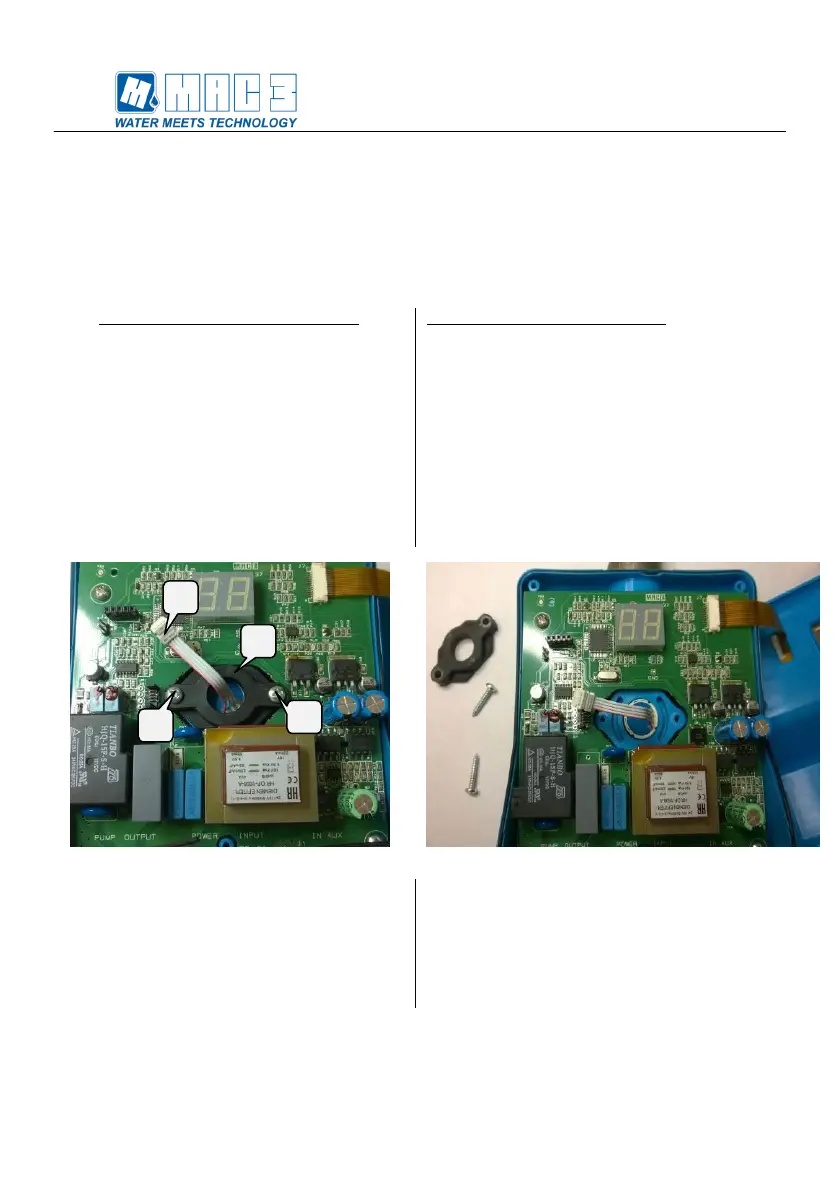
Inlocuirea senzorului de presiune:
1. Pentru inlocuirea senzorului de presiune
urmati pasii 1-2-3 din sectiunea “Inlocuirea
placii electronice”, si apoi scoateti clema
senzorului de presiune (1) (Figura 8).
2. Desurubati suruburile (2) si (3) ale
garniturii (inelului) senzorului (4) (Figura 8).
3. Odata ce ati scos suruburile si garnitura
senzorului, este posibila inlaturarea
senzorului de presiune din lacasul lui
(Figura 9) .
Replacing the pressure sensor:
1. To replace the pressure sensor it is
necessary to follow the same steps as in
points 1-2-3 on the "replacing electronic
board " and then continues to unclip the
pressure sensor connector (1) (Figura 8).
2. Unscrew the screws (2) and (3) of the
sensor ring (4) (Figura 8).
3. Once the screws and the sensor ring have
been removed, it is possible to remove the
pressure sensor from its slot (Figura 9) .
4. Dupa scoaterea sensorului din lacas
trebuie sa inlaturati si ORingul (8) (Figura
10).
5. Inainte de a monta noul senzor, introduceti
ORingul in acesta (Figura 11) si apoi folositi
instructiunile de mai sus in sens invers,
pentru montare.
4. After removing the sensor from the slot you
need to remove the ORing (8) (Figura 10).
5. Before placing the new sensor, insert the
ORing into the new sensor (Figura 11) and
follow in reverse mode the assembly
operations described above.


 To Next Page
 Loading...