Software Installation for PC
IEEE1394 FireWire Connection for Windows98SE/ME/2000/XP
Plug the IEEE 1394 cable into any available port, Windows(98,ME,2000
or XP) will start searching for the proper driver. Please follow the
on screen instruction to complete the driver installation. (You may need
the Windows CD during the installation.)
USB Connection for Windows/ME/2000/XP
Plug the USB cable into any available port, Windows(,ME,2000
or XP) will start searching for the proper driver. Please follow the
on screen instruction to complete the driver installation. (You may need
the Windows CD during the installation.)
USB Connection for Windows98 Software Installation
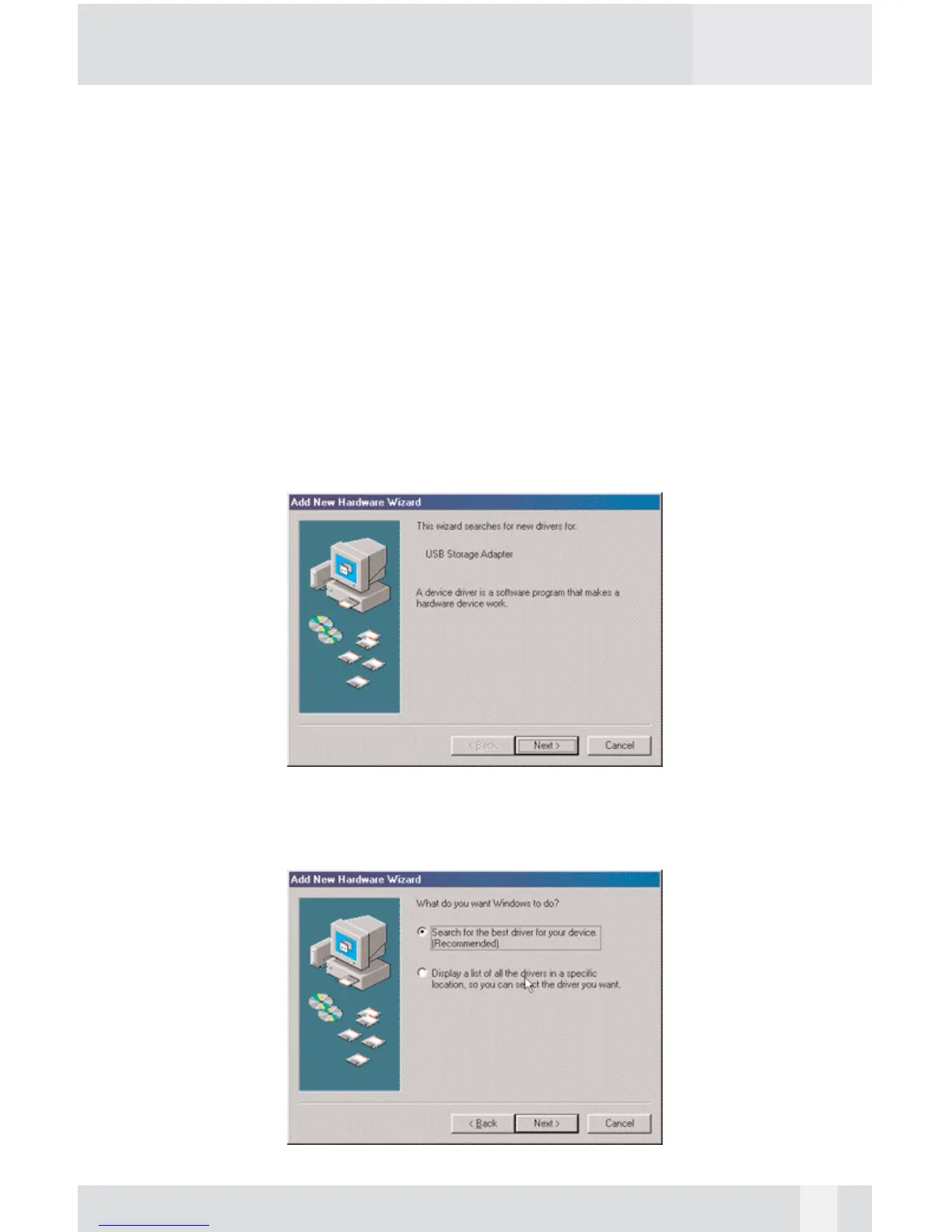
Power on the USB2.0 Enclosure and plug the USB cable into your USB2.0
port. The “Add New Hardware Wizard” should automatically appear as
shown above. Click “Next” when this window appears.
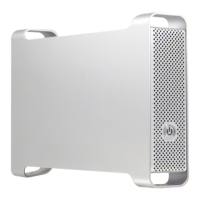
Choose “Search for the best driver for your device.” And click “Next”.
14


 To Next Page