P0010/082016/Rev.0.0 73
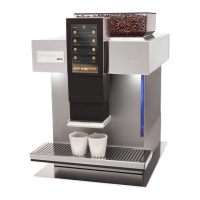
NEVIS Components – Figure 1
1 - i-TouchScreen-Display
2 - Control panel
3 - Menu bar, status bar, and page selection
4 - Milk connection hose
5 - Height-adjustable spout
6 - Drip tray
7 - Water tank
8 - Water tank viewer
9 - Brewing unit slot
10 - Water tank lid
11 - Cup warmer
12 - Slot for cleaning tablets & powder
13 - Bean container
14 - Setting the degree of grinding
15 - Bean container lid
Control elements
1 - i-TouchScreen-Display
The appliance’s operating condition, status messages, setting options, and
other useful information is shown on the screen.
The screen also leads you through all the necessary operations with
prompts. They disappear automatically after each operation has been
carried out or as the appropriate button has been pressed.
Each step is also displayed on the screen helping you to simply and quickly
reach the desired goal.


 To Next Page