P0010/082016/Rev.0.0 89
Operating your NEVIS + NEVIS-Unique
In this section you will learn how to select, set up and prepare outputs and
how their characteristics can be adjusted according to your wishes via
NEVIS-Unique.
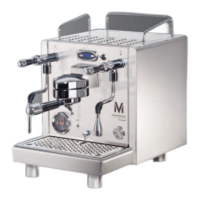
Important!: NEVIS uses two access codes in the
menu.
1122 - Owner-Code
3333 - User-Code
This feature enables you to restrict or allow
access to some of the machine’s functions to
certain users.
Page 116 + 117 shows you how the codes can
affect the menu.
Setting up the Products – NEVIS-Unique
1. Select the “MENU” button in the bottom left bar.
2. Type in the Owner-Code 1122 and confirm by pressing “OK”.
3. Select “Settings” in the main menu.
4. Select “Product Settings” to see the list of all available drink
options.


 To Next Page