1 (Networking and internet)
1 (External) 2 (Internal)
21.5" Capacitive Touch Color LCD
Wireless - Full QWERTY with numpad
Wireless - Optical mouse with scroll wheel
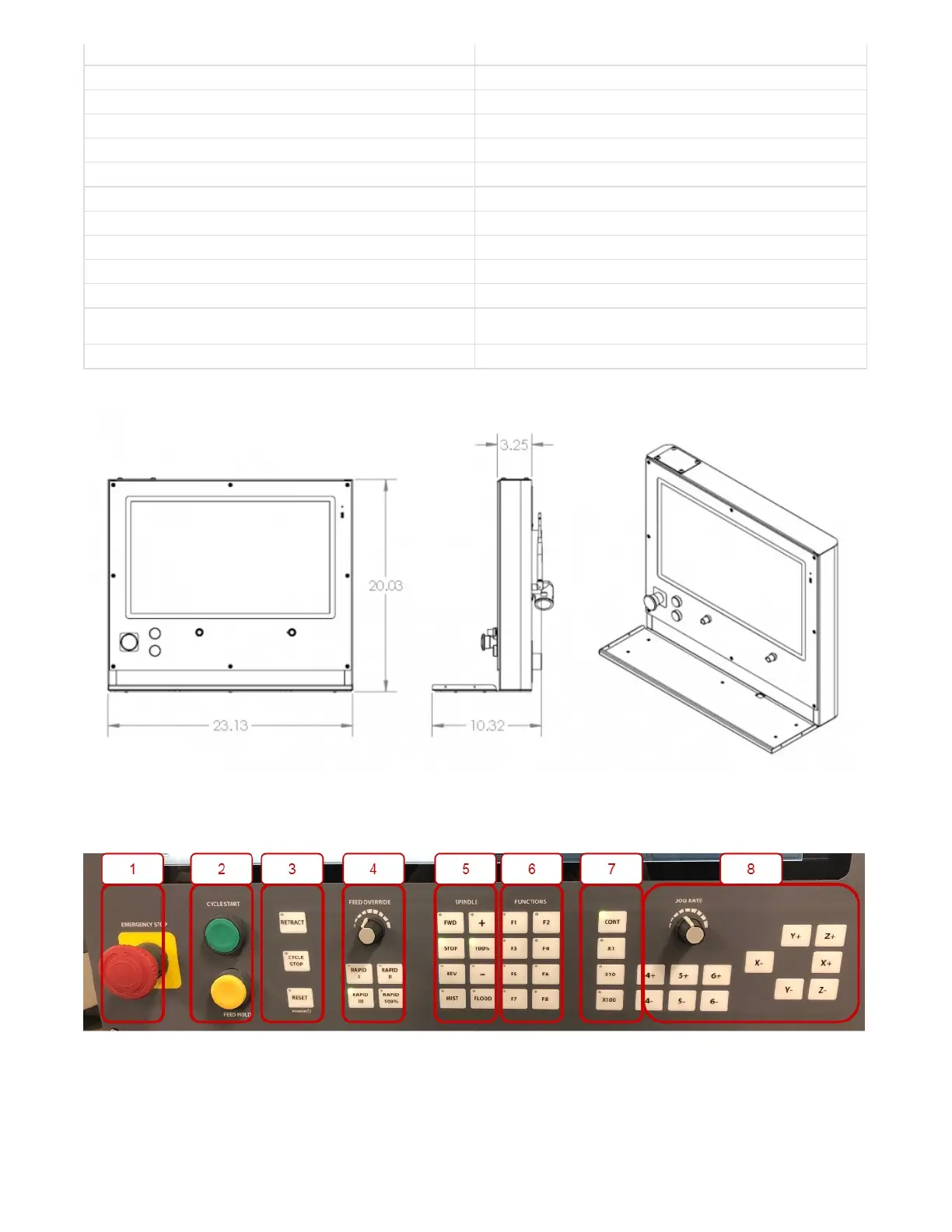
23.125"(W) X 20.0"(H) X 3.25"(D)
18 Gauge Steel, Powder Coated Skin. Machined Aluminum Face
Membrane button panel with Jog, Spindle, Coolant, Feed selections,
Emergency Stop, Cycle Start, Feed Hold, and Reset Buttons
X15-41-01 Wireless Pendant (Optional)
Emergency Stop should be used in the event of an emergency and as a safety precaution any time the machine isn't
running. Emergency Stop will not lose position of machine or require rehoming.
Cycle Start can be used to start a GCode file and is also used to start other commands such as MDI and GoTo
2. Mechanical Drawings
4. Operator Panel
1. Emergency Stop
2. Cycle Control


 To Next Page