EasyManua.ls Logo

Mackie MTEST-1 - User Manual

Mackie MTEST-1
10 pages
Print Icon
To Next Page IconTo Next Page
Loading...
OWNER’S MANUAL
1 2 3 4 5
GROUND
TS / TRSMIDIRCA / PHONOXLRSPEAKON
3.5mm TRS 3.5mm TRS
BANANA / CONTINUITY
BATTERY
CHECK
Question and Answer IconNeed help?

Do you have a question about the Mackie MTEST-1 and is the answer not in the manual?

Summary

Important Safety Instructions

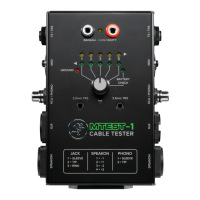
MTest-I Cable Tester: Top and Side Panel Features

9 V Battery

Details on installing and checking the 9V battery for the tester's operation.

Top Panel Input Jacks and LED

Description of input jacks and LEDs located on the top panel of the tester.

Side Panel Input Jacks

Details the various input jacks located on the side panels of the tester.

Pin Indicator LEDs

Explains the pin indicator LEDs that show connection status for tested pins.

Appendix A: Service Information

Troubleshooting

Provides tips for diagnosing and resolving common issues with the cable tester.

Limited Warranty

Summary

Important Safety Instructions

MTest-I Cable Tester: Top and Side Panel Features

9 V Battery

Details on installing and checking the 9V battery for the tester's operation.

Top Panel Input Jacks and LED

Description of input jacks and LEDs located on the top panel of the tester.

Side Panel Input Jacks

Details the various input jacks located on the side panels of the tester.

Pin Indicator LEDs

Explains the pin indicator LEDs that show connection status for tested pins.

Appendix A: Service Information

Troubleshooting

Provides tips for diagnosing and resolving common issues with the cable tester.

Limited Warranty

Mackie MTEST-1 Specifications

General IconGeneral
BrandMackie
ModelMTEST-1
CategoryCable Tester
LanguageEnglish