Macro-Tech 3600VZ Power Amplifier
Page 13
Reference Manual
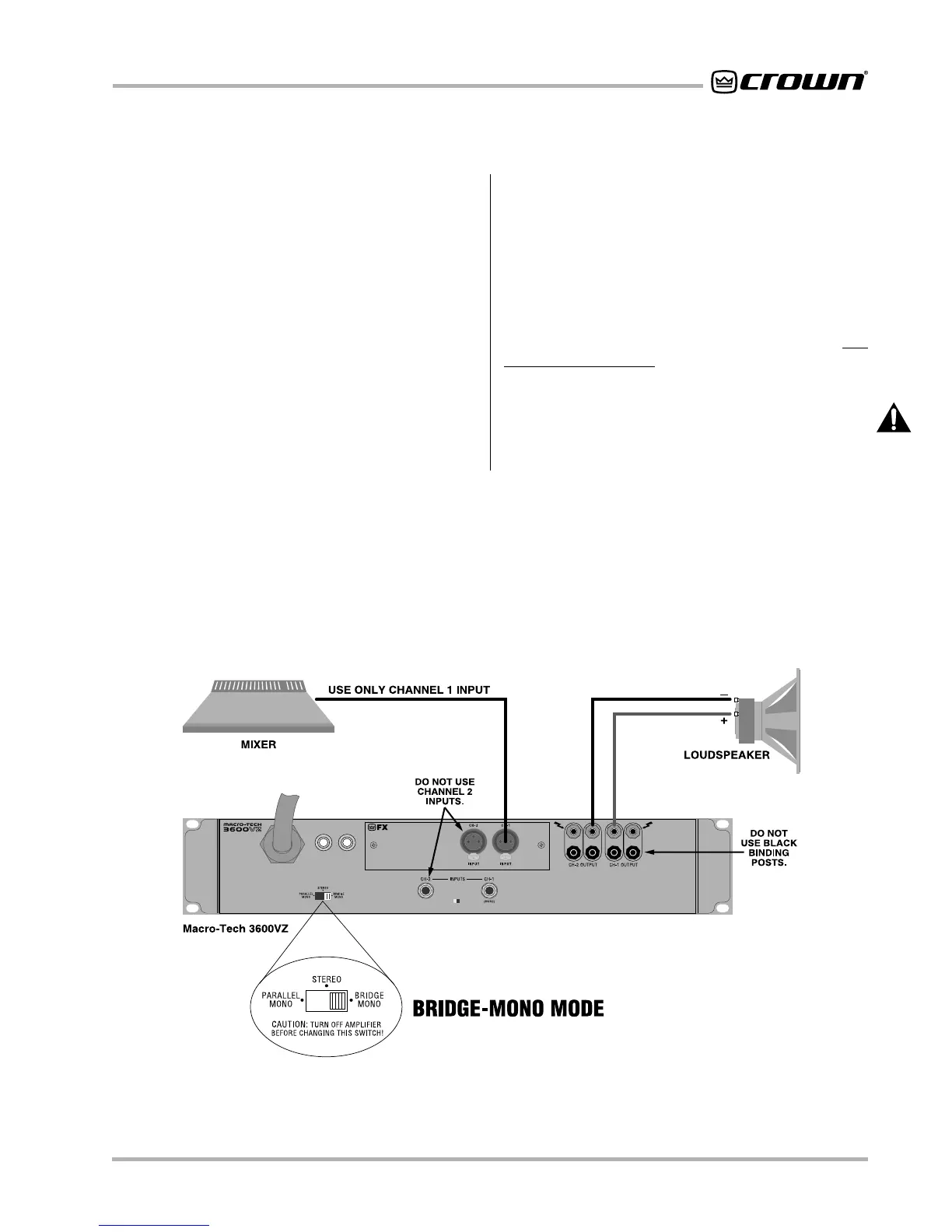
Fig. 3.5 Bridge-Mono Wiring
3.3.2 Bridge-Mono Operation
Bridge-Mono mode is intended for driving loads with a
net impedance of 4 ohms or greater. (See Parallel-Mono
if the load is less than 4 ohms.) Installing the amplifier in
Bridge-Mono mode is very different from the other
modes and requires special attention.
To put the amplifier in Bridge-Mono mode, turn the am-
plifier off and slide the Stereo/Mono switch toward the
right (as you face the back of the amplifier). Both out-
puts receive the signal from Channel 1 with the output
of Channel 2 inverted so it can be bridged with the
Channel 1 output. DO NOT USE THE CHANNEL 2 IN-
PUT or the signal level and quality may be greatly de-
graded. Keep the Level control of Channel 2 turned
completely down (counterclockwise).
Note: The input jack and level control for Channel 2 are
not defeated in Bridge-Mono mode. Any signal fed into
Channel 2 may work against and add to or distort the
signal in Channel 1.
Connect the load across the Channel 1 and 2 red bind-
ing posts with the positive lead from the load attaching
to a red post of Channel 1 and the negative lead of the
load attaching to a red post of Channel 2 as shown in
Figure 3.5. THE TWO BLACK BINDING POSTS ARE
NOT USED AND SHOULD NOT BE SHORTED.
The
load must be balanced (neither side shorted to ground).
CAUTION: Be certain all equipment (meters,
switches, etc.) connected to the mono output is bal-
anced. To prevent oscillations, both sides of the line
must be isolated from the input grounds.



 To Next Page