®
2
Instructions
UTILITY CARTS and ACCESSORIES
MB199UC / MB199UCFD UTILITY CARTS and ACCESSORIES - MANUAL - REV 1.0 - 2013
PN# 080106
Removing drawer runners and slides
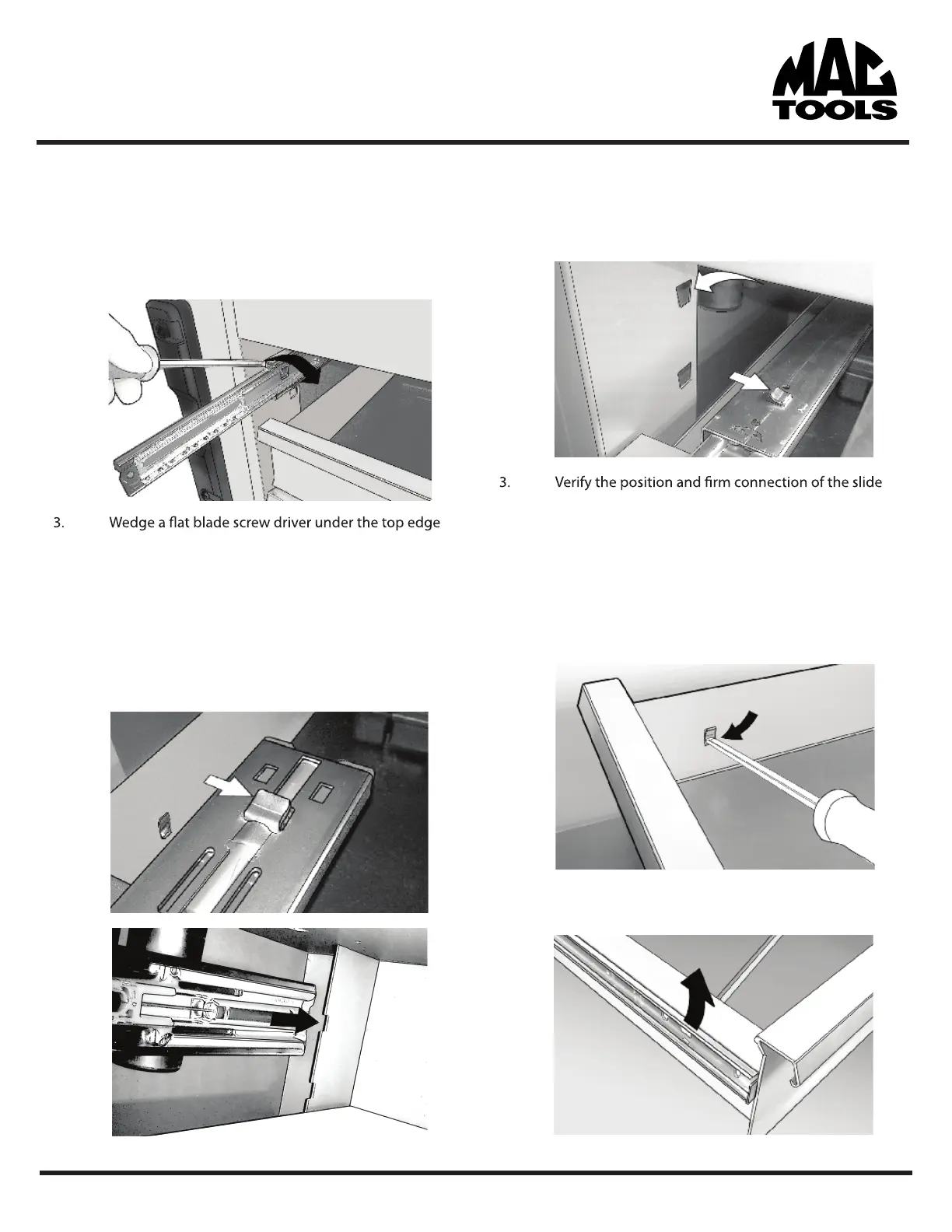
1. Remove the target drawer and drawers immediately
above and below to give better access to the slides.
2. Pull slides out to their full extended position
and lightly twist or pry to create separation between
the slide frame and the box. At the same time lift on
the slide until it snaps out of position.
4. Pull the slide forward and remove
Installing drawer runners and slides
1. Align tab on back edge of the slide with square
notch at the back edge of the slide support wall.
2. Insert forward tab on slide into slot on cabinet slide
support wall and push down until the slide snaps
into position and is horizontal.
before attempting to re-install the drawer.
Removing drawer runners
1. Locate the forward tab on the inside wall of the
drawer body.
2. With a slim object like a screwdriver, push in the
protruding lower edge of the tab.
3. While pushing in the tab (on step 2) lift up on the
drawer runner until it pops free and slide it forward.


 To Next Page