14
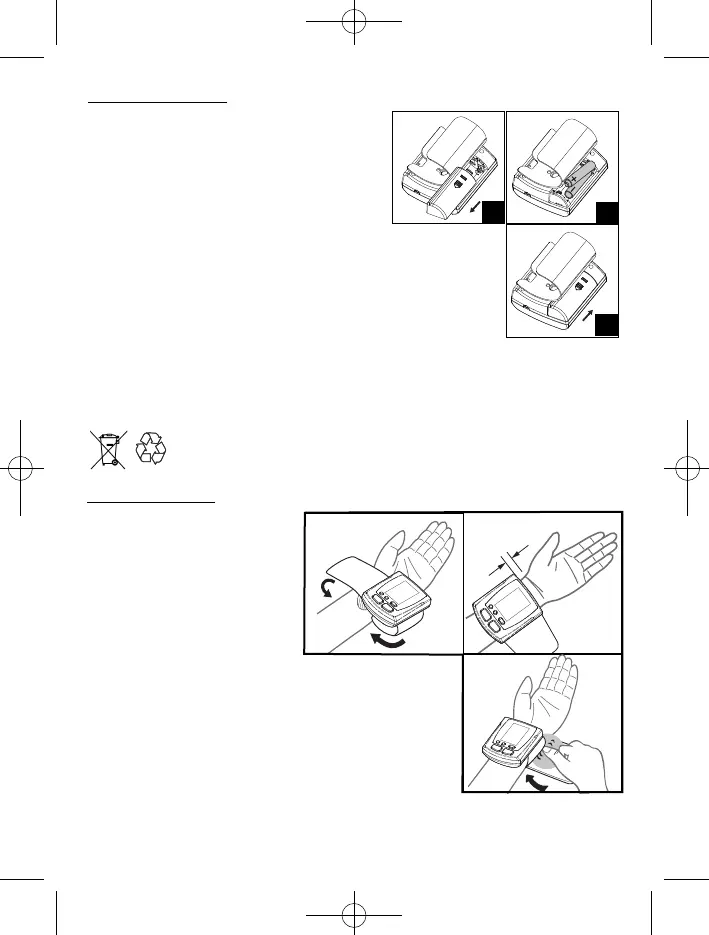
1. Remove all watches, jewelry,
etc. prior to attaching the wrist
monitor.
Clothing sleeves should be
rolled up and the cuff should be
wrapped on bare skin for
correct measurements.
2. Apply cuff to left wrist with
palm facing up as Fig. A.
3. Make sure the edge of the cuff is about 1 cm from the
palm as Fig. B.
4. In order to insure accurate measurements, fasten the
velcro strap securely around your wrist so there is no
extra space between the cuff and the wrist as Fig. C.
If the cuff is not wrapped tight enough, the measurement
values will be false.
8.
Installing Batteries
11..
Place your thumb on the side of the battery
cover. Pull the battery cover in the direction of
the cuff to open. Replace the batteries in pairs.
22..
Install lower battery first in the bottom position
with the battery ribbon underneath.
Battery Type: 2 Alkaline LR03 (AAA) size
33..
Place in the other battery and pull up the
battery ribbon over it.
44..
Replace the cover by placing the end tabs of the battery cover in
the slots on the top of the battery compartment. Click in the other
end to secure the battery cover.
Replace the batteries if:
11..
The weak battery mark appears in the display.
22..
Nothing appears in the display when the power is switched on.
Remove batteries when unit is not in use for extended periods of time.
Batteries disposal: to safeguard the environment, when the batteries have
reached the end of life, dispose them to an appropriate collection site.
9.
Applying the Cuff
11
22
33
Minipulsar Ing. 12-09-2008 10:31 Pagina 4


 To Next Page