16
12.
Measurement Procedures
1.
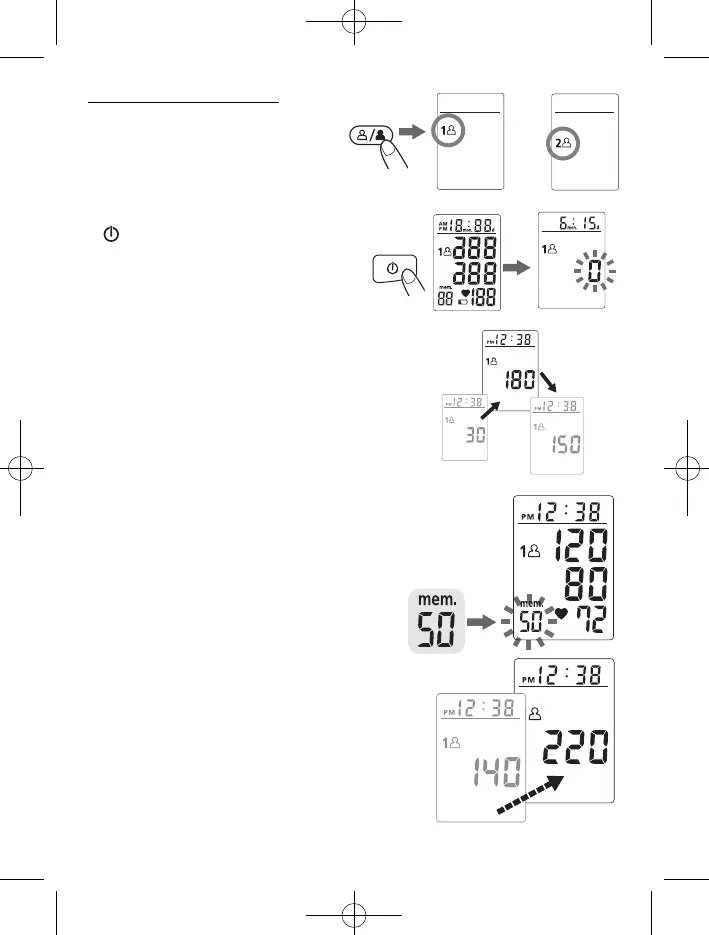
Press the User-Switching key to
select Memory Zone 1 or Memory
Zone 2.
2.
Place the cuff on the wrist. Press the
key. All digits will light up, checking
the display functions. The checking
procedure will be completed after about
2 seconds.
3.
After all symbols appear, the display will
show a blinking “0”. The monitor is “Ready
to Measure” and will automatically inflate
the cuff to start measurement.
4.
When the measurement is completed,
systolic pressure, diastolic pressure and
pulse will be shown simultaneously on the
LCD screen. The measurement is then
automatically stored into the pre-
designated memory zone.
This monitor will re-inflate automatically to
approximately 220 mmHg if the system
detects that your body needs more pressure to
measure your blood pressure.
Note:
1.
This monitor automatically switches off
approximately
1 minute after last key operation.
2. To interrupt the measurement, simply press
any key
..
The cuff will deflate immediately
after a key is pressed.
3. During the measurement, do not talk or
move your arm or hand muscles.
or
Minipulsar Ing. 12-09-2008 10:31 Pagina 6


 To Next Page