Magic Chef® Air Fryer Product Guide
5
General Product Description
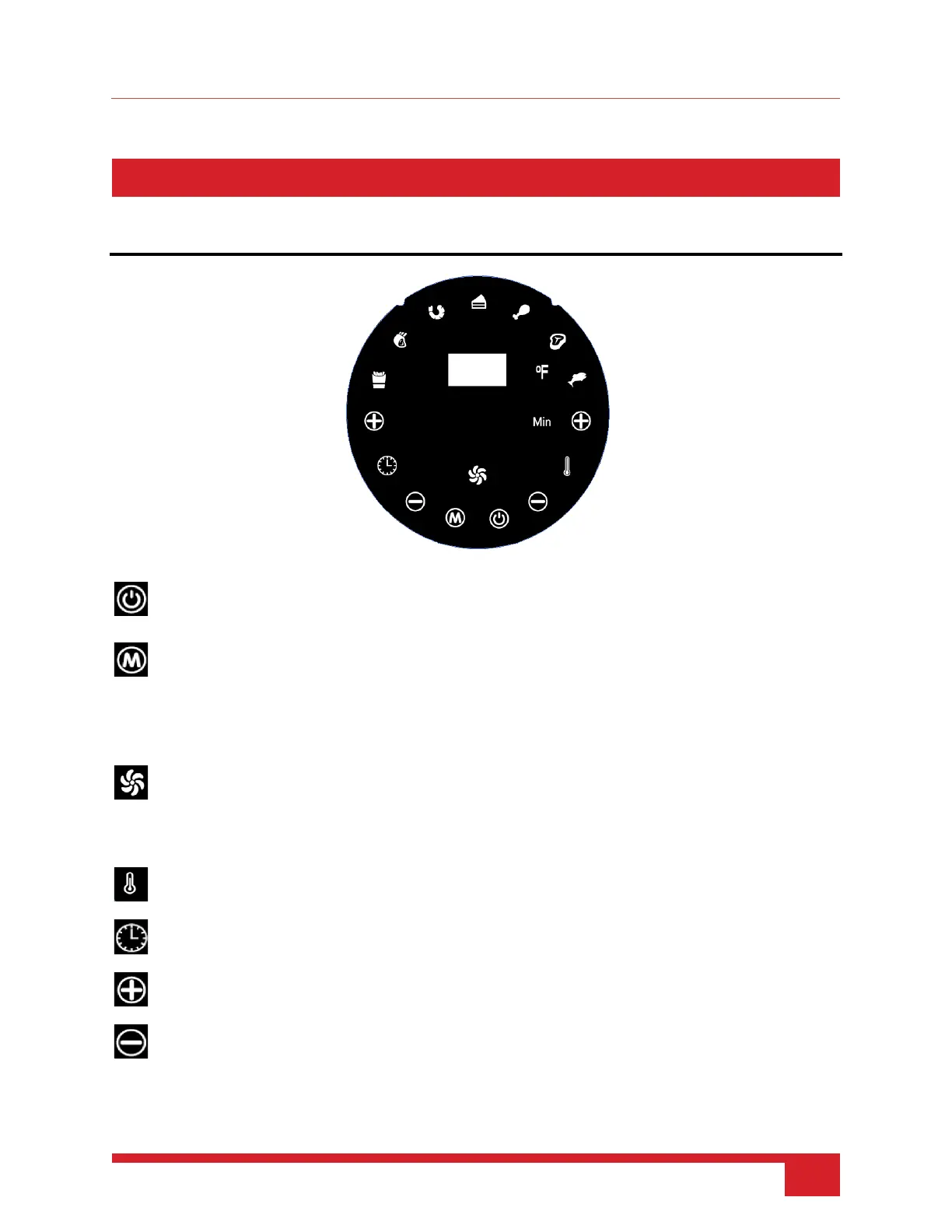
Control Panel Details
POWER ON/OFF. Plug in the appliance and this light will turn on. Press to make the appliance
ready for use.
MODE. Use to choose from a variety of cooking presets and to start or stop the cooking process.
After choosing a selected preset or manually setting the required time and temperature, press
the “POWER ON/OFF” button to start the appliance.
Note: This icon will blink slowly when paused or before the cooking process, and blink quickly
COOKING. Once you have chosen a cooking preset or have manually set your desired cooking
time and temperature, this icon will blink quickly while it’s working.
Note: This icon will blink slowly when paused or before the cooking process, and blink quickly
TEMPERATURE. Use the “+” and “-” to adjust the desired temperature.
TIMER. Use the “+” and “-” to adjust the desired cooking time.
PLUS. Press to increase the cooking time and temperature accordingly.
MINUS. Press to decrease the cooking time and temperature accordingly.


 To Next Page