Fonctionnement (suite)
13
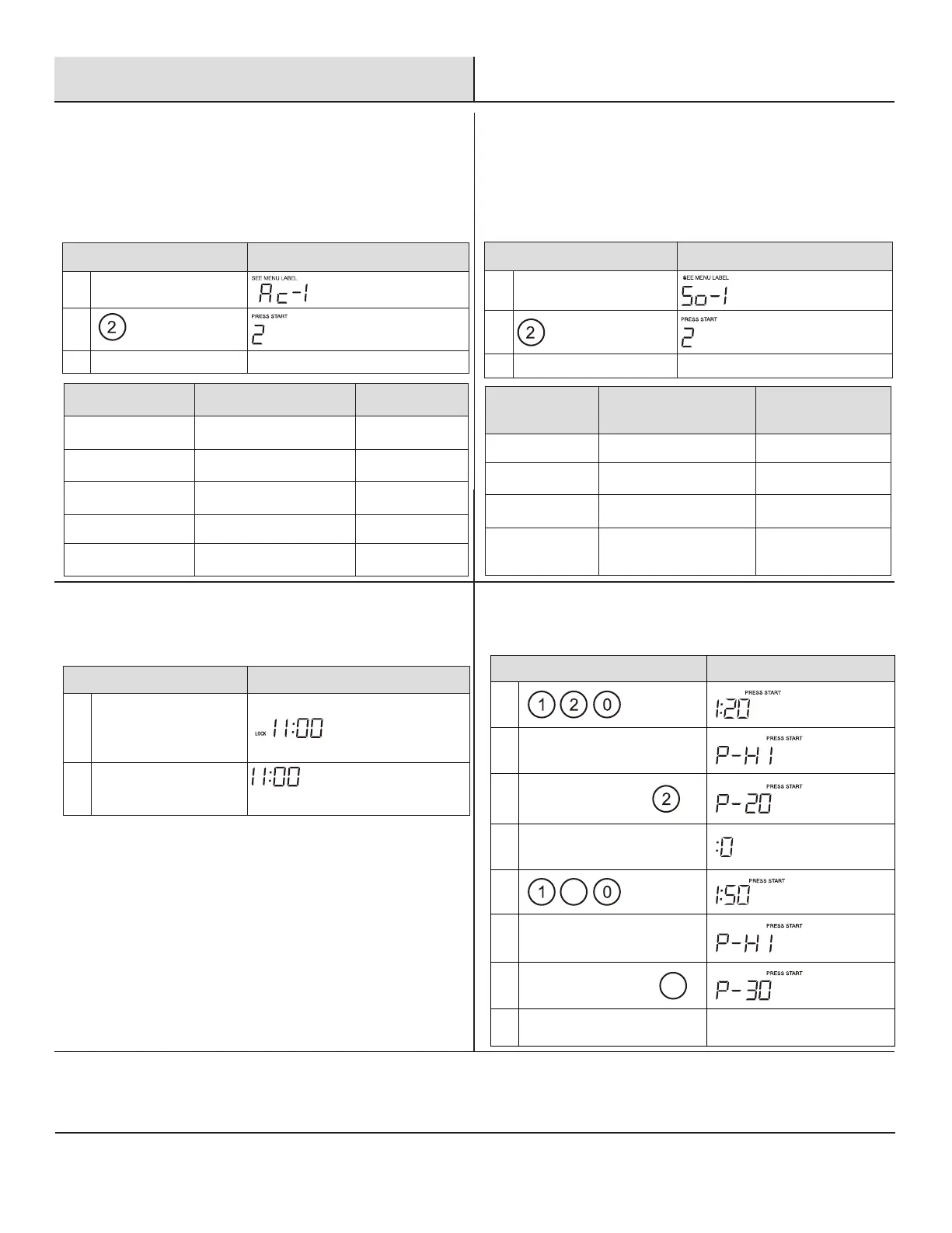
AUTO COOK
(CUISSON AUTOMATIQUE)
15
SÉCURITÉ ENFANTS
14
MELT/SOFTEN (ALIMENTS
FONDUS/RAMOLLIS)
16
CUISSON ÉCHELONNÉE
Le four utilise la basse puissance pour faire fondre et ramollir les
aliments. Reportez-vous au tableau suivant.
□ Supposons que vous vouliez faire fondre 2mottes de beurre.
Le bouton AUTO COOK comprend 5options: Bacon, Dinner Plate
(Assiette plate), Rice (Riz), Frozen breakfast (Petit déjeuner
surgelé) et Frozen Pizza (Pizza surgelée).
TOUCHER L’ÉCRAN AFFICHE:
1.
STOP/CLEAR
(pendant 3secondes)
LOCK ou
(Si l’horloge est réglée)
2.
STOP/CLEAR
(pendant 3secondes)
(Si l’horloge est réglée)
TOUCHER L’ÉCRAN AFFICHE:
1. MELT/SOFTEN X 1
2.
3.
START/+30SEC Le compte à rebours démarre
APPUYER SUR
AUTO COOK
ALIMENT QUANTITÉ
X1 Bacon 1à 3tranches
X2 Assiette plate 1à 2assiettes
X3 Riz 1à 2tasses
X4 Petit déjeuner surgelé 8/12oz
X5 Pizza surgelée 6/8/12oz
APPUYER SUR
LE BOUTON
MELT/SOFTEN
ALIMENT QUANTITÉ
X1 Beurre fondu 1/2motte
X2 Chocolat fondu 2/4/8oz
X3 Crème glacée ramollie 1pinte/1,5quart
X4
Fromage à la crème
ramolli
3/8oz
TOUCHER L’ÉCRAN AFFICHE:
1. AUTO COOK X1
2.
3.
START/+30SEC Le compte à rebours démarre
TOUCHER L’ÉCRAN AFFICHE:
1.
2.
POWER
LEVEL
3.
POWER
x 8 ou
LEVEL
4.
COOK
TIME
5.
5
6.
POWER
LEVEL
7.
POWER
x 7 ou
3
LEVEL
8. START/+30SEC
Le compte à rebours
démarre
FR-11



 To Next Page