EN-8
Operation(continued)
□ Before operating your new oven make sure you read and
understand this Use and Care Guide completely.
□ The clock can be disabled when the microwave is rst
plugged in and the STOP key is selected.
To re-enable the clock follow clock instructions.
1
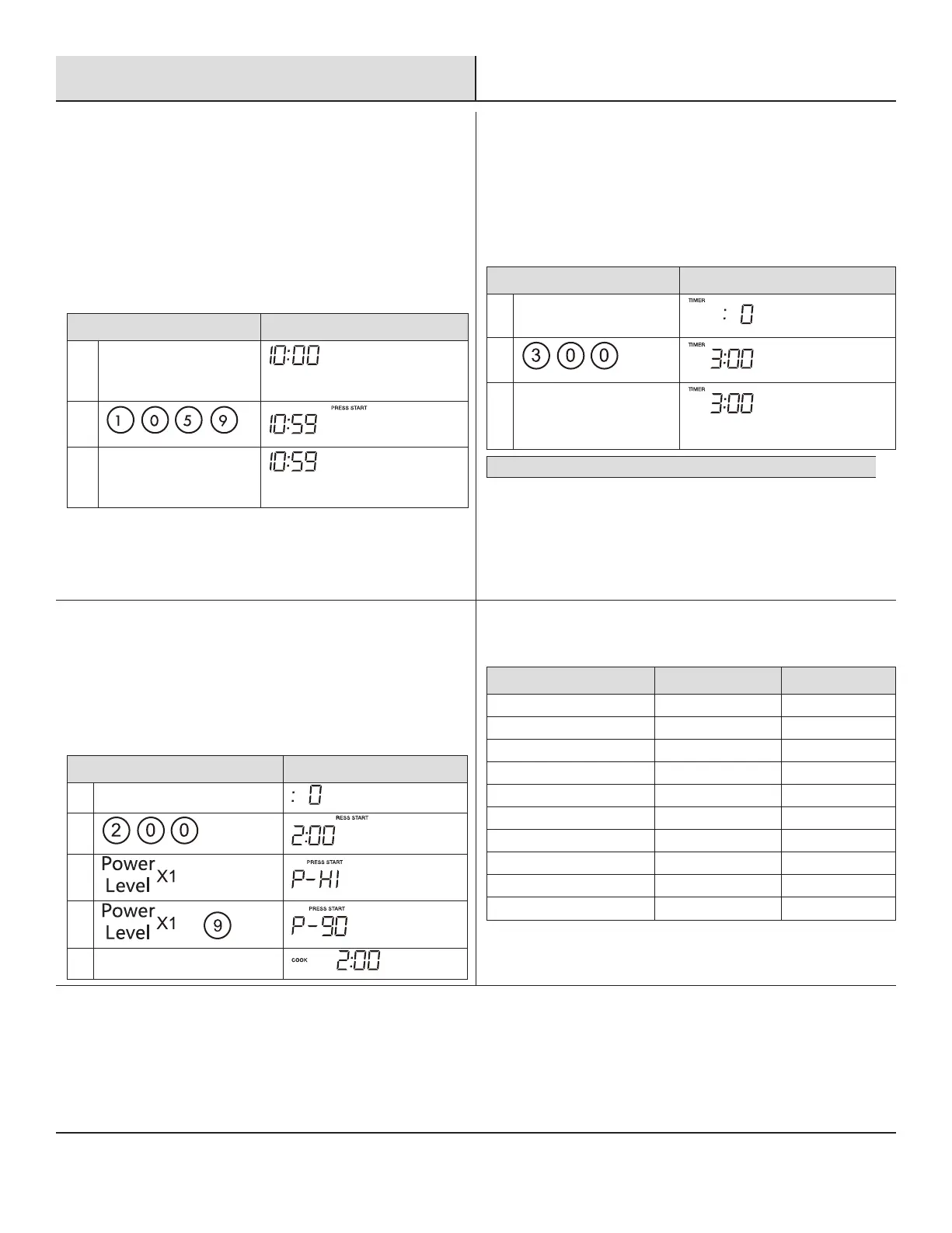
SETTING THE CLOCK
□ Suppose you want to enter the correct time of day 10:59
TOUCH DISPLAY SHOWS
:
1. Clock
Current time
2.
3. Clock or Start+30sec.
2
SETTING THE TIMER
Your microwave oven can be used as a kitchen timer. You can set
up to 99 minutes , 99 seconds. The kitchen timer can be used while
the microwave oven is running.
□ Suppose you want to set for three minutes.
TOUCH DISPLAY SHOWS
:
1. Timer
2.
3. Timer
Time counting down
NOTE: There are not any other programs during the kitchen timer.
3
MICROWAVE
Your Over the Range Microwave Oven can be programmed for 99
minutes 99 seconds (99 :99). Always enter the seconds after the
minutes, even if they are both zeros.
□ Suppose you want to cook for 2 minutes at 90% power
TOUCH DISPLAY SHOWS
:
1. Cook Time
2.
3.
4.
or
5. Start+30sec.
4
POWER CHART
PRESS POWER LEVEL DISPLAY
POWER LEVEL x 1 100% P-HI
POWER LEVEL x 2 or 9 90% P-90
POWER LEVEL x 3 or 8 80% P-80
POWER LEVEL x 4 or 7 70% P-70
POWER LEVEL x 5 or 6 60% P-60
POWER LEVEL x 6 or 5 50% P-50
POWER LEVEL x 7 or 4 40% P-40
POWER LEVEL x 8 or 3 30% P-30
POWER LEVEL x 9 or 2 20% P-20
POWER LEVEL x 10 or 1 10% P-10



 To Next Page