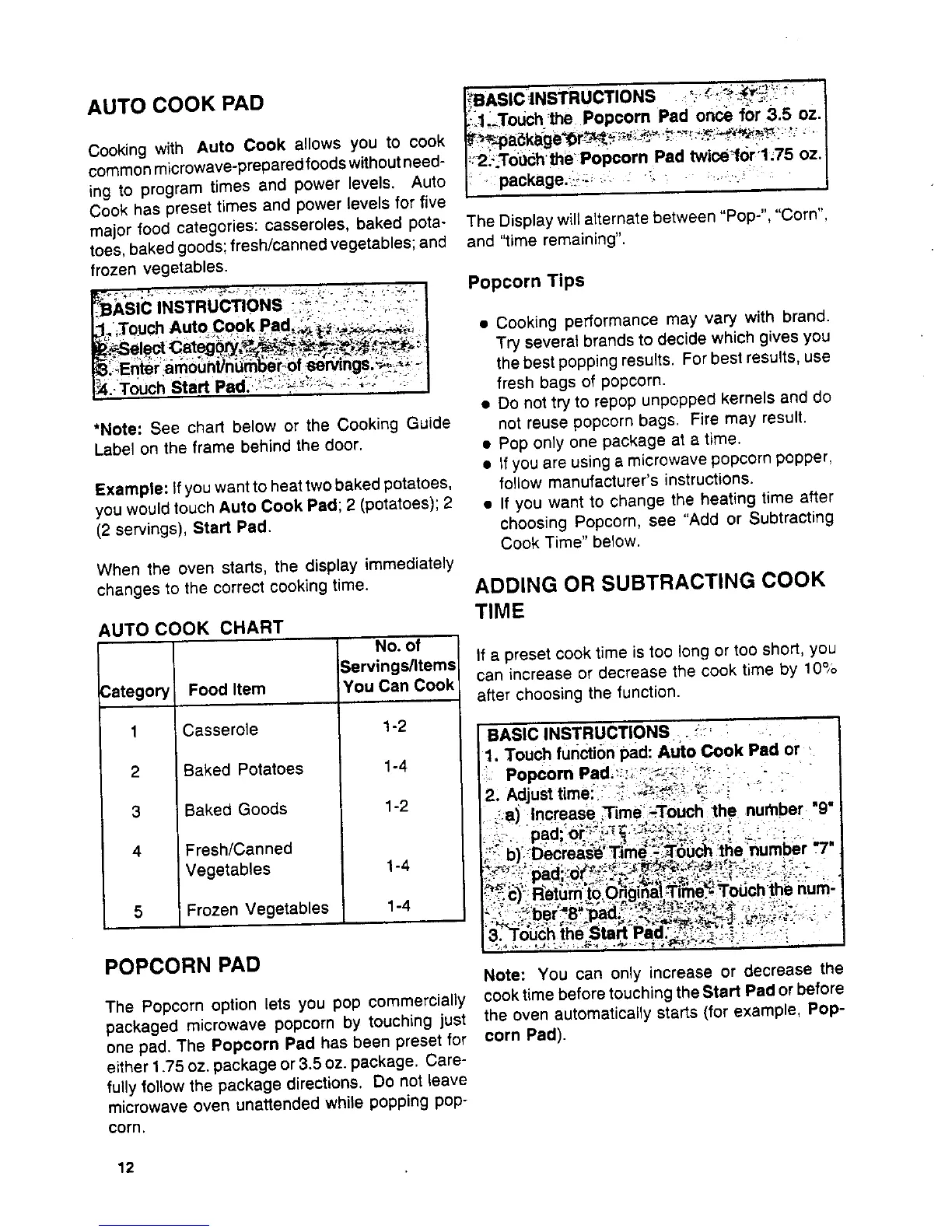
AUTO COOK PAD _3BASICINSTRUCTIONS __:_i": :' I
i lTouch'thePopcornPadoncefor3.5 oz.
Cooking with Auto Cook allows you to cook _'.-p_k_ge'Or_;_._,_:'-:._t_:_:,. I
commonmicrowave-preparedfoodswithoutneed- _2_;.Tobc_h'the'Popcorn Pad twice'forl;75 oz, I
ing to program times and power levels. Auto , package, i_ -ili (
Cook has preset times and power levels for five
major food categories: casseroles, baked pota- The Display will alternate between "Pop-", "Corn",
toes,baked goods; fresh/cannedvegetables; and and 'lime remaining".
frozen vegetables.
__7_:_.,:_. _-,-._=__,," •-_ .. :__. :_._:-. Popcorn Tips
P
ASICINS Ruc'rlONS _ : ... ,., ._
_.' Touch Auto Cook Pad_:_:_,._;_; • Cooking performance may vary with brand.
_ele= Categ _'_, Try several brands to decide which gives you
_Enter iamo0nt]nLtrt-/_k0f ,6ervings__;;_-. the best popping results. For best results, use
1_4.T0uch StartPad."!_':i;_i_:_!:'_ "; ;;_: '_:; fresh bags of popcorn.
• Do nottry to repop unpopped kernels and do
•Note: See chart below or the Cooking Guide not reuse popcorn bags. Fire may result.
Label on the frame behind the door. • Pop only one package at a time.
• tfyou are using a microwave popcornpopper,
Example: if you want to heat twobaked potatoes, follow manufacturer's instructions.
you would touch Auto Cook Pad; 2 (potatoes); 2 • If you want to change the heating time after
(2 servings), Start Pad. choosing Popcorn, see "Add or Subtracting
Cook Time" below,
When the oven starts, the display immediately
changes to the correct cooking time. ADDING OR SUBTRACTING COOK
TIME
AUTO COOK CHART
No. of
Servings/Items If a preset cook time is too long or too short, you
can increase or decrease the cook time by 10%
3ategory Food Item You Can Cook
after choosing the function.
1 Casserole 1-2 ( BASIC INSTRUCTIONS .'_:' _
I1, Touch function pad: Auto Cook Pad or._
2 Baked Potatoes 1-4 I" Popcorn Pad._:;, _.':_:_.::;_-- - .. "
12: Adjust time!i:_i_.,Gi_:_:_:/ ':: :
3 Baked Goods 1-2 I _a) Increase .Time'._-ToUch_he number "9"
pad or , _ ...... _ .... ..,. .
4 Fresh/Canned ._ .. _ :, ,_,,; _, ._._:. =,,.:._-.; : _-_ • _, ,
.::c)Return to._)_g,n_,}Tim(,. Touch the num-
5 Frozen Vegetables 1-4 ,-.... ,.,.-- -._., .-,__,-:_,_..., -,, _.. , _,_
POPCORN PAD
Note: You can only increase or decrease the
The Popcorn option lets you pop commercially cooktime before touchingthe Start Pad or before
packaged microwave popcorn by touching just the oven automatically starts (for example, Pop-
one pad. The Popcorn Pad has been preset for corn Pad).
either 1.75 oz. package or3.5 oz. package. Care-
fully follow the package directions, Do not leave
microwave oven unattended while popping pop-
corn.
12



 To Next Page