POWER PAD TO CHECK OR CHANGE POWER
WHILE COOKING
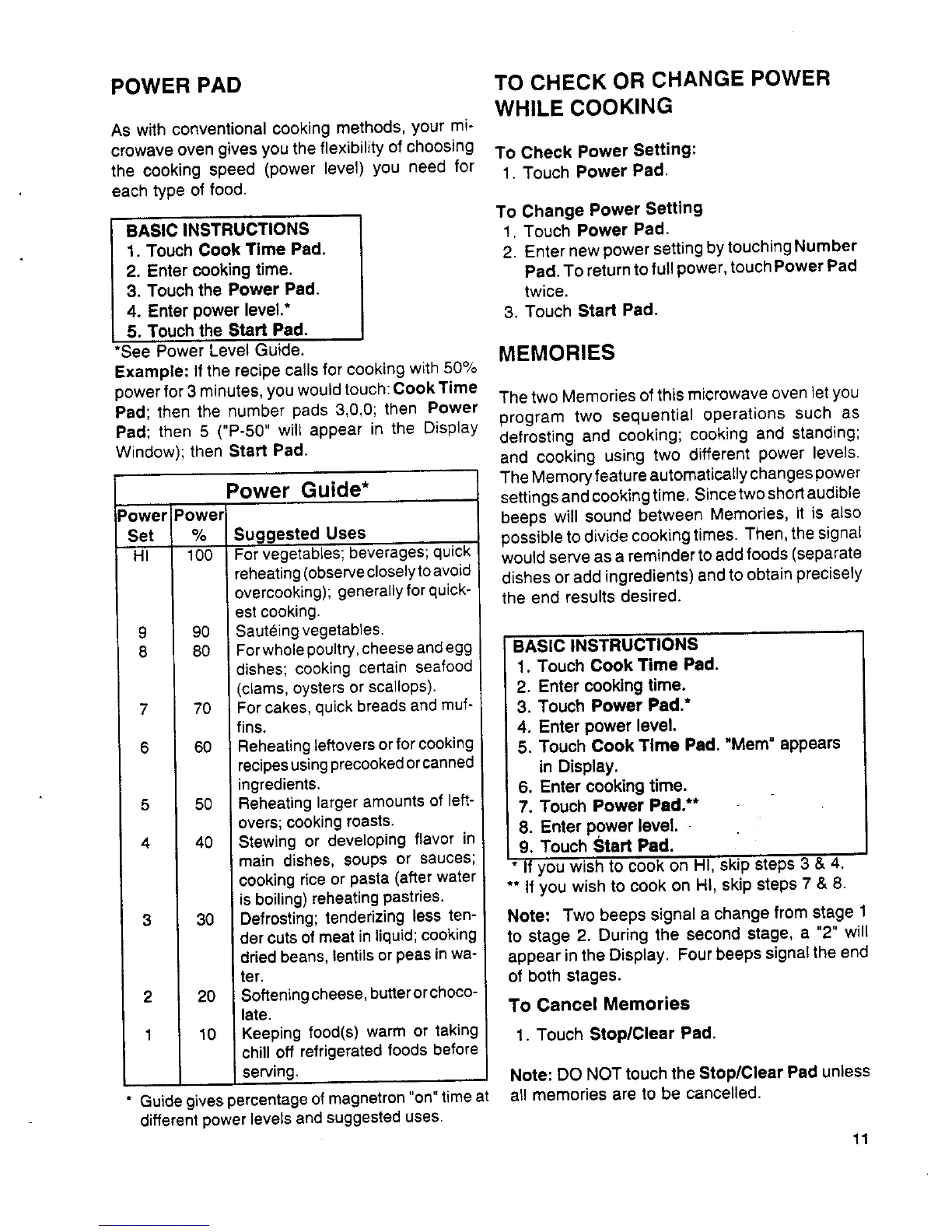
As with conventional cooking methods, your mi-
crowave oven givesyou the flexibility of choosing To Check Power Setting:
the cooking speed (power level) you need for 1. Touch Power Pad.
each type of food.
To Change Power Setting
BASIC INSTRUCTIONS 1. Touch Power Pad.
1. Touch Cook Time Pad. 2. Enter new power setting by touching Number
2, Enter cooking time. Pad. To return to full power, touch Power Pad
3. Touch the Power Pad. twice.
4. Enter power level.* 3. Touch Start Pad.
5, Touch the Start Pad.
*See Power Level Guide. MEMORIES
Example: If the recipe calls for cooking with 50%
power for 3 minutes, you would touch:Cook Time The two Memories of this microwave oven letyou
Pad; then the number pads 3,0,0; then Power
Pad; then 5 ("P-50" will appear in the Display program two sequential operations such as
Window); then Start Pad. defrosting and cooking; cooking and standing;
and cooking using two different power levels,
Power Guide* The Memory feature automatically changes power
settings and cooking time. Since two short audible
Power Power beeps will sound between Memories, it is also
Set % Suggested Uses possible to divide cooking times. Then, the signal
HI 100 Forvegetables; beverages; quick would serve as a reminder to add foods (separate
reheating(observecloselytoavoid dishes or add ingredients) and toobtain precisely
overcooking); generallyforquick- the end results desired.
est cooking.
9 90 Sauteing vegetables.
8 80 Forwholepoultry,cheese andegg BASIC INSTRUCTIONS
dishes; cooking certain seafood 1. Touch Cook Time Pad,
(clams, oysters or scallops). 2. Enter cooking time.
7 70 For cakes, quick breads and muf- 3. Touch Power Pad.*
fins, 4. Enter power level.
6 60 Reheatingleftoversorfor cooking 5. Touch Cook Time Pad, "Mere" appears
recipesusingprecookedorcanned in Display.
ingredients. 6. Enter cooking time.
5 50 Reheating largeramounts of left- 7. Touch Power Pad.**
overs;cookingroasts.
8. Enter power level.
4 40 Stewing or developing flavor in
9. Touch Start Pad.
main dishes, soups or sauces;
cookingrice or pasta (after water If you wish to cook on HI, skip steps 3 & 4,
is boiling) reheating pastries. ** If you wish to cook on HI, skip steps 7 & 8.
3 30 Defrosting; tenderizing less ten- Note: Two beeps signal a change from stage 1
dercutsof meatin liquid;cooking to stage 2. During the second stage, a "2" will
dried beans, lentilsor peas inwa° appear inthe Display. Fourbeeps signal the end
ter, of both stages.
2 20 Softening cheese, butteror choco-
late. To Cancel Memories
1 10 Keeping food(s) warm or taking 1. Touch Stop/Clear Pad.
chill off refrigerated foods before
serving. Note: DO NOT touch the Stop/Clear Pad unless
* Guide gives percentage of magnetron "on" time at all memories are to be cancelled.
different power levels and suggested uses.
11


 To Next Page
 Loading...