ET23KHC QUICK GUIDE | 05
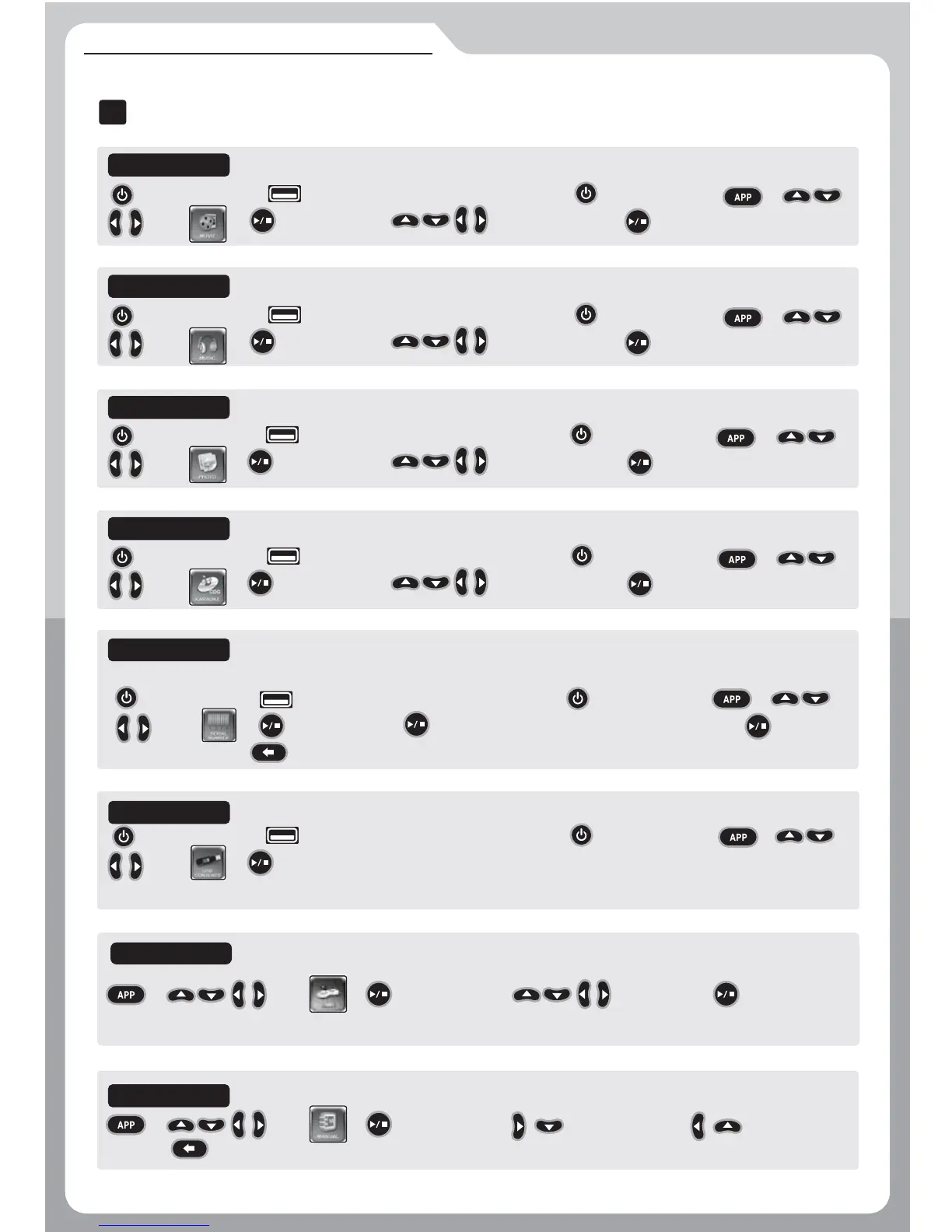
APP(Application), EXTRA FUNCTIONS
Turn the power off
→ (USB PORT) Insert the USB memory device → Turn the power on → →
Select → Open the screen → Select a folder or file → Open the selected folder or the file.
MOVIE
MUSIC
PHOTO
CDG Karaoke
SERIAL NUMBER
Turn the power off → (USB PORT) Insert the USB memory device → Turn the power on → →
Select → Open the screen → Save the Serial Number in the USB memory device → Check if it is
successfully saved. → Exit.
The serial number stored in your USB memory device is needed when purchasing any additional songs from the website www.netkara.com.
MANUAL
→ Select → Open the screen → View the next page, View the previous
page → Exit.
APP (Application)
I
GAME
Turn the power off
→ (USB PORT) Insert the USB memory device → Turn the power on → →
Select → Open the screen → Select a folder or file → Open the selected folder or the file.
Turn the power off
→ (USB PORT) Insert the USB memory device → Turn the power on → →
Select → Open the screen → Select a folder or file → Open the selected folder or the file.
Turn the power off
→ (USB PORT) Insert the USB memory device → Turn the power on → →
Select → Open the screen → Select a folder or file → Open the selected folder or the file.
Turn the power off
→ (USB PORT) Insert the USB memory device → Turn the power on → →
Select → Open the screen → The main device will automatically find additional songs on USB memory device
and move them to the internal memory inside the main device.
USB CONTENTS
→ Select → Open the screen → Select a game→ Start the game.


 To Next Page