15
MAGNAMED Ventilator Analyzer - VentMeter P/N: 1901509 – Rev 05
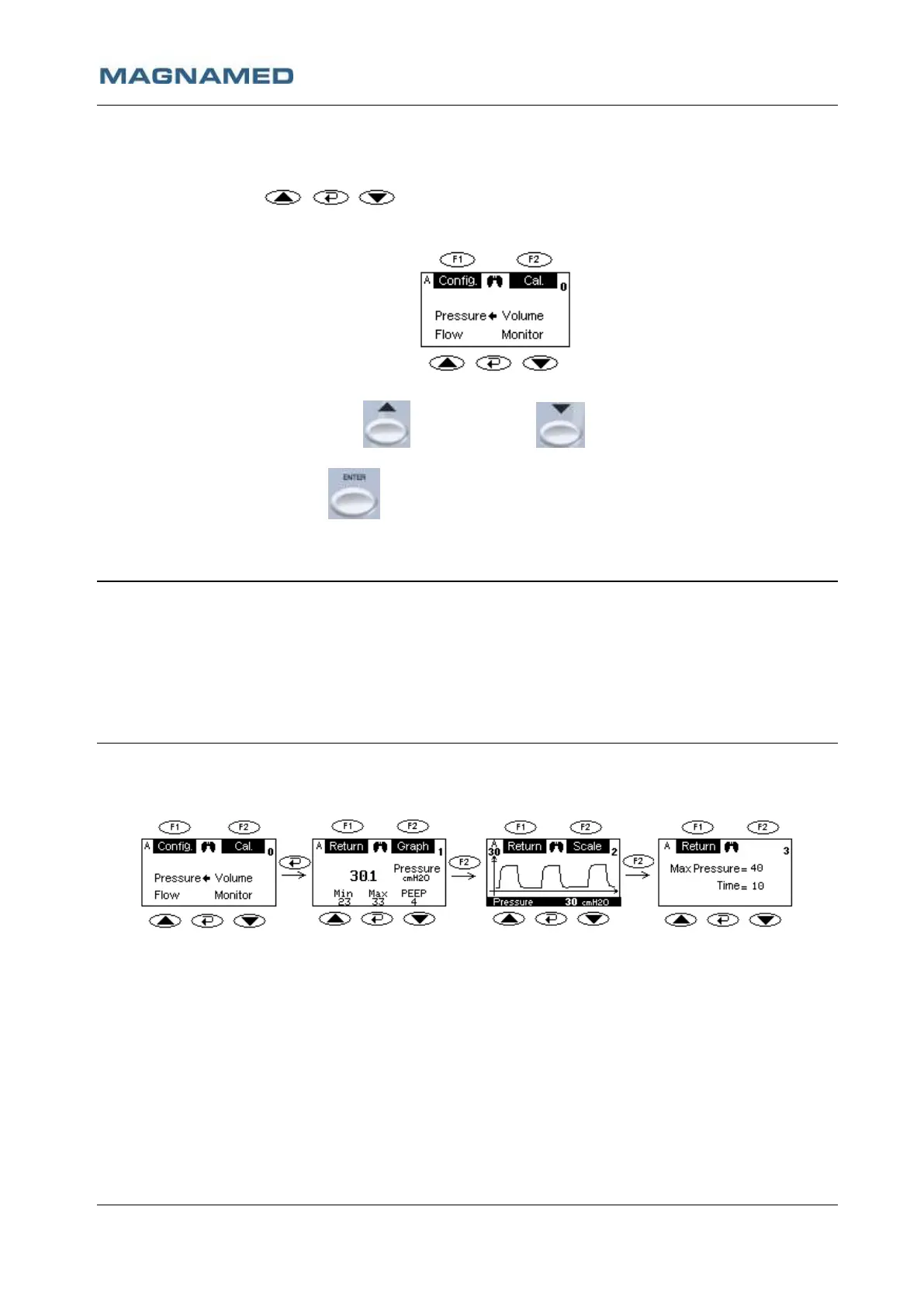
All the measurements are selected from the main screen through the selection button (UP and DOWN
arrows) and CONFIRM . The F1 and F2 have variable function according to highlighted
text shown in the screen bellow each button.
Main Screen:
In the Main Screen if INCREMENT or DECREMENT key is pressed the arrow moves to
Pressure, Flow, Volume or Monitor
In the figure above if the ENTER key is pressed the Display will show the Pressure Measurement
Screen.
Notes
• The number at superior right corner indicates the distance in screen from the main
screen. Zero = Main screen.
• The letter at superior left corner indicates which flow sensor is selected:
A = Adult Sensor;
I = Infant Sensor;
N = Neonatal Sensor.
Pressure Measurement Screens:
The F1 and F2 keys allows navigation between pressure screens, notice that as the F2 key is pressed the
number at the superior right corner is incremented, indicating greater distance from the Main Screen.
• Pressure Screen (1): Pressure Numerical Values
o Screen Central – Instantaneous Pressure
o Screen Inferior – Minimum Pressure, Maximum Pressure, PEEP
• Screen Pressure (2): Pressure Graph
o Screen Central – Pressure Graph
o Screen Inferior – Instantaneous Pressure Value
• Pressure Screen (3): Graph Scale
o Max Pressure – Maximum pressure value in the graph (adjusts from 20 to 120 cmH
2
O with
steps of 5 cmH
2
O)
o Time – One screen sweep time (adjusted from 1 to 15 seconds with steps of 1 second).


 To Next Page