
 Need help?
Do you have a question about the Magnetic Autocontrol MPP-112 and is the answer not in the manual?
Provides essential details on how to use the MAGNETIC pedestrian pivot barriers.
Explains warning symbols used in the manual to indicate hazards.
Outlines conditions under which the manufacturer is not liable for damages.
Lists all items included in the pedestrian pivot barrier package.
How to contact customer service for technical advice and support.
Defines the specific purpose for which the MAGNETIC pedestrian pivot barriers are designed.
Warns against unauthorized changes and requires manufacturer authorization.
Specifies qualifications needed for operating and maintaining the barrier.
Details necessary PPE to minimize health hazards during operation.
Highlights general safety measures and specific dangers associated with the barrier.
Identifies dangerous areas on the barrier using specific pictograms.
Provides critical safety information and compliance requirements for safe operation.
Covers safety precautions for transporting and handling the heavy barrier.
Addresses risks associated with insufficient fixing during installation.
Covers risks from inadmissible operation, sharp edges, and illegible signs.
Details the information found on the barrier's type plate and its meaning.
Explains the structure and meaning of the product's type code.
Provides physical dimensions for MPP-112 and MPP-212 models.
Details the physical dimensions for the MPP-132 barrier.
Provides physical dimensions for MPP-122 and MPP-222 models.
Outlines voltage, current, and frequency requirements for the barrier.
Specifies temperature, humidity, and protection class for barrier operation.
Lists the weight of different MPP barrier models.
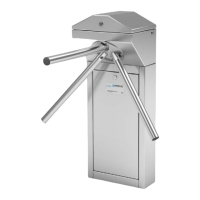
Describes the physical design and components of MPP-112 and MPP-212 barriers.
Details the physical design and components of the MPP-132 barrier.
Describes the design and components of MPP-122 and MPP-222 barriers.
Explains the primary function of separating and controlling pedestrian access.
Explains the logic controller (MBC-110) and motor controller (MMC-120) integration.
Warns about dangers of improper transport and heavy weight.
Procedures for checking delivery for completeness and damage.
Guidelines for securing and transporting the assembled barrier.
Specifies environmental conditions for storing the barrier to prevent damage.
General safety warnings for installation, including improper installation and handling.
Outlines the sequence of procedures for assembly and installation.
Details requirements for the foundation and installation of conduits.
Provides detailed foundation layout for specific barrier models.
Provides detailed foundation layout for specific barrier models.
Instructions for safely unpacking the pedestrian barrier.
Specific instructions for mounting the barrier directly to a wall.
Step-by-step guide for securing the barrier to the foundation.
Step-by-step guide for securing the barrier to the foundation.
Instructions for mounting the three turnstile arms to the capstan.
Checklist for verifying correct assembly and installation.
Crucial safety warnings related to electric voltage and installation.
Guidelines to prevent malfunctions caused by electromagnetic interference.
Specifies required customer-provided safety devices like RCDs and circuit breakers.
Details how to connect the MPP-112, MPP-132, and MPP-212 models.
Details how to connect the MPP-122 and MPP-222 models.
Explains connections for control and feedback using the MBC-110.
Describes the function and voltage for various digital inputs.
Details the functions of relay outputs for status feedback.
Describes the functions of MOSFet outputs for control signals.
Guides on attaching access control devices to MPP-122 and MPP-222.
Checklist for verifying electrical installation correctness.
Warns about dangers of incorrect configuration and electrical hazards.
Introduces DIP switches and other settings for configuring barrier functions.
Explains settings for pulse storage, buzzer, drop arm, and safety level.
Details hold-open time and software version/home position settings.
Explains settings for continuous turning and vandalism detection.
Details extended brake time settings for vandalism attempts.
Explains multiply brake time and provides an example configuration.
Covers CAN termination and brake engagement in home position settings.
Procedure for setting the reference 'home position' for the blocking element.
Critical safety warnings for initial start-up and ongoing operation.
Inspections required before initial start-up of the barrier.
Covers switching the barrier on and off.
A flowchart illustrating the barrier's operational logic.
Explains power-off state, teaching home position, and start-up routines.
Explains passage clearing with impulses without storing them.
Explains passage clearing with stored impulses.
Describes operation with continuous clearance signals.
Details operation with combined impulse and permanent clearance.
Covers mid-movement stops, backward turns, and adaptive speed.
Explains how the barrier detects and responds to attempted vandalism.
Describes barrier behavior during emergency situations (e.g., fire, power outage).
Critical safety warnings before performing any maintenance work.
Guidelines for cleaning the barrier, including recommended agents.
Outlines routine maintenance tasks and their intervals.
Safety warnings for performing troubleshooting tasks.
Lists common malfunctions, their causes, and corrective actions.
Explains LED indicators and error status for the MBC-110.
How error codes are displayed on the MBC-110.
How to view the software version on the MBC-110.
Lists error codes, their descriptions, and possible causes/actions.
Lists further error codes and their causes/actions.
How to configure CAN bus addresses and termination.
Explains LED indicators and error diagnosis for the MMC-120.
Lists error codes for the MMC-120 and their possible causes.
Critical safety warnings before performing any repair work.
Step-by-step instructions for replacing the motor controller.
Step-by-step instructions for replacing the logic controller.
Procedure for updating software on the motor controller.
Instructions for safely decommissioning and disposing of the barrier.
Official statement of product compliance with EU directives.
Indicates the electric circuit diagram is provided separately.
 General
| Brand | Magnetic Autocontrol |
|---|---|
| Model | MPP-112 |
| Category | Automatic Barriers |
| Language | English |

 To Next Page
