EasyManua.ls Logo

MAHA RGB - User Manual

MAHA RGB
25 pages
Go to English
Print Icon
To Next Page IconTo Next Page
Loading...
Fehler! Verwenden Sie die Registerkarte 'Start', um Name dem Text zuzuweisen, der hier angezeigt werden soll.Fehler! Verwenden Sie
die Registerkarte 'Start', um Name dem Text zuzuweisen, der hier angezeigt werden soll.Fehler! Verwenden Sie die Registerkarte
'Start', um Name dem Text zuzuweisen, der hier angezeigt werden soll.
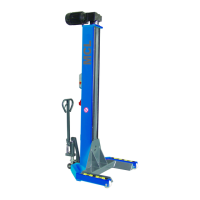
MCL
Mobile Column Lift
Original Operating Instructions
BA491201-en
Pos: 1 /Technisc he Dokumentation/Hebe technik/COLUMNLIF T/491201 MCL/BA/Inhalt: 4912 Tite lbild @ 42\mod_143195341854 0_0.docx @ 2243757 @ @ 1
Pos: 2 /-----Format-----/ MANUELLER UMBRUC H Seitenumbruch @ 0\mod_113440357 7687_0.d
Pos: 2 /-----Format-----/ MANUELLER UMBRUCH Seitenumbruch @ 0\mo d_1134403577687_0.do cx @ 1277 @ @ 1

Questions and Answers

  • R
    Richard MccallAug 1, 2025
    What to do if my MAHA RGB Lifting columns experience sluggish operation?
    • C
      Chris ReedAug 1, 2025
      If your MAHA Lifting columns are operating sluggishly, release the button and try again. If the issue persists, contact service. Possible causes include prolonged standing under load or insufficient lubrication.
  • A
    Audrey BaileyAug 5, 2025
    What to do if a hardware error occurred in my MAHA Lifting columns?
    • B
      Brett MaxwellAug 5, 2025
      If a hardware error occurs with your MAHA Lifting columns, interrupt the voltage supply for 5 seconds. If the error persists after this, contact service.
  • L
    Lucas LyonsAug 9, 2025
    What to do if I see no LEDs are ON on my MAHA RGB Lifting columns?
    • A
      Ashley HahnAug 9, 2025
      If no LEDs are ON on your MAHA Lifting columns, it indicates that the emergency-stop is actuated. Enable the emergency-stop button to resolve the issue.
  • S
    Scott ArnoldAug 13, 2025
    What to do if my MAHA Lifting columns lift has contacted obstruction or floor?
    • B
      briancummingsAug 13, 2025
      If your MAHA Lifting columns lift has contacted an obstruction or the floor, raise the lift until the yellow LED goes off.
  • M
    Michael MooreAug 17, 2025
    What to do if I see other LEDs are ON on my MAHA RGB?
    • J
      Jeffrey MolinaAug 17, 2025
      If other LEDs are ON on your MAHA Lifting columns, it indicates radio interference. Wait until the radio interference has stopped. This may be caused by devices transmitting on the 433 MHz band, such as garage door openers or radio sets.
  • W
    Wendy WoodsAug 22, 2025
    What to do if my MAHA RGB Lifting columns experienced Error occurred (Watchdog)?
    • S
      Shelly WrightAug 22, 2025
      If an error occurred (Watchdog) on your MAHA Lifting columns, turn off the main switch and turn it on again after approximately 5 seconds. If the error repeats, contact service.
  • J
    Jessica SchultzAug 27, 2025
    What to do if my MAHA RGB Lifting columns lift is not yet referenced?
    • P
      prodgersAug 27, 2025
      If your MAHA Lifting columns lift is not yet referenced, when a new column with new control is being connected after final assembly, lower the lift with the emergency-down function.

Summary

Operation

Handling; Moving the Columns

Instructions for safely moving the mobile column lift.

Control Unit

Explanation of the controls and displays on the lift's control unit.

Positioning, Logging in and Interconnecting the Columns

Guide to correctly positioning and linking multiple lift columns.

Raising and Lowering

Procedures for safely raising and lowering the vehicle.

Emergency-down Function, Mechanical

Manual procedure for lowering the lift in emergency situations.

Maintenance

Troubleshooting

MAHA RGB Specifications

General IconGeneral
BrandMAHA
ModelRGB
CategoryLifting columns
LanguageEnglish

Related product manuals