20
M6*1*14Hexagon Socket
Round Head Screw
×12
29
×1
M4 Allen Wrench
20
1
20
29
12
10
23
23
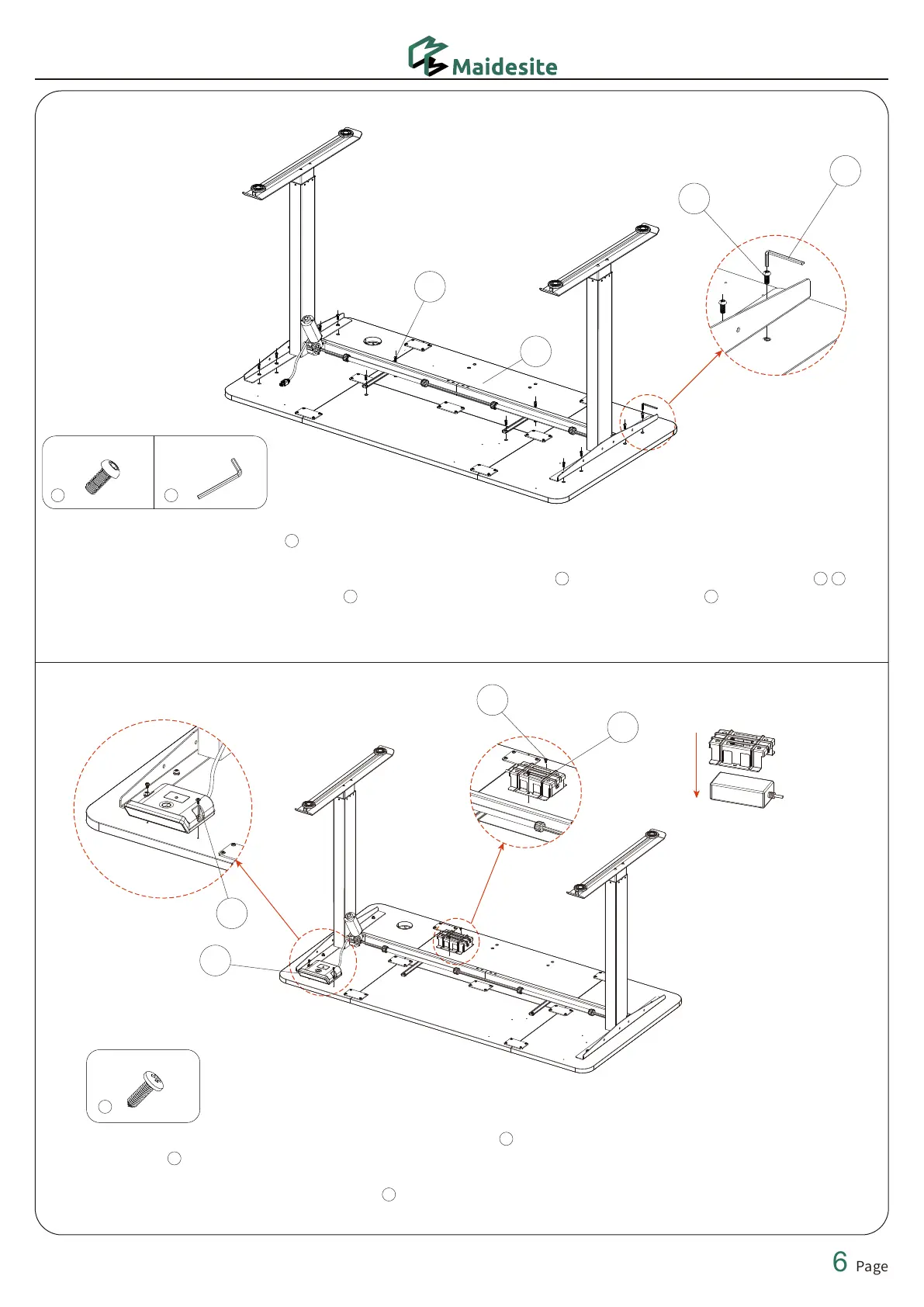
STEP 7: Put the adapter into the adapter clip. Use a screwdriver and 2 ST4.8*0.8*13 flat head self-tapping
screws to fix the adapter to the desktop. (Pay attention to the direction of the adapter)
Use a screwdriver and 2 ST4.8*0.8*15 flat head self-tapping screws to fix the hand controller to the
desktop.
23
ST4.8*0.8*15
×4
32
23
23
STEP 6: First, place the desktop horizontally on the ground (with the pre-embedded screw holes facing up).
Next, place the desk frame upside down on the desktop. The pre-embedded screw holes on the desktop
correspond one-to-one with the screw holes on the side boards and the left and right frame beams .
Finally, use the M4 allen wrench and 12 M6*14 hexagon socket round head screw to connect the
desktop to the desk frame.
1
2
29 20
5 6


 To Next Page