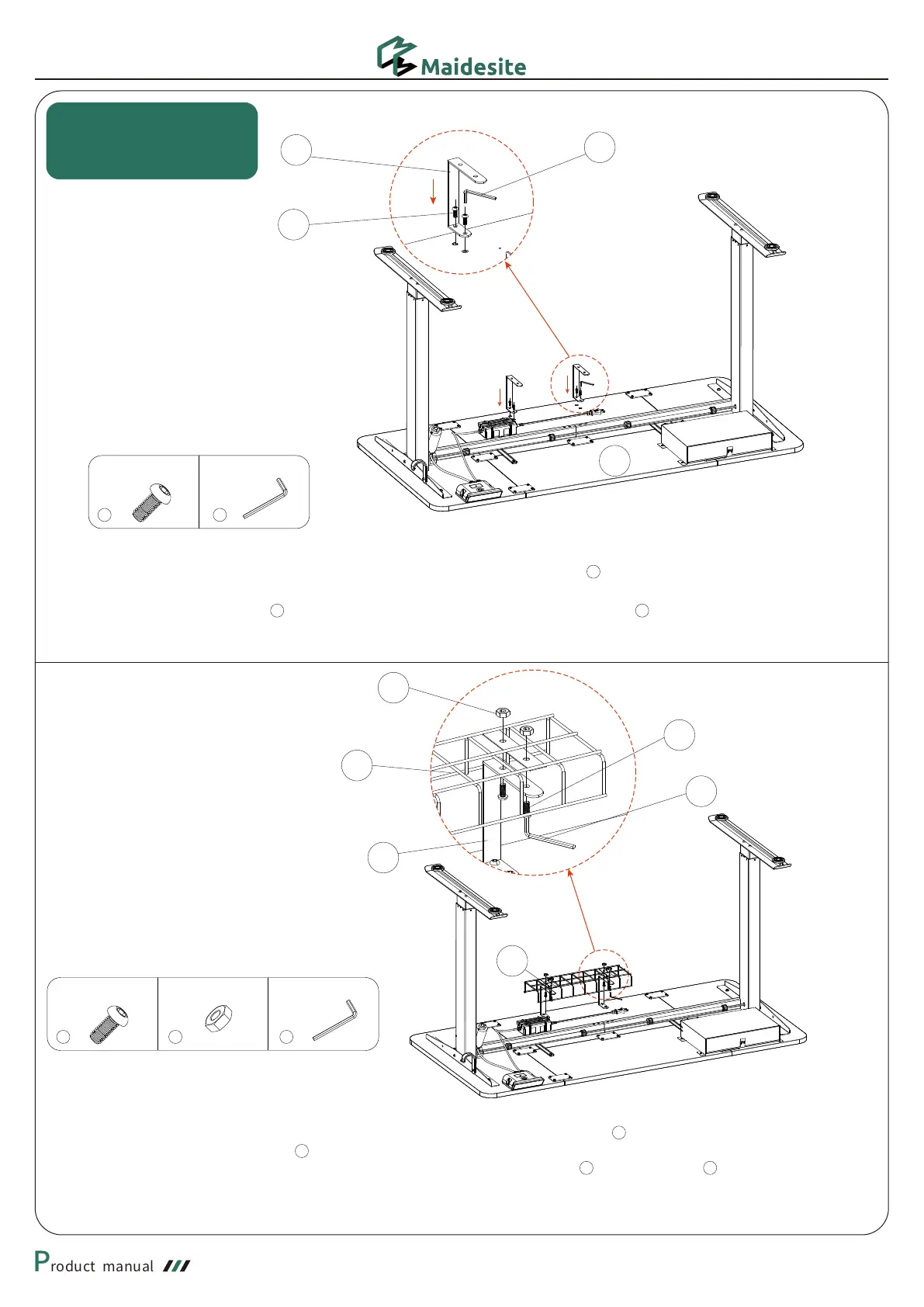
As shown in the figure, match the mounting holes of the cable management (Pay attention to the direction)
to the holes of the C-brackets .
Use the M4 allen wrench, 4 M6*14 hexagon socket round head screws and 4 M6 nuts to fix the cable
management to the C-brackets
20
×4
24
M6 Nut
×4
29
×1
24
13
20
29
14
14
20
M6*1*14 Hexagon Socket
Round Head Screw
M6*1*14 Hexagon Socket
Round Head Screw
×4
29
M4 Allen Wrench
M4 Allen Wrench
×1
29
13
20
1
As shown in the picture, firstly match the mounting holes of the 2 C-brackets (Pay attention to the direction) to the
pre-embedded screw holes on the desktop.
Then use the M4 allen wrench and 4 M6*14 hexagon socket round head screws to fix the C-brackets to the
desktop
Cable Management
Installation
13
13
14
2420
29 20


 To Next Page