- 5 -
1
3
4 5 2
2)
5
5 4
54
54
2
6
7
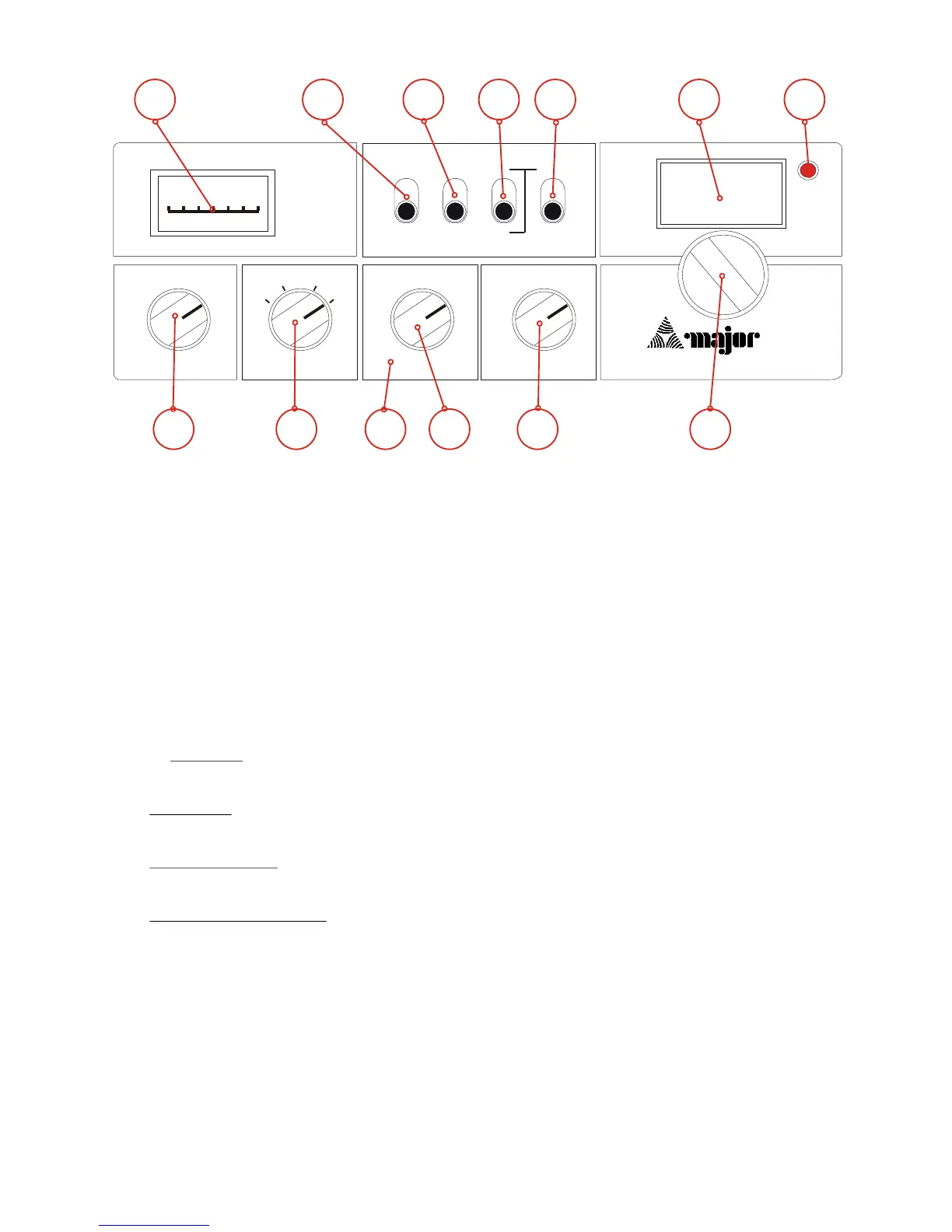
S-RF Power Meter
This meter shows the relative strength of incoming signals when receiving, and RF power output when
transmitting.
Loc-Dx Switch
The Loc-Dx switch operates an RF Gain function to reduce reception of weaker signals. For normal
operation, set the switch to the DX (up position). If the signal is too strong, distortion may result, in
which case set the switch to the LOC (down position).
Frequency Selection Switches
For all normal Channels ensure the “Uk40” ( switch is set to “Off”
- For MID Band (26.965 27.405)
- “Hi Band - Lo Band” switch ( ) to “Lo Band”
- For HIGH Band (27.415 27.855)
- Set “Hi Band - Lo Band” ( ) to “Hi Band” AND set the “Hi - Lo” switch ( ) to “Lo”
- For HIGH-HIGH Band (27.865 28.305)
- Set “Hi Band - Lo Band” ( ) to “Hi Band” AND set the “Hi - Lo” switch ( ) to “Hi”
- For UK FM (CB 27/81) Band (27.60125 27.99125)
- Set “Hi Band - Lo Band” ( ) to “Hi Band” AND set the “Hi - Lo” switch ( ) to “Lo”
- AND - Ensure the “UK40-Off” ( ) switch is set to “UK 40”
Channel Display
Shows current selected Channel
TX Indicator
Illumination of the TX indicator shows that your CB unit is transmitting.
Controls and Functions
88
HI HI BAND
UK 40
LO BANDLO
LOC
OFF
DX
HI
SQUELCHCLARIFIER
VOLUME
LSB FM
USB AM
OFF
PA
SIGNAL
1 3 5 7 9
AM/FM/SSB
M 360
.
.
.
.
.
.
.
.
.
.
.
.
.
.
.
.
.
.
.
.
.
.
.
.
.
1
2
3
4
5
6
7
8
9
10
11
12
13


 To Next Page