19
EN
Instructions Guide
3. Press
w
/
s
buttons to select, then press SELECT button to conrm the
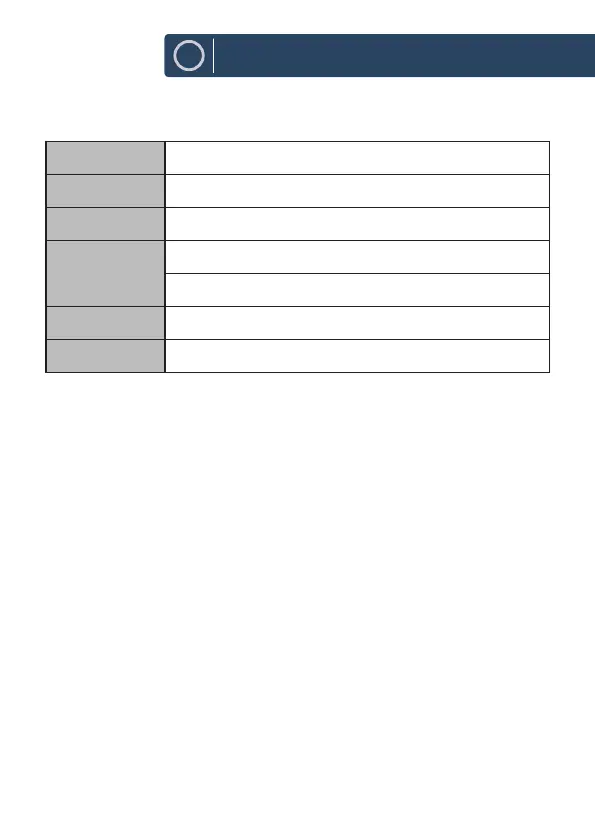
following parameters:
Alarm Alarm On / O
Frequency Daily / Once / Weekends / Weekdays
Wake Up time (Alarm On time)
Source When BestTune turn ON: Buzzer / DAB+ / FM
When BestTune turn OFF: Buzzer / DAB/FM
Duration 15 / 30 / 45 / 60 / 90 / 120 minutes
Volume 0-31
In Standby mode, active alarms are indicated by displaying the relevant
Alarm 1 and/or Alarm 2 icons.
At the set time, the alarm will sound quietly at rst, then gradually building
up to the set volume.
To cancel a sounding alarm and switch the unit to Standby mode, press
q
STANDBY button.
Snooze
To temporarily switch o alarm, press SNOOZE button.
You can change the snooze period by pressing SNOOZE button repeatedly.
Snooze periods are 5, 10, 15 and 30 minutes.
The unit returns to Standby mode for the set time period with a snooze
countdown displayed. When the countdown reaches 0 (zero), the alarm will
trigger again.
Press
q
STANDBY button to fully cancel a sounding alarm and switch the
unit to Standby mode.



 To Next Page