

EasyManua.ls Logo

MAK A20 - User Manual

MAK A20
6 pages
Print Icon
To Next Page IconTo Next Page
Loading...
www.mak-powersis.de
A20 Vattery Cabinet USER MANUAL
A20 Battery Cabinet
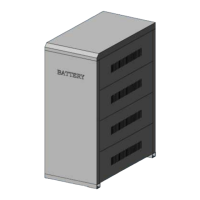
Cabinet dimension of A20: 780mm×470mm×1520mm (D×W×H), including connecting
wires,
air switch and wire holder. The cabinet can be mounted up to 20 pieces 65AH/12V
battery or 100AH/12V battery, each layer has 4 pieces and five layers in total. The
external appearance is shown as Figure 1.
Figure 1
Installation Steps:
1.
Place the cabinet base, then plug the V-slot of the front and rear panel into the
flume of the base’s two sides correspondingly. Shown as Figure 2.
Question and Answer IconNeed help?

Do you have a question about the MAK A20 and is the answer not in the manual?

Summary

A20 Battery Cabinet Overview

Cabinet Specifications

Details the A20 Battery Cabinet's dimensions, capacity for batteries, and included components.

External Appearance Illustration

Visual representation of the A20 Battery Cabinet, referred to as Figure 1.

Installation Step 1: Base and Panel Assembly

Installation Step 2: Battery Placement and Wiring

Installation Step 3: Rack and Battery Installation

Installation Step 4: Final Checks and Side Panels

Installation Step 5: Cabinet Cover Installation

Wiring Method

Series Battery Group Connection

Connects battery groups in series and then connects groups to the air switch.

Terminal Wiring

Connects anode/cathode wires to the air switch and output wires to the wire holder.
Battery Wiring Sketch-Map

Important Notes on Wiring

A20 Battery Cabinet Fittings List

MAK A20 Specifications

General IconGeneral
BrandMAK
ModelA20
CategoryStorage
LanguageEnglish