7 ENGLISH
FUNCTIONAL
DESCRIPTION
CAUTION:
• Always be sure to remove the fuel cell, the
battery cartridge and nails before adjusting or
checking function on the tool.
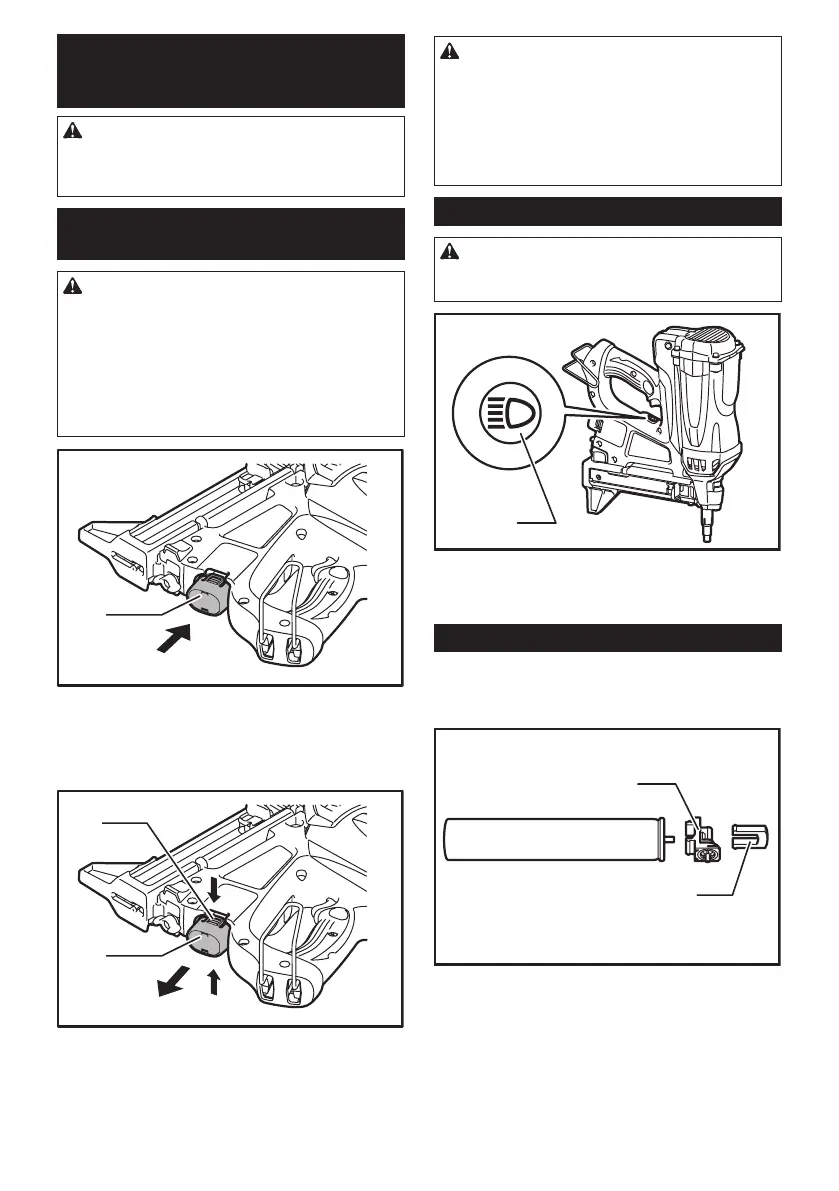
Installing or removing battery
cartridge
CAUTION:
• Always switch off the tool before installing or
removing of the battery cartridge.
• Hold the tool and the battery cartridge rmly
when installing or removing battery car-
tridge. Failure to hold the tool and the battery
cartridge rmly may cause them to slip off your
hands and result in damage to the tool and
battery cartridge and a personal injury.
1
► 1. Battery cartridge
To install the battery cartridge, hold it so that the battery
cartridge front shape ts to that of the battery install-
ment opening and slip it into place. Insert it all the way
until it locks in place with a little click.
1
2
► 1. Battery cartridge 2. Button
To remove the battery cartridge, withdraw it from the
tool while pressing the both sides of the cartridge.
CAUTION:
• Always insert the battery cartridge all the way
until it locks in place. If not, it may accidentally
fall out of the tool, causing injury to you or some-
one around you.
• Do not install the battery cartridge forcibly. If the
cartridge does not slide in easily, it is not being
inserted correctly.
Lighting up the lamp
CAUTION:
• Do not look in the light or see the source of light
directly.
1
► 1. Lamp button
• To switch on the Lamp, press the lamp button. To
switch off the lamp, press the lamp button again.
Fuel cell
Attaching the metering valve to the
fuel cell
1
2
► 1. Metering valve 2. Cap
Detach the cap (in case the metering valve is provided
with the cap).



 To Next Page
 Loading...