9
• Use the reversing switch only after the tool comes to a
complete stop. Changing the direction of rotation before
the tool stops may damage the tool.
• When not operating the tool, always set the reversing
switch lever to the neutral position.
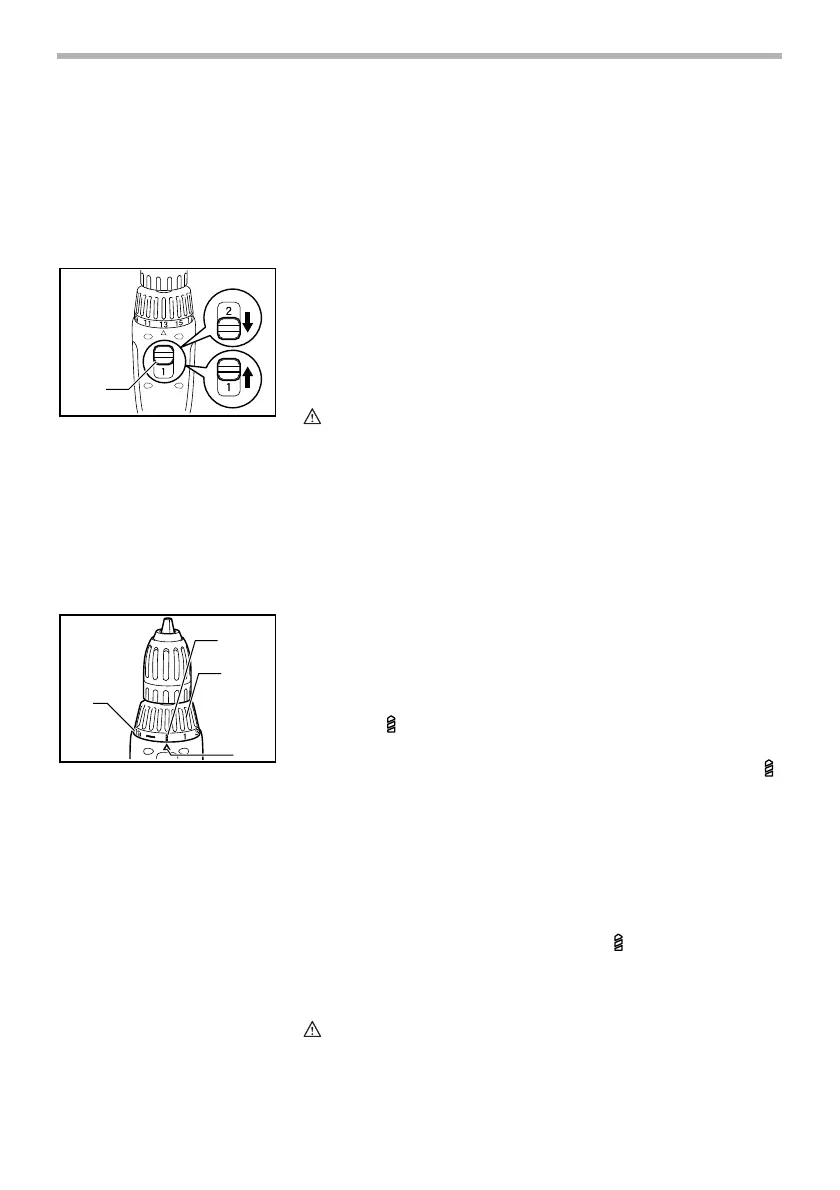
Speed change
To change the speed, first switch off the tool and then slide
the speed change lever to the lower side for high speed
(“2” marking) or upper side for low speed (“1” marking). Be
sure that the speed change lever is set to the correct position
before operation. Use the right speed for your job.
CAUTION:
• Always set the speed change lever fully to the correct
position. If you operate the tool with the speed change
lever positioned half-way between the “1” marking side
and “2” marking side, the tool may be damaged.
• Do not use the speed change lever while the tool is
running. The tool may be damaged.
Adjusting the fastening torque
The fastening torque can be adjusted in 20 steps by turning
the adjusting ring so that its graduations are aligned with the
pointer on the tool body. The fastening torque is minimum
when the number 1 is aligned with the pointer, and maximum
when the marking is aligned with the pointer.
The clutch will slip at various torque levels when set at the
number 1 to 19. The clutch is designed not to slip at the
marking.
Before actual operation, drive a trial screw into your material
or a piece of duplicate material to determine which torque
level is required for a particular application.
NOTE:
• Do not operate the tool with the adjusting ring set
between the number 19 and the marking. The tool
may be damaged.
ASSEMBLY
CAUTION:
• Always be sure that the tool is switched off and the
battery cartridge is removed before carrying out any
work on the tool.
1. Speed change lever
1
003952
1. Graduations
2. Drill marking
3. Adjusting ring
4. Pointer
1
2
3
4
003953


 To Next Page