4
may cause a personal injury.
SAVE THESE INSTRUCTIONS.
WARNING:
DO NOT let comfort or familiarity with product
(gained from repeated use) replace strict adherence
to safety rules for the subject product. MISUSE or
failure to follow the safety rules stated in this
instruction manual may cause serious personal
injury.
FUNCTIONAL DESCRIPTION
CAUTION:
• Always be sure that the tool is switched off and
unplugged before adjusting or checking function on
the tool.
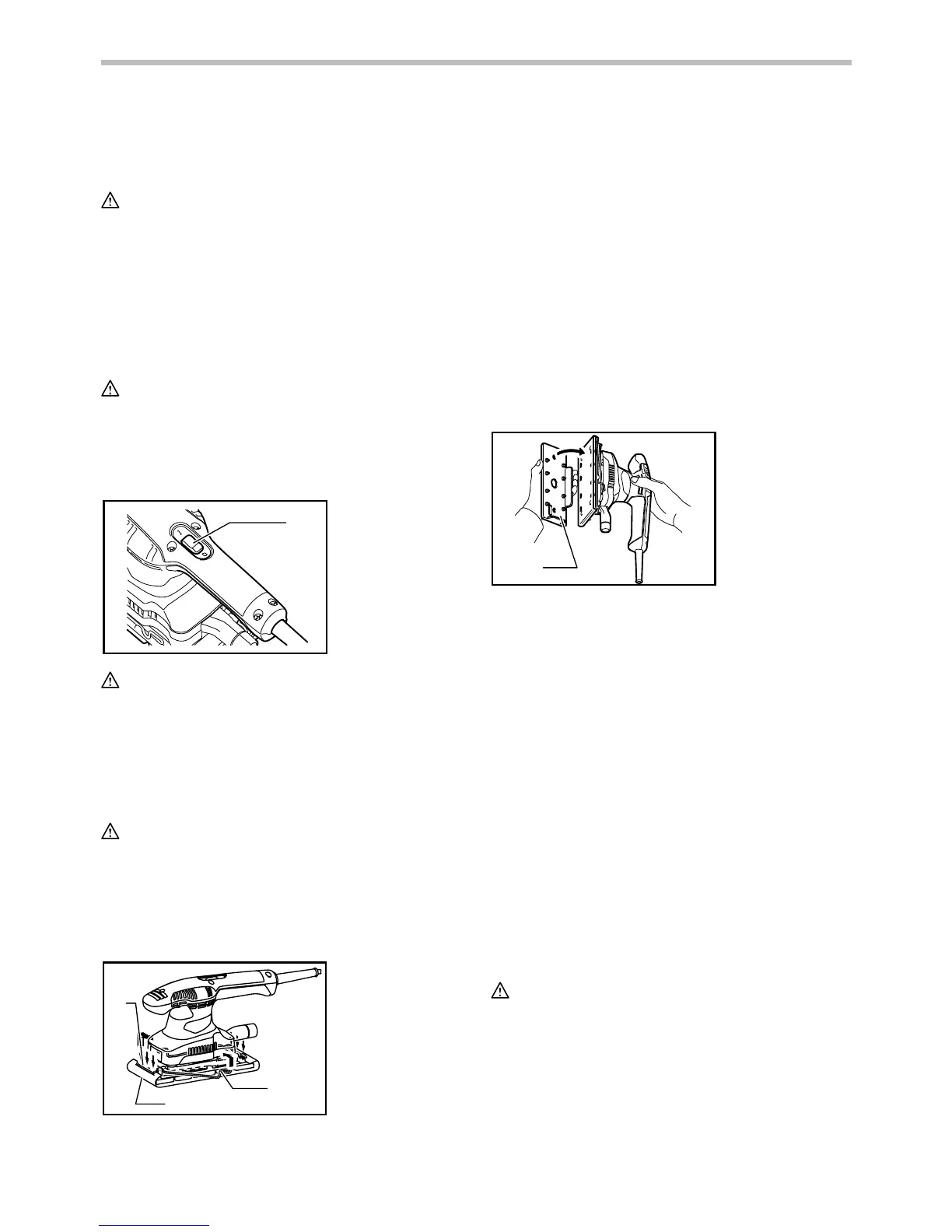
Switch action
1
011317
CAUTION:
• Before plugging in the tool, always check to see
that the tool is switched off.
To start the tool, press the "ON ( I )" side of the switch. To
stop the tool, press the "OFF (O)" side of the switch.
ASSEMBLY
CAUTION:
• Always be sure that the tool is switched off and
unplugged before carrying out any work on the tool.
Installing or removing abrasive paper
For conventional type of abrasive paper with
pre-punched holes (standard equipment):
1
2
3
011318
Open the paper clamp by raising on the lever to release
from the locking port and then insert the paper end into
the clamping part, aligning the paper edges even and
parallel with the sides of the base. (Bending the paper
beforehand makes attachment easier). Once the paper is
in place, return the lever to its original position.
Repeat the same process for the other end of the base,
maintaining the proper paper tension.
After inserting the paper, make sure the clamping part
hold it securely. Otherwise the paper will be loose and
subject to slippage, resulting in uneven sanding
operation.
To remove the paper, release the clamper as stated
above.
For conventional type of abrasive paper without
pre-punched holes (available on the market):
1
011320
Open the paper clamp by raising on the lever to release
from the locking port and then insert the paper end into
the clamping part, aligning the paper edges even and
parallel with the sides of the base. (Bending the paper
beforehand makes attachment easier). Once the paper is
in place, return the lever to its original position.
Repeat the same process for the other end of the base,
maintaining the proper paper tension.
After inserting the paper, make sure the clamping part
hold it securely. Otherwise the paper will be loose and
subject to slippage, resulting in uneven sanding
operation.
Place the punch plate (optional accessory) over the
paper so that the guide of the punch plate is flush with the
sides of the base. Then press the punch plate to make
holes in the paper.
To remove the paper, release the clamper as stated
above.
For hook-and-loop type of abrasive paper with
pre-punched holes (optional accessory):
CAUTION:
• Always use hook-and-loop type of abrasive papers.
Never use pressure-sensitive abrasive paper.
1. Punch plate
1. Clamping part
2. Abrasive paper
3. Clamp lever
1. Switch


 To Next Page
 Loading...