VARIGATE 4+ MANUAL V.1
PG. 5
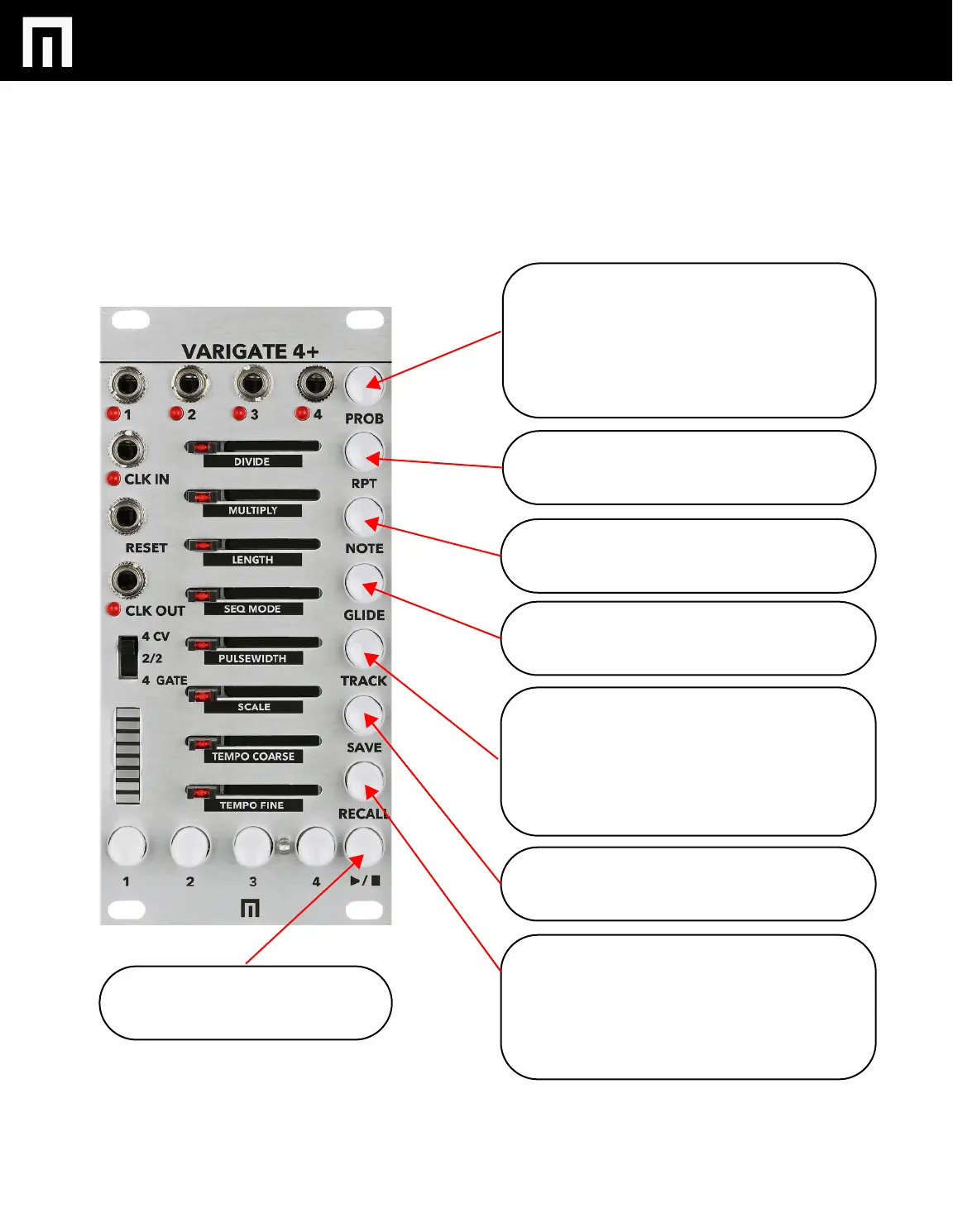
PROB:
Select and then adjust a step slider to control
the amount of probability per step. NOTE:
HOLDING PROB and then SELECTING RPT,
NOTE or GLIDE will engage the randomize
function for those features and for a selected
channel.
RPT:
Select and then adjust a step slider to control
the amount of repeats per step.
NOTE:
Select and then adjust a step slider to add
CV per step.
GLIDE:
Select and then adjust a step slider to add glide
per step.
TRACK:
Select to enter TRACK MODE for adjusting all
of the features listed in black underneath the
sliders (DIVIDE, MULTIPLY, SEQUENCE
LENGTH, SEQUENCE MODE, PULSEWIDTH,
SCALE, TEMPO COARSE AND TEMPO FINE
per channel).
SAVE:
Hold and then select Buttons 1-4 to save your
current settings to a preset.
RECALL:
Hold while selecting a saved preset to RECALL
saved presets.
HOLDING SAVE + RECALL and then selecting
buttons 1-4 will change BANKS.
PLAY / STOP: Press to start or stop the
Varigate 4+


 To Next Page