12
Pulse Programme
(”P” displays at the bottom left corner of the LCD)
Step Key Programming
1 Press and hold ”H+ and M+” To start the pulse programming.
2
Press ”
” and ”H+/M+”
Set the pulse time range 1 sec - 59 min 59 sec.
3
Press ”
” and ”MANUAL”
Confirm pulse time range.
4 Press ”P”
To set the first ON time (the display shows ”1 on”).
5 Press ”H+/M+” Set hours and minutes.
6* Press ”D+” Select the week days.
7** Repeat step 2-3
To set the remaining 2-18 pulse programmes.
8
Press ”
”
To end. ”P” will flash as long as the pulse programme
is active.
9 Press ”H+/M+” To cancel the pulse programme.
* If you would like to have the same time every day you do not need to press this key.
** If you do not need 18 different pulse settings, press ”
” to end.
Count Down Programme
(”d” displays at the bottom left corner of the LCD)
This feature allows you to run with manual override during a limited period of time. Max. 60 min.
Step Key Programming
1
Press and hold ”P” and ”
”
To start the count down programming.
2
Press ”
” and ”H+/M+” together
Set minutes and seconds.
3 Press ”MANUAL” Start count down.
4 Press ”P” To restart count down, start again with
”MANUAL”.
5
Press ”P” and ”
”
To confirm.
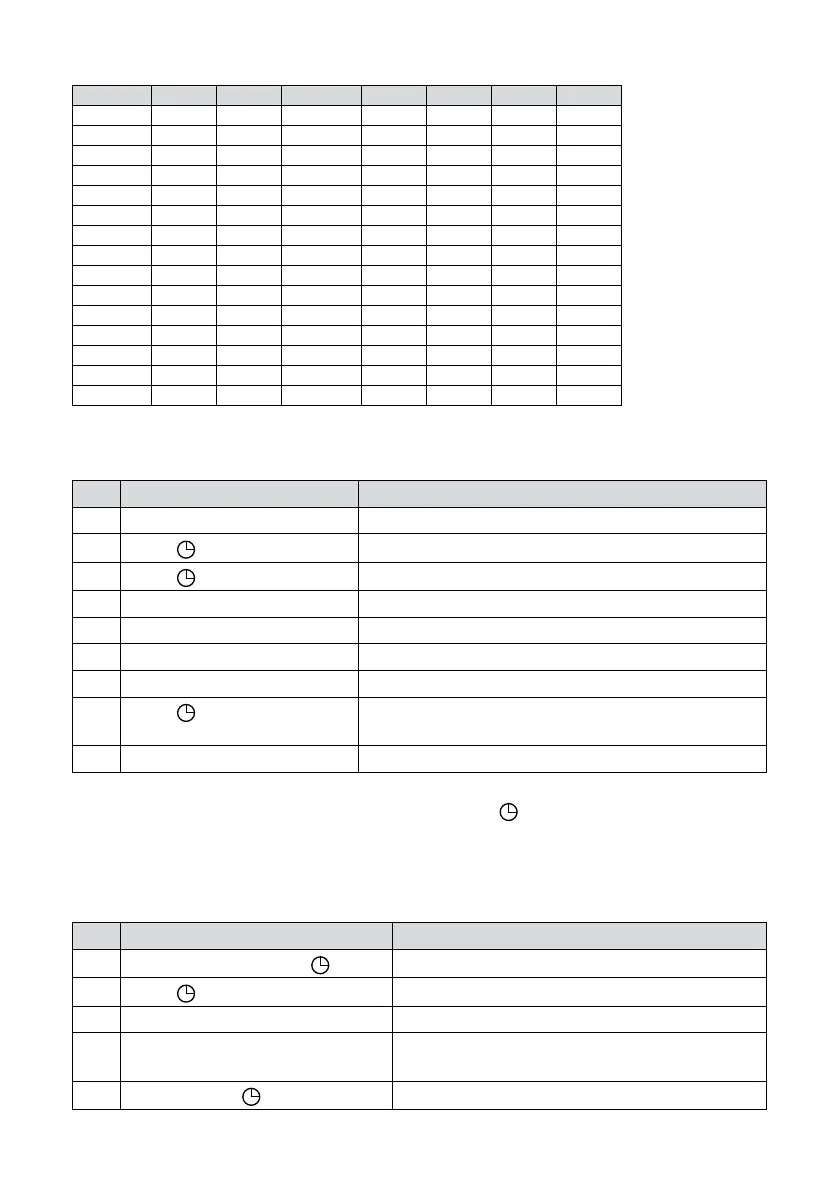
Week Programmes
Programme Monday Tuesday Wednesday Thursday Friday Saturday Sunday
1 MO TU WE TH FR SA SU
2 MO TU WE TH FR SA
3 MO TU WE TH FR
4 SA SU
5 MO TU WE
6 TH FR SA
7 MO WE FR
8 TU TH SA
9 MO
10 TU
11 WE
12 TH
13 FR
14 SA
15 SU


 To Next Page